Ⅰ. 插件描述
A light color scheme for vim with a very pleasant yellowish tone, great for prolonged codingⅡ. 基本信息
|
Ⅲ. 安装方法
使用Vundle管理器安装
在你的.vimrc下添加:Plugin 'zefei/cake16':source %
:PluginInstall对于Vundle版本 < 0.10.2,请用上面的Bundle替换Plugin。
使用NeoBundle管理器安装
在你的.vimrc下添加:NeoBundle 'zefei/cake16':source %
:NeoBundleInstall使用VimPlug管理器安装
在你的.vimrc下添加:Plug 'zefei/cake16':source %
:PlugInstall使用Pathogen管理器安装
在终端中运行以下命令:cd ~/.vim/bundle
git clone https://github.com/zefei/cake16Ⅳ. 文档说明
Summary
Cake16 is a light color scheme for vim with mild contrast and not so many
- It has a very pleasant yellowish tone and is great for prolonged coding.
It supports both gvim and 16-color terminals. Terminal support is done by
mapping colors in terminal emulator settings, like
solarized.
Screenshots
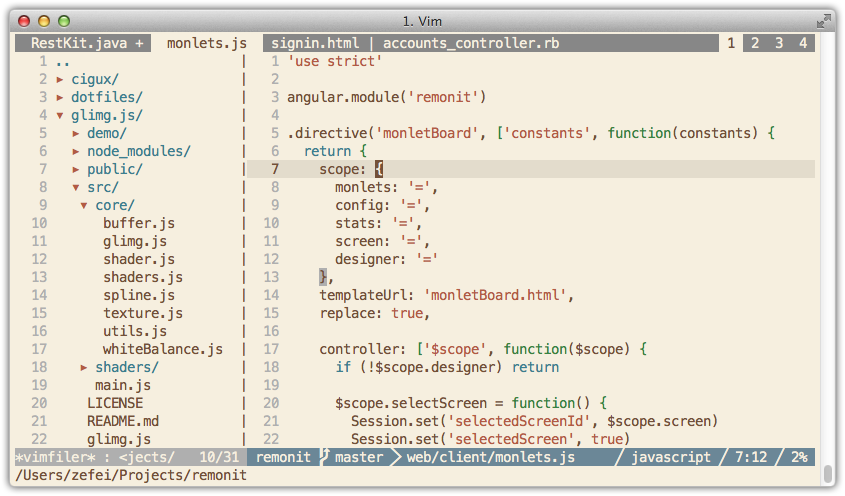
Javascript and vimfiler:
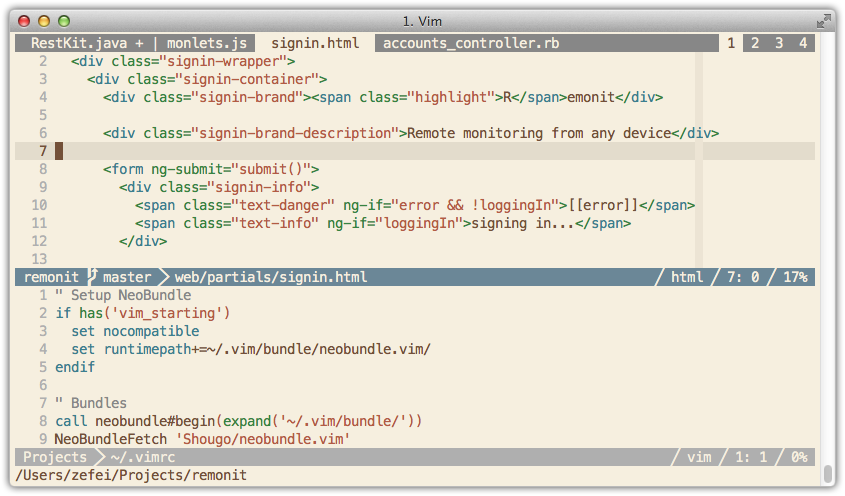
HTML and .vimrc:
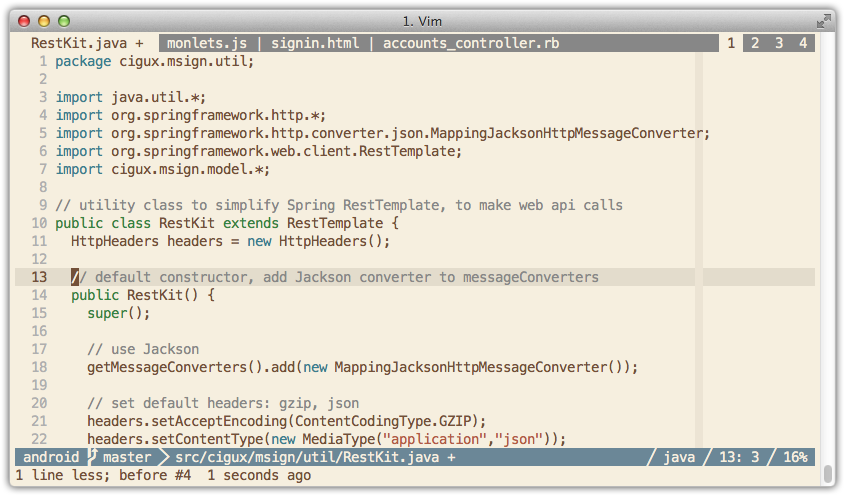
Java:
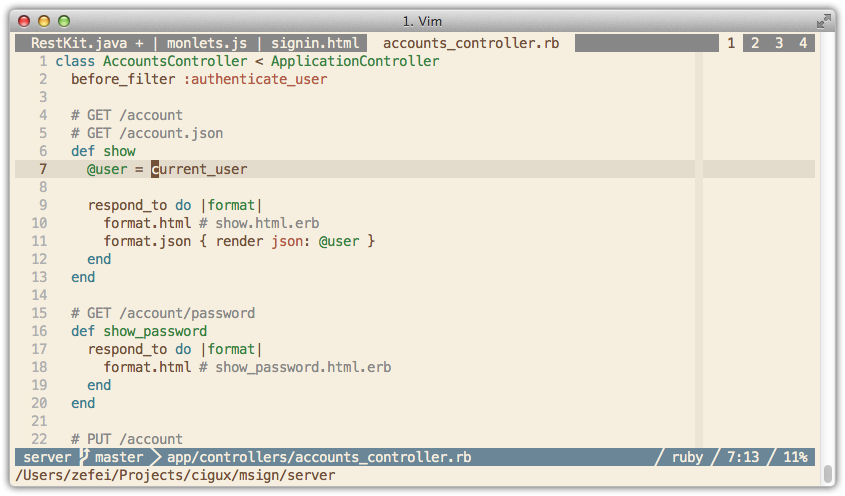
Ruby:
Installation
Use your favorite package manager to install:
git clone https://github.com/zefei/cake16 ~/.vim/bundle/cake16
Plugin 'zefei/cake16'
NeoBundle 'zefei/cake16'
Usage
After installation, add this line to your .vimrc:
colorscheme cake16
If you are using gvim only, there's no more work. If you are using vim in
terminals, open your terminal settings and map each color to the following
table:
UNIX color code           |  color hex value
--------------------------+-----------------
ANSI 0  (normal black)    |  #774f38
ANSI 1  (normal red)      |  #b95942
ANSI 2  (normal green)    |  #308444
ANSI 3  (normal yellow)   |  #996e1f
ANSI 4  (normal blue)     |  #50707e
ANSI 5  (normal magenta)  |  #aa56b2
ANSI 6  (normal cyan)     |  #308090
ANSI 7  (normal white)    |  #ede4d4
ANSI 8  (bright black)    |  #878787
ANSI 9  (bright red)      |  #f10000
ANSI 10 (bright green)    |  #82a3b3
ANSI 11 (bright yellow)   |  #c79747
ANSI 12 (bright blue)     |  #678797
ANSI 13 (bright magenta)  |  #afafaf
ANSI 14 (bright cyan)     |  #e4dccc
ANSI 15 (bright white)    |  #f7efdf
--------------------------+-----------------
Foreground                |  #774f38
Background                |  #f7efdf
If you are using iTerm2, you don't have to do this manually, just import colors
from iterm2/cake16.itermcolors.
256-color approximation
Alternatively, if you don't want to map terminal colors, you can approximate
cake16 using 256 terminal colors. Simply install CSApprox using your package
manager, it will calculate and set colors automatically: