Ⅰ. 插件描述
Uniform contrast light/dark colorscheme for Vim (GUI and 256 color terminal).Ⅱ. 基本信息
|
Ⅲ. 安装方法
使用Vundle管理器安装
在你的.vimrc下添加:Plugin 'andbar-ru/unicon':source %
:PluginInstall对于Vundle版本 < 0.10.2,请用上面的Bundle替换Plugin。
使用NeoBundle管理器安装
在你的.vimrc下添加:NeoBundle 'andbar-ru/unicon':source %
:NeoBundleInstall使用VimPlug管理器安装
在你的.vimrc下添加:Plug 'andbar-ru/unicon':source %
:PlugInstall使用Pathogen管理器安装
在终端中运行以下命令:cd ~/.vim/bundle
git clone https://github.com/andbar-ru/vim-uniconⅣ. 文档说明
unicon
Uniform contrast light and dark colorscheme for Vim (GUI, true-color and 256-color terminals).
This colorscheme is heavily inspired by [solarized][], [gruvbox][] and [lucius][].
I like the idea, solarized based on: 8 monotonous and 8 accent colours, where accent colours are
chosen to present even contrast, high identifiability and readability. But it wasn't implemented
very well in solarized, in my opinion, mainly due to very low contrast. So I have decided to
reimplement those ideas.
Differences from solarized:
- unicon has higher contrast;
- accent colours have actually the same contrast to background;
- different set of accent colours for light and dark variants of colorscheme;
- highlighting of syntax groups is different;
- Extra colors for diff mode;
- There are not language- and plugin-specific syntax for now.
Installation
- Copy colors/unicon.vim to directory ~/.vim/colors/ or better use any of plugin manager:
[vim-plug][], [NeoBundle][], [Vundle][] или [Pathogen][]. Append to ~/.vimrc:
set background=light  " or dark
colorscheme unicon
You can toggle between light and dark variants using commands:
:set background=light
:set background=dark
True colors in terminal
If your terminal supports true colors add this line to ~/.vimrc before the line setting colorscheme.
set termguicolorsScreenshots
Light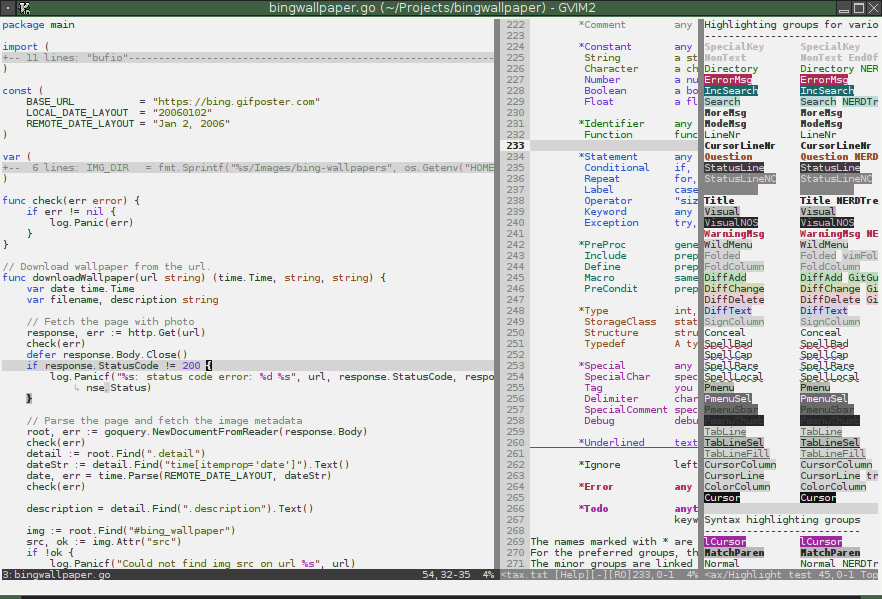
Dark