Ⅰ. 插件描述
Vim text objects for blocks of indentation whitespaceⅡ. 基本信息
|
Ⅲ. 安装方法
使用Vundle管理器安装
在你的.vimrc下添加:Plugin 'glts/textobj-indblock':source %
:PluginInstall对于Vundle版本 < 0.10.2,请用上面的Bundle替换Plugin。
使用NeoBundle管理器安装
在你的.vimrc下添加:NeoBundle 'glts/textobj-indblock':source %
:NeoBundleInstall使用VimPlug管理器安装
在你的.vimrc下添加:Plug 'glts/textobj-indblock':source %
:PlugInstall使用Pathogen管理器安装
在终端中运行以下命令:cd ~/.vim/bundle
git clone https://github.com/glts/vim-textobj-indblockⅣ. 文档说明
textobj-indblock
This Vim plugin provides text objects to act on a block of indentation
whitespace based on the indentation of the current line.
This plugin supplements and closely follows the example of the
textobj-indent plugin.
In general, that plugin is more useful but on some occasions it can be
preferable to act on indentation whitespace directly.
Usage
As usual, on-line documentation is available at :h textobj-indblock.
But as they say, a picture is worth a thousand words. Have a GIF:
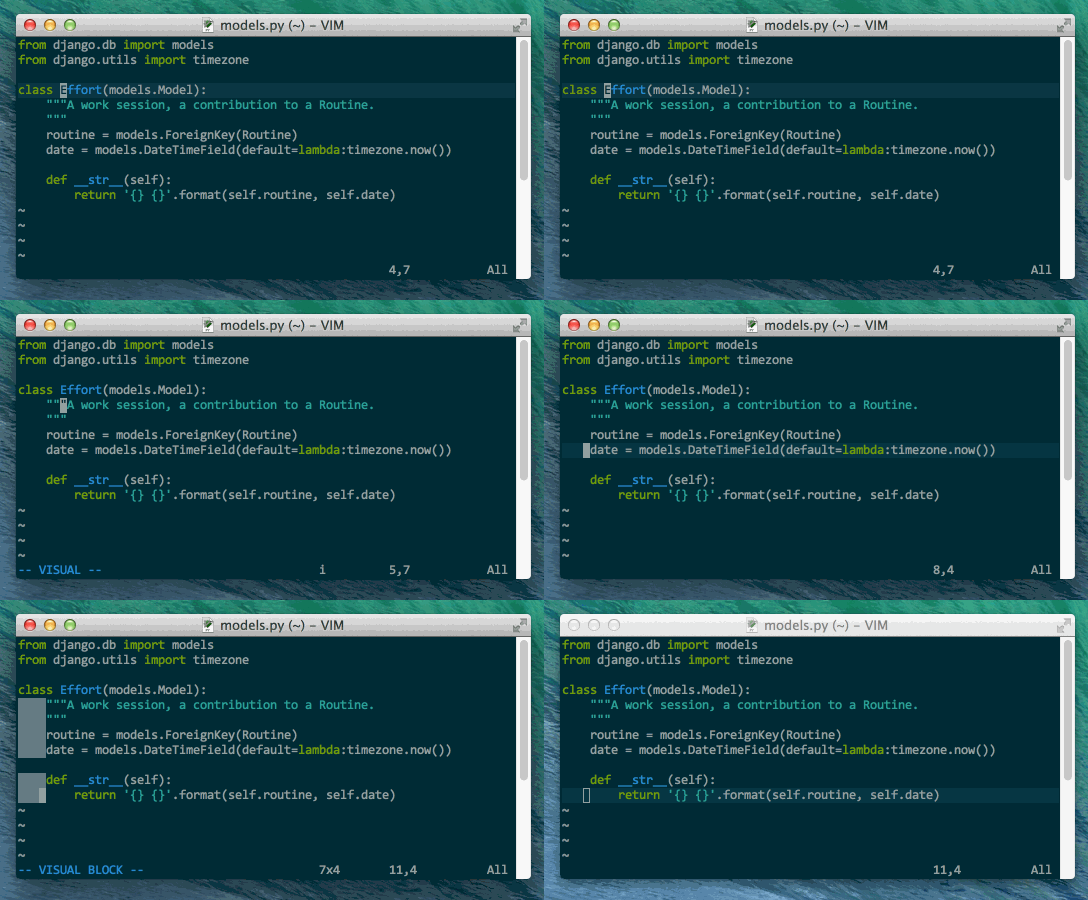
The GIF shows the effects of the two text objects 'inner/a block of
indentation whitespace' in Visual mode, vio and vao by default. ('o'
is right next to 'i' for 'indent'.)
Requirements
- Vim 7.3 or later
- textobj-user Vim plugin
Installation
Move the files into their respective directories inside your ~/.vim
directory (or your $HOME\vimfiles directory if you're on Windows).
This plugin plays well with plugin managers. For example, with
pathogen.vim the installation is as simple as this:
git clone git://github.com/glts/vim-textobj-indblock.git ~/.vim/bundle/textobj-indblock
Don't forget to install textobj-user, too, if you haven't already.