Ⅰ. 插件描述
Persist the results of :ilist and related commands via the quickfix list.Ⅱ. 基本信息
|
Ⅲ. 安装方法
使用Vundle管理器安装
在你的.vimrc下添加:Plugin 'romainl/vim-qlist':source %
:PluginInstall对于Vundle版本 < 0.10.2,请用上面的Bundle替换Plugin。
使用NeoBundle管理器安装
在你的.vimrc下添加:NeoBundle 'romainl/vim-qlist':source %
:NeoBundleInstall使用VimPlug管理器安装
在你的.vimrc下添加:Plug 'romainl/vim-qlist':source %
:PlugInstall使用Pathogen管理器安装
在终端中运行以下命令:cd ~/.vim/bundle
git clone https://github.com/romainl/vim-qlistⅣ. 文档说明
# vim-qlist
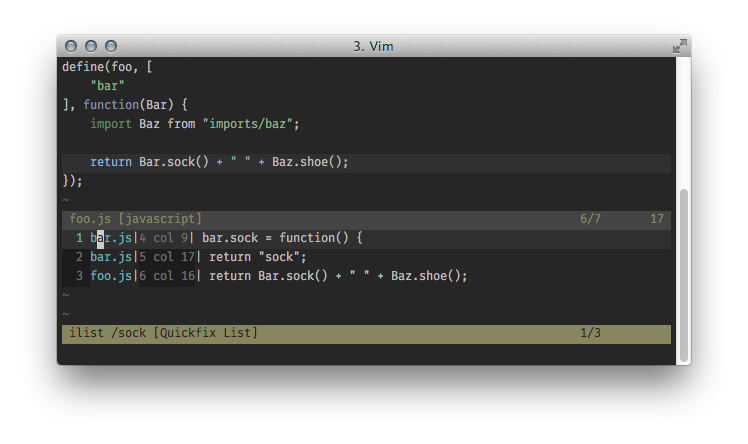
Vim-qlist is an updated, more powerful, version of the function discussed in this /r/vim thread.
The purpose of this script is to make the results of "include-search" and "definition-search" easier to navigate and more persistent by using the quickfix list instead of the default list-like interface.
Installation
Use your favorite plugin manager or dump the files in this repository in their
standard location:
on Unix-like systems...
~/.vim/doc/qlist.txt
~/.vim/plugin/qlist.vim
on Windows...
%userprofile%\vimfiles\doc\qlist.txt
%userprofile%\vimfiles\plugin\qlist.vim
Don't forget to execute the following command to make the documentation
globally available:
on Unix-like systems...
:helptags ~/.vim/doc
on Windows...
:helptags %userprofile%\vimfiles\doc
TODO
- Add options?
DONE
- Add a gifcast to the
README. (sort of) - Add proper documentation.