Ⅰ. 插件描述
The missing motion for Vim :athletic_shoe:Ⅱ. 基本信息
|
Ⅲ. 安装方法
使用Vundle管理器安装
在你的.vimrc下添加:Plugin 'justinmk/vim-sneak':source %
:PluginInstall对于Vundle版本 < 0.10.2,请用上面的Bundle替换Plugin。
使用NeoBundle管理器安装
在你的.vimrc下添加:NeoBundle 'justinmk/vim-sneak':source %
:NeoBundleInstall使用VimPlug管理器安装
在你的.vimrc下添加:Plug 'justinmk/vim-sneak':source %
:PlugInstall使用Pathogen管理器安装
在终端中运行以下命令:cd ~/.vim/bundle
git clone https://github.com/justinmk/vim-sneakⅣ. 文档说明
sneak.vim :shoe:
Jump to any location specified by two characters.
Sneak is a powerful, reliable, yet minimal motion plugin for Vim. It works with **multiple
lines, operators** (including repeat . and [surround]), motion-repeat
(; and ,), [keymaps], visual mode, [multibyte] text, and
macros.
Try label-mode for a minimalist alternative to
EasyMotion:
let g:sneak#label = 1Usage
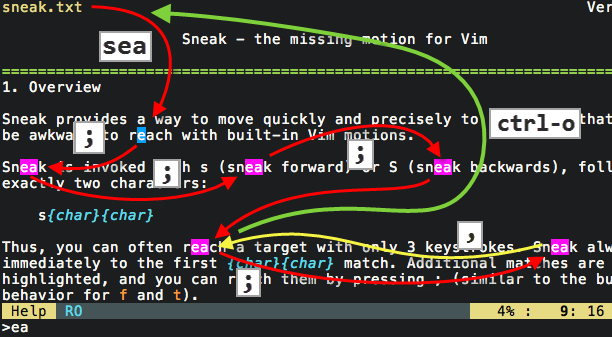
Sneak is invoked with s followed by exactly two characters:
s{char}{char}
Type
sabto move the cursor immediately to the next instance of the text "ab".- Additional matches, if any, are highlighted until the cursor is moved.
- Type
;to go to the next match (orsagain, ifs_nextis enabled; see:help sneak). - Type
3;to skip to the third match from the current position. Type
ctrl-oor``to go back to the starting point.- This is a built-in Vim motion; Sneak adds to Vim's jumplist
only onsinvocation—not repeats—so you can
abandon a trail of
;or,by a singlectrl-oor``.- This is a built-in Vim motion; Sneak adds to Vim's jumplist
- Type
s<Enter>at any time to repeat the last Sneak-search. - Type
Sto search backwards.
Sneak can be limited to a vertical scope by prefixing s with a [count].
- Type
5sxyto go immediately to the next instance of "xy" within 5 columns
of the cursor.
Sneak is invoked with operators
via z (because s is taken by surround.vim).
Type
3dzqtto delete up to the third instance of "qt".- Type
.to repeat the3dzqtoperation. - Type
2.to repeat twice. - Type
d;to delete up to the next match. - Type
4d;to delete up to the fourth next match.
- Type
Type
yszxy]to [surround] in brackets up toxy.- Type
.to repeat the surround operation.
- Type
Type
gUz\}to upper-case the text from the cursor until the next instance
of the literal text\}- Type
.to repeat thegUz\}operation.
- Type
Install
Plug 'justinmk/vim-sneak'
git clone git://github.com/justinmk/vim-sneak.git ~/.vim/bundle/vim-sneak
Manual installation:
- Copy the files to your
.vimdirectory.
- Copy the files to your
To repeat Sneak operations (like dzab) with dot .,
repeat.vim is required.
FAQ
Why not use /?
For the same reason that Vim has motions
like f and t: common operations should use the fewest keystrokes.
/ab<cr>requires 33% more keystrokes thansab- Sets only the initial position in the Vim jumplist—so you can explore a
trail of matches via;, then return to the start with a singlectrl-oor`` - Doesn't clutter your search history
Input is always literal (don't need to escape special characters)
- Ignores accents ("equivalence class") when matching
(#183)
- Ignores accents ("equivalence class") when matching
- Smarter, subtler highlighting
Why not use f?
- 50x more precise than
fort - Moves vertically
- Highlights matches in the direction of your search
How dare you remap s?
You can specify any mapping for Sneak (see :help sneak).
By the way: cl is equivalent to s, and cc is equivalent to S.
How can I replace f with Sneak?
map f <Plug>Sneak_s
map F <Plug>Sneak_S
How can I replace f and/or t with one-character Sneak?
Sneak has <Plug> mappings for f and t 1-character-sneak.
These mappings do not invoke label-mode, even if you have it enabled.
map f <Plug>Sneak_f
map F <Plug>Sneak_F
map t <Plug>Sneak_t
map T <Plug>Sneak_T
Related
License
Copyright © Justin M. Keyes. Distributed under the MIT license.