Ⅰ. 插件描述
Intellisense engine for Vim8 & Neovim, full language server protocol support as VSCodeⅡ. 基本信息
|
Ⅲ. 安装方法
使用Vundle管理器安装
在你的.vimrc下添加:Plugin 'neoclide/coc-nvim':source %
:PluginInstall对于Vundle版本 < 0.10.2,请用上面的Bundle替换Plugin。
使用NeoBundle管理器安装
在你的.vimrc下添加:NeoBundle 'neoclide/coc-nvim':source %
:NeoBundleInstall使用VimPlug管理器安装
在你的.vimrc下添加:Plug 'neoclide/coc-nvim':source %
:PlugInstall使用Pathogen管理器安装
在终端中运行以下命令:cd ~/.vim/bundle
git clone https://github.com/neoclide/coc.nvimⅣ. 文档说明
<img alt="Coc Logo" src="https://user-images.githubusercontent.com/251450/55009068-f4ed2780-501c-11e9-9a3b-cf3aa6ab9272.png" height="160" />
<p align="center">Make your Vim/Neovim as smart as VSCode.</p>
<p align="center">
<a target="_blank" rel="nofollow" href="/LICENSE.md"><img alt="Software License" src="https://img.shields.io/badge/license-MIT-brightgreen.svg?style=flat-square"></a>
<a target="_blank" rel="nofollow" href="https://salt.bountysource.com/teams/coc-nvim"><img alt="Bountysource" src="https://img.shields.io/bountysource/team/coc-nvim/activity.svg?style=flat-square"></a>
<a target="_blank" rel="nofollow" href="https://github.com/neoclide/coc.nvim/actions"><img alt="Actions" src="https://github.com/neoclide/coc.nvim/workflows/coc.nvim%20CI/badge.svg?style=flat-square"></a>
<a target="_blank" rel="nofollow" href="/doc/coc.txt"><img alt="Doc" src="https://img.shields.io/badge/doc-%3Ah%20coc.txt-brightgreen.svg?style=flat-square"></a>
<a target="_blank" rel="nofollow" href="https://gitter.im/neoclide/coc.nvim"><img alt="Gitter" src="https://img.shields.io/gitter/room/neoclide/coc.nvim.svg?style=flat-square"></a>
</p>
</p>
Coc is an intellisense engine for Vim/Neovim.
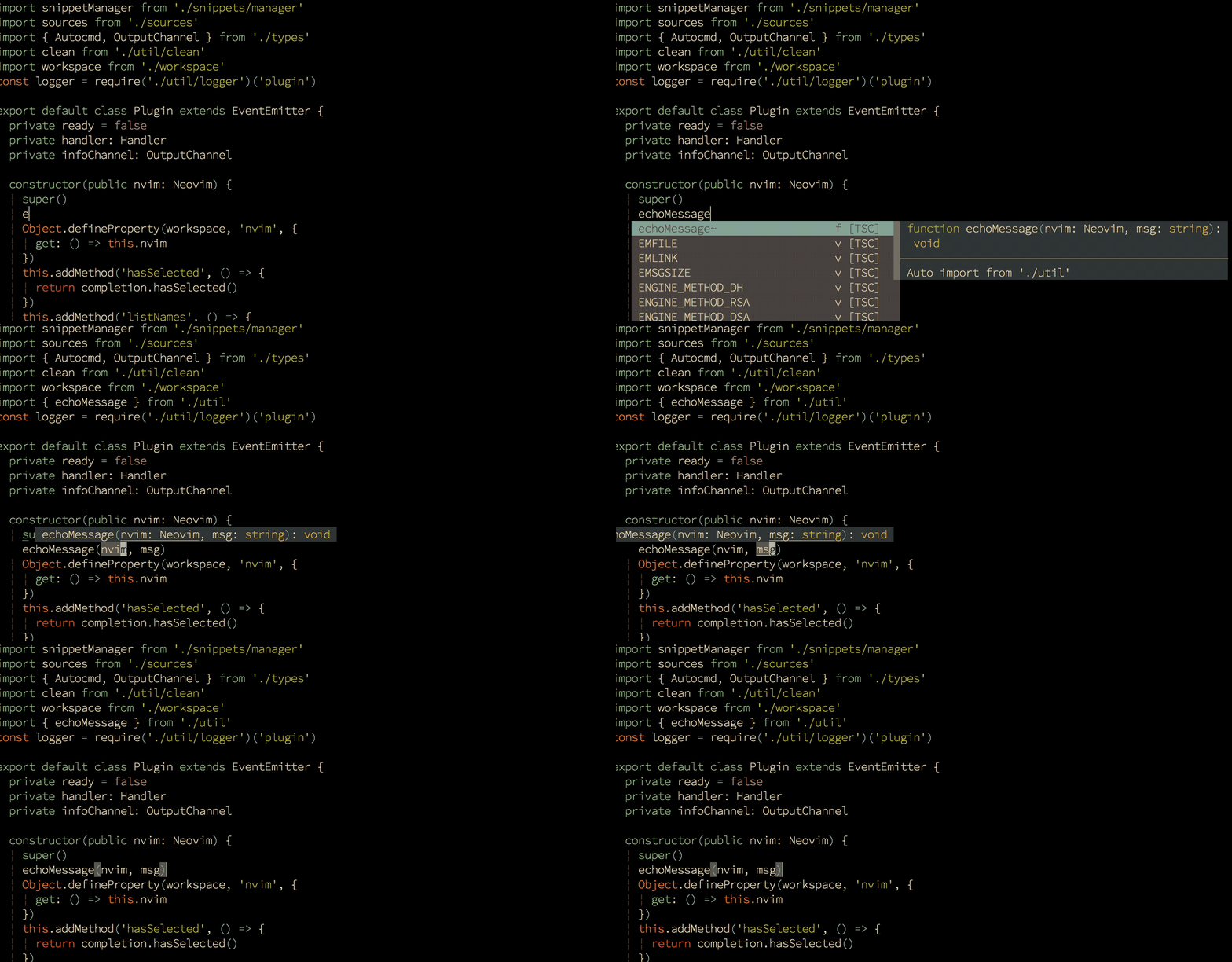
True snippet and additional text editing support
Check out Wiki, or
doc/coc.txt for the Vim interface.
Quick Start
Install nodejs when necessary:
curl -sL install-node.now.sh/lts | bashFor vim-plug users:
" Use release branch (Recommend)
Plug 'neoclide/coc.nvim', {'branch': 'release'}

" Or build from source code by use yarn: https://yarnpkg.com
Plug 'neoclide/coc.nvim', {'do': 'yarn install --frozen-lockfile'}
in your .vimrc or init.vim, then restart Vim and run :PlugInstall.
Checkout [Install
coc.nvim](https://github.com/neoclide/coc.nvim/wiki/Install-coc.nvim) Wiki for
more info.
Note: The first time building from source code may be slow.
Example vim configuration
Configuration is required to make coc.nvim easier to work with, since it
doesn't change your key-mappings or Vim options. This is done as much as
possible to avoid conflict with your other plugins.
❗️Important: Some Vim plugins could change key mappings. Please use:verbose imap <tab> to make sure that your keymap has taken effect.
" TextEdit might fail if hidden is not set.
set hidden

" Some servers have issues with backup files, see #649.
set nobackup
set nowritebackup

" Give more space for displaying messages.
set cmdheight=2

" Having longer updatetime (default is 4000 ms = 4 s) leads to noticeable
" delays and poor user experience.
set updatetime=300

" Don't pass messages to |ins-completion-menu|.
set shortmess+=c

" Always show the signcolumn, otherwise it would shift the text each time
" diagnostics appear/become resolved.
set signcolumn=yes

" Use tab for trigger completion with characters ahead and navigate.
" NOTE: Use command ':verbose imap <tab>' to make sure tab is not mapped by
" other plugin before putting this into your config.
inoremap <silent><expr> <TAB>
      \ pumvisible() ? "\<C-n>" :
      \ <SID>check_back_space() ? "\<TAB>" :
      \ coc#refresh()
inoremap <expr><S-TAB> pumvisible() ? "\<C-p>" : "\<C-h>"

function! s:check_back_space() abort
  let col = col('.') - 1
  return !col || getline('.')[col - 1]  =~# '\s'
endfunction

" Use <c-space> to trigger completion.
inoremap <silent><expr> <c-space> coc#refresh()

" Use <cr> to confirm completion, `<C-g>u` means break undo chain at current
" position. Coc only does snippet and additional edit on confirm.
if has('patch8.1.1068')
  " Use `complete_info` if your (Neo)Vim version supports it.
  inoremap <expr> <cr> complete_info()["selected"] != "-1" ? "\<C-y>" : "\<C-g>u\<CR>"
else
  imap <expr> <cr> pumvisible() ? "\<C-y>" : "\<C-g>u\<CR>"
endif

" Use `[g` and `]g` to navigate diagnostics
nmap <silent> [g <Plug>(coc-diagnostic-prev)
nmap <silent> ]g <Plug>(coc-diagnostic-next)

" GoTo code navigation.
nmap <silent> gd <Plug>(coc-definition)
nmap <silent> gy <Plug>(coc-type-definition)
nmap <silent> gi <Plug>(coc-implementation)
nmap <silent> gr <Plug>(coc-references)

" Use K to show documentation in preview window.
nnoremap <silent> K :call <SID>show_documentation()<CR>

function! s:show_documentation()
  if (index(['vim','help'], &filetype) >= 0)
    execute 'h '.expand('<cword>')
  else
    call CocAction('doHover')
  endif
endfunction

" Highlight the symbol and its references when holding the cursor.
autocmd CursorHold * silent call CocActionAsync('highlight')

" Symbol renaming.
nmap <leader>rn <Plug>(coc-rename)

" Formatting selected code.
xmap <leader>f  <Plug>(coc-format-selected)
nmap <leader>f  <Plug>(coc-format-selected)

augroup mygroup
  autocmd!
  " Setup formatexpr specified filetype(s).
  autocmd FileType typescript,json setl formatexpr=CocAction('formatSelected')
  " Update signature help on jump placeholder.
  autocmd User CocJumpPlaceholder call CocActionAsync('showSignatureHelp')
augroup end

" Applying codeAction to the selected region.
" Example: `<leader>aap` for current paragraph
xmap <leader>a  <Plug>(coc-codeaction-selected)
nmap <leader>a  <Plug>(coc-codeaction-selected)

" Remap keys for applying codeAction to the current line.
nmap <leader>ac  <Plug>(coc-codeaction)
" Apply AutoFix to problem on the current line.
nmap <leader>qf  <Plug>(coc-fix-current)

" Introduce function text object
" NOTE: Requires 'textDocument.documentSymbol' support from the language server.
xmap if <Plug>(coc-funcobj-i)
xmap af <Plug>(coc-funcobj-a)
omap if <Plug>(coc-funcobj-i)
omap af <Plug>(coc-funcobj-a)

" Use <TAB> for selections ranges.
" NOTE: Requires 'textDocument/selectionRange' support from the language server.
" coc-tsserver, coc-python are the examples of servers that support it.
nmap <silent> <TAB> <Plug>(coc-range-select)
xmap <silent> <TAB> <Plug>(coc-range-select)

" Add `:Format` command to format current buffer.
command! -nargs=0 Format :call CocAction('format')

" Add `:Fold` command to fold current buffer.
command! -nargs=? Fold :call     CocAction('fold', <f-args>)

" Add `:OR` command for organize imports of the current buffer.
command! -nargs=0 OR   :call     CocAction('runCommand', 'editor.action.organizeImport')

" Add (Neo)Vim's native statusline support.
" NOTE: Please see `:h coc-status` for integrations with external plugins that
" provide custom statusline: lightline.vim, vim-airline.
set statusline^=%{coc#status()}%{get(b:,'coc_current_function','')}

" Mappings using CoCList:
" Show all diagnostics.
nnoremap <silent> <space>a  :<C-u>CocList diagnostics<cr>
" Manage extensions.
nnoremap <silent> <space>e  :<C-u>CocList extensions<cr>
" Show commands.
nnoremap <silent> <space>c  :<C-u>CocList commands<cr>
" Find symbol of current document.
nnoremap <silent> <space>o  :<C-u>CocList outline<cr>
" Search workspace symbols.
nnoremap <silent> <space>s  :<C-u>CocList -I symbols<cr>
" Do default action for next item.
nnoremap <silent> <space>j  :<C-u>CocNext<CR>
" Do default action for previous item.
nnoremap <silent> <space>k  :<C-u>CocPrev<CR>
" Resume latest coc list.
nnoremap <silent> <space>p  :<C-u>CocListResume<CR>
Articles
- coc.nvim 插件体系介绍
- CocList 入坑指南
- [Create coc.nvim extension to improve Vim
experience](https://medium.com/@chemzqm/create-coc-nvim-extension-to-improve-vim-experience-4461df269173)
Trouble shooting
Try these steps when you have problem with coc.nvim.
- Make sure your Vim version >= 8.0 by command
:version. - If service failed to start, use command
:CocInfoor:checkhealthon Neovim. - Checkout the log of coc.nvim by command
:CocOpenLog. - When you have issues with the language server, it's recommended to [checkout
the output](https://github.com/neoclide/coc.nvim/wiki/Debug-language-server#using-output-channel).
Feedback
- If you think Coc is useful, consider giving it a star.
- If you have a question, ask on gitter
- 中文用户请到 中文 gitter 讨论
- If something is not working, [create an
issue](https://github.com/neoclide/coc.nvim/issues/new).

License
MIT