Ⅰ. 插件描述
A vim plugin for padawan.php completion serverⅡ. 基本信息
|
Ⅲ. 安装方法
使用Vundle管理器安装
在你的.vimrc下添加:Plugin 'mkusher/padawan-vim':source %
:PluginInstall对于Vundle版本 < 0.10.2,请用上面的Bundle替换Plugin。
使用NeoBundle管理器安装
在你的.vimrc下添加:NeoBundle 'mkusher/padawan-vim':source %
:NeoBundleInstall使用VimPlug管理器安装
在你的.vimrc下添加:Plug 'mkusher/padawan-vim':source %
:PlugInstall使用Pathogen管理器安装
在终端中运行以下命令:cd ~/.vim/bundle
git clone https://github.com/mkusher/padawan.vimⅣ. 文档说明
Padawan.vim
Padawan.vim is a vim plugin for [padawan.php server
](https://github.com/mkusher/padawan.php), a smart PHP code
completion server for Composer projects.
This plugin includes:
- Omnifunc
- Commands for index generation and index saving
- Commands for starting, stopping and restarting the server
Demo video
Currently Padawan.vim offers basic completion for methods and classes based on doc comments
and method signatures.
Click the image below to watch a short video on what Padawan.vim can already do.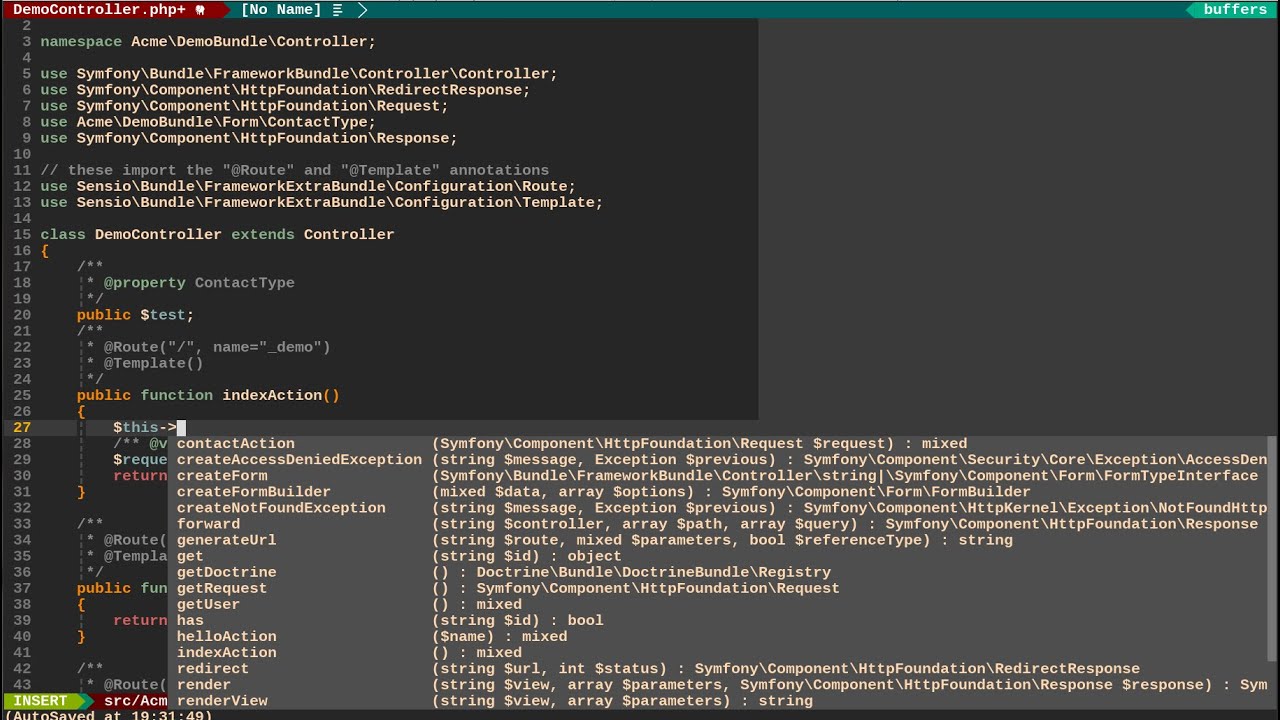
Requirements
Padawan.vim requires:
- PHP 5.5+
- Composer
- Vim with +python
Installation
You can install Padawan.vim using any of the popular plugin managers like
Pathogen, Vundle, Neobundle or Plug.
- Make sure you have installed padawan.php package:
$ composer global require mkusher/padawan- Configure $PATH variable. You may add $PATH to your vimrc:
let $PATH=$PATH . ':' . expand('~/.composer/vendor/bin')- Configure composer command:
let g:padawan#composer_command = "php /path/to/composer.phar"Pathogen
To install Padawan.vim with Pathogen do the following steps:
$ cd ~/.vim/bundle
$ git clone https://github.com/mkusher/padawan.vim.git
Plug
Add this to your vimrc
Plug 'mkusher/padawan.vim'Vundle
Add this to your vimrc
Plugin 'mkusher/padawan.vim'NeoBundle
Add this to your vimrc
NeoBundle 'mkusher/padawan.vim'How to use
- In your php composer project folder, run the following
- command to generate an index:
:PadawanGenerateIndex- Start Padawan.php server with:
:PadawanStartServer- Enjoy smart completion
Index generation can take a while, but needs to be performed only once per project.
Autocomplete engines
YouCompleteMe
You should set semantic triggers like
let g:ycm_semantic_triggers = {}
let g:ycm_semantic_triggers.php =
\ ['->', '::', '(', 'use ', 'namespace ', '\']
Neocomplete
You should set omni input patterns like
let g:neocomplete#force_omni_input_patterns = {}
let g:neocomplete#force_omni_input_patterns.php =
\ '\h\w*\|[^- \t]->\w*'
Plugins(Extensions)
You can extend Padawan.php by installing different plugins.
See Plugins List
for more info.
Installing
To install a plugin, run :PadawanAddPlugin PLUGIN_NAME, for example:
:PadawanAddPlugin mkusher/padawan-symfonyRemoving
To remove a plugin, run :PadawanRemovePlugin PLUGIN_NAME, for example:
:PadawanRemovePlugin mkusher/padawan-symfonyConfiguring
You may want to change Composer to the one already installed on your system.
You can do so by with the following line:
let g:padawan#composer_command = 'php /usr/bin/composer.phar'Another configurable option is http request timeout. The following
example sets it to 100 ms:
let g:padawan#timeout = 0.1If you don't want to use composer global for installing padawan, then you
should configure commands for running padawan:
let g:padawan#cli = '/path/to/padawan.php/bin/padawan'
let g:padawan#server_command = '/path/to/padawan.php/bin/padawan-server'
Vim functions
For quick access to the functions below, map them to keys of your choice.
Index generation
Use padawan#GenerateIndex() function:
:call padawan#GenerateIndex()Index saving
Use padawan#SaveIndex() function:
:call padawan#SaveIndex()Starting server
Use padawan#StartServer() function:
:call padawan#StartServer()Stopping server
Use padawan#StopServer() function:
:call padawan#StopServer()Restarting server
Use padawan#RestartServer() function:
:call padawan#RestartServer()