Ⅰ. 插件描述
A modern man page plugin for vimⅡ. 基本信息
|
Ⅲ. 安装方法
使用Vundle管理器安装
在你的.vimrc下添加:Plugin 'nhooyr/neoman-vim':source %
:PluginInstall对于Vundle版本 < 0.10.2,请用上面的Bundle替换Plugin。
使用NeoBundle管理器安装
在你的.vimrc下添加:NeoBundle 'nhooyr/neoman-vim':source %
:NeoBundleInstall使用VimPlug管理器安装
在你的.vimrc下添加:Plug 'nhooyr/neoman-vim':source %
:PlugInstall使用Pathogen管理器安装
在终端中运行以下命令:cd ~/.vim/bundle
git clone https://github.com/nhooyr/neoman.vimⅣ. 文档说明
# neoman
Read manpages faster than superman!
note: A much improved version of this plugin is included by default in neovim! see :h man.vim
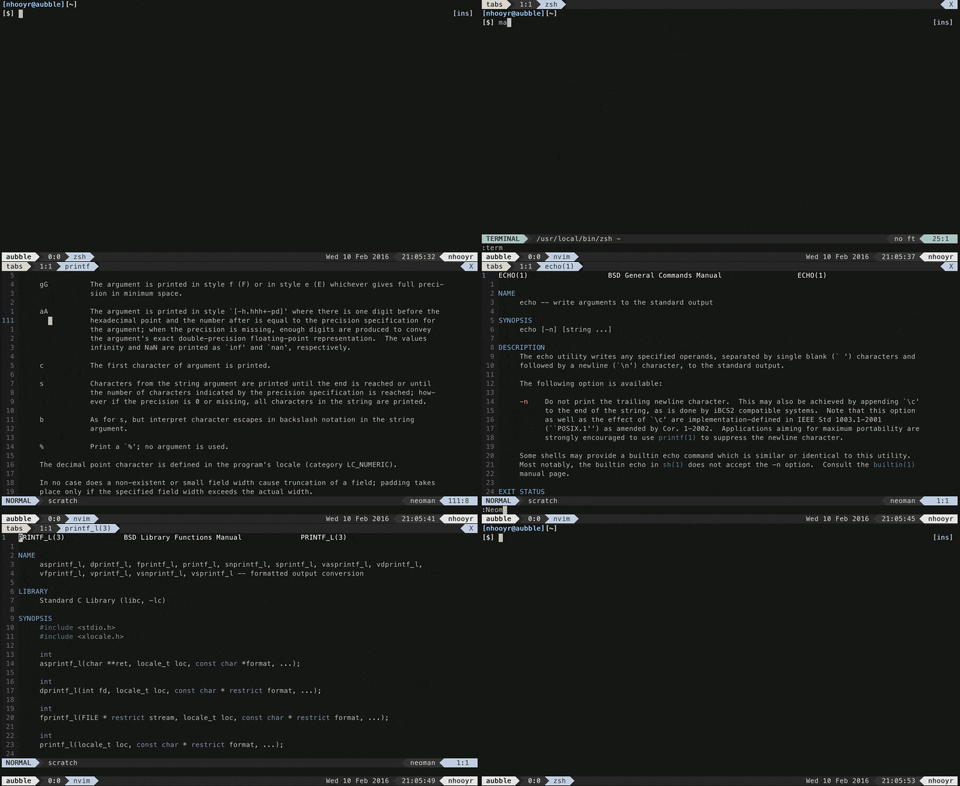
Features
- Smart manpage autocompletion
- Open in a split/vsplit/tabe/current window
- Control whether or not to jump to closest (above/left) neoman window
- Open from inside a neovim terminal!
- Jump to manpages in specific sections through the manpage links
- Aware of modern manpages, e.g. sections are not just 1-8 anymore
- zsh/bash/fish support
- Can open paths to manpages!
- Support for multiple languages!
Install
Any plugin manager should work fine.
Plug 'nhooyr/neoman.vim' "vim-plugUsage
Command
The command is as follows:
Nman " display man page for <cWORD>
Nman [sect] page
Nman page[(sect)]
Nman path " if in current directory, start path with ./
Several ways to use it, probably easier to explain with a few examples.
:Nman printf
:Nman 3 printf
:Nman printf(3)
:Nman ./fzf.1 " open manpage in current directory
Nman without any arguments will use the WORD (it strips anything after ')') under the cursor as the page.
For splitting there are the following commands (exact same syntax as Nman)
:Snman 3 printf "horizontal split
:Vnman 3 printf "verical split
:Tnman 3 printf "in a new tab
Mappings
Default Mappings
<C-]> to jump to a manpage under the cursor. <C-t> to jump back to the previous man page. q to quit
Here is a global K mapping to take you to the manpage under the cursor.
nnoremap <silent> K :Nman<CR>Here is a custom mapping for a vertical split man page with the word under the cursor.
nnoremap <silent> <leader>mv :Vnman<CR>Or perhaps you want to give the name of the manpage?
nnoremap <leader>mv :Vnman<Space>Command line integration
For vim (or neovim if you do not want terminal integration) you can simply set:
export MANPAGER="nvim -c 'set ft=neoman' -"To use it with man.
If you want the super cool terminal integration, you will need nvr
Add the correct one to your .zshrc, w.bashrc or config.fish
source /somepath/neoman.vim/scripts/nman.zsh # or bash
source /somepath/neoman.vim/scripts/nman.fish
Now just use nman to open the manpages from within neovim!
Settings
g:neoman_find_window
If this option is set, neoman will first attempt to find the current neoman window before opening a new one.
By default this is set.
g:neoman_tab_after
If set, :Tnman will open a tab just after the current one, instead of just before.
g:no_neoman_maps
If set, no mappings are made in neoman buffers. By default it is not set.
Contributing
I'm very open to new ideas, new features. Open up an issue, send me a PR or an email.
TODO:
- [ ] Vim docs
- [x] Rewrite for clean code, check PR #15 to test it!
- [x] Update fish script
- [ ] document plug mappings
- [x] remove bang
- [x] add count feature (count is the section)
- [ ] fix autocomplete bug with vim/neovim
- [ ] merge with neovim!!!
- [ ] See https://www.reddit.com/r/vim/comments/45b7s6/neoman_a_modern_plugin_for_using_vim_as_a_man/ for more advice
- [ ] Bash specific script, not neovim.zsh