Ⅰ. 插件描述
lcd to the root of the project everytime you BufEnter a file inside a project.Ⅱ. 基本信息
|
Ⅲ. 安装方法
使用Vundle管理器安装
在你的.vimrc下添加:Plugin 'amiorin/project-vim':source %
:PluginInstall对于Vundle版本 < 0.10.2,请用上面的Bundle替换Plugin。
使用NeoBundle管理器安装
在你的.vimrc下添加:NeoBundle 'amiorin/project-vim':source %
:NeoBundleInstall使用VimPlug管理器安装
在你的.vimrc下添加:Plug 'amiorin/project-vim':source %
:PlugInstall使用Pathogen管理器安装
在终端中运行以下命令:cd ~/.vim/bundle
git clone https://github.com/amiorin/vim-projectⅣ. 文档说明
## News
- New feature
project#utils#alternate. To alternate betweenfile.extand
file_suffix.extorfileSuffix.extwith the command:A - Windows support added
Introduction
A Project is made of :
- One directory (the
root of the project) - One title (by default the last part of the the
root of the project) - One or more
callbacks
Everytime you open a file nested in the root of the project
- the
local current directoryis changed to theroot of the project - the
guitablabelis set to thetitleof the project - the
callbacksof the project are executed
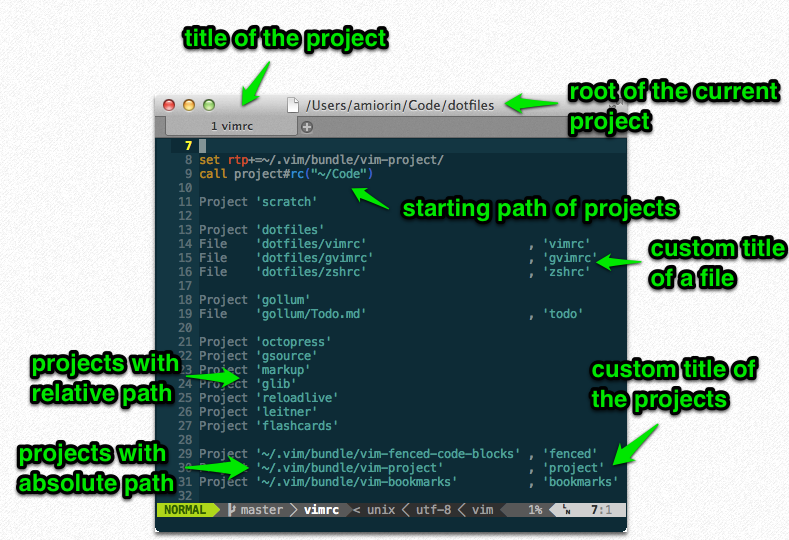
Commands
There are four commands :
Project
It's used inside the.vimrc. The first parameter is thepathto the
- The second parameter is optional and it is the
titleof the - and the default value of it is the last part of the name of the
directory containing the project. If the path to the project is a
relative path, it's combined with the starting path. The ``starting
path`` is defined when you initialize the plugin :
set rtp+=~/.vim/bundle/vim-project/
" custom starting path
call project#rc("~/Code")
" default starting path (the home directory)
call project#rc()ProjectPath
It's used inside thecmdline mode. The first parameter is thepath
without quotation. The second parameter is optional and it is the title of
the project without quotation.
If the path to the project is a relative path, it's combined withcurrent working directory and not with the starting path.
File
It's used inside the.vimrc. The first parameter is thepathto
the file. The second parameter is the title of the file. This command
doesn't change the local current directory.
Callback
It's used inside the.vimrc. The first parameter is thetitleof a
project already defined with Project or File. The second parameter is
the name a function or an array of function names. This function or these
functions are callbacks and they are executed everytime a file nested in theroot of the project is opened with one parameter that is the title
of the project.
WelcomeIt's theStartifyequivalent.
If you don't wantWelcometo appear when you start vim:
" before call project#rc()
let g:project_enable_welcome = 0
" if you want the NERDTree integration.
let g:project_use_nerdtree = 1
set rtp+=~/.vim/bundle/vim-project/
call project#rc("~/Code")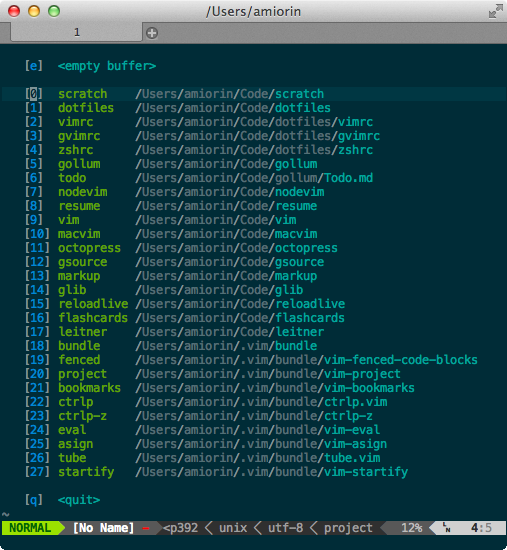
Callbacks
The command Callback accepts a string (the name of the function). The
function project#config#callback accepts string or dictionary. If it's a
dictionary, the method invoke(title) is called on the dictionary.
" For more information on dictionary and prototype programming in vim :
:h selfThe function project#utils#alternate can be used together withproject#config#callback. It returns a dictionary. This dictionary
has the method invoke(title) that creates <buffer> commands to
switch to the alternate files like the plugin vim-rake.
" :A :AE :AS :AV :AT :AD :AR . They all accept the bang (!)
" Remembet that the title of the project is only the last dir of the path
Project 'nugg.ad/nuggad-compiler'
" project#utils#alternate returns a dictionary with a method ``invoke(title)``.
"
" everytime we open a file inside the project if the path starts with
" ``spec`` or ``src`` the commands :A are defined.
"
" +_spec means add _spec to the file
" -_spec means remove _spec to the file
call project#config#callback("nuggad-compiler", project#utils#alternate(
\ [{'regex': '^src', 'string': 'spec', 'suffix': '+_spec'},
\ {'regex': '^spec', 'string': 'src', 'suffix': '-_spec'}]
\ ))Install
If you use Vundle you can install this plugin using Vim command :BundleInstall amiorin/vim-project.
Don't forget put a line Bundle 'amiorin/vim-project' in your .vimrc.
If you use Pathogen, you just execute following:
cd ~/.vim/bundle
git clone https://github.com/amiorin/vim-project.gitIf you don't use either plugin management system, copy the plugin directory to your .vim directory.
*nix: $HOME/.vim
Windows: $HOME/vimfiles
Configure
sample .vimrc:
let g:project_use_nerdtree = 1
set rtp+=~/.vim/bundle/vim-project/
call project#rc("~/Code")

Project  'scratch'

Project  'dotfiles'
File     'dotfiles/vimrc'                       , 'vimrc'
File     'dotfiles/gvimrc'                      , 'gvimrc'
File     'dotfiles/zshrc'                       , 'zshrc'

Project  'gollum'
File     'gollum/Todo.md'                       , 'todo'
Callback 'gollum'                               , 'RemoveTextWidth'

function! RemoveTextWidth(...) abort
  setlocal textwidth=0
endfunction

Project  'octopress'
Project  'gsource'
Project  'markup'
Project  'glib'
Project  'reloadlive'
Project  'flashcards'
Project  'leitner'
Callback 'leitner'                              , ['AddSpecToPath', 'RemoveTextWidth']

function! AddSpecToPath(tile) abort
  setlocal path+=spec
endfunction

Project  '~/.vim/bundle/vim-fenced-code-blocks' , 'fenced'
Project  '~/.vim/bundle/vim-project'            , 'project'
Project  '~/.vim/bundle/vim-bookmarks'          , 'bookmarks'
Project  '~/.vim/bundle/ctrlp.vim'              , 'ctrlp'
Project  '~/.vim/bundle/ctrlp-z'                , 'ctrlp-z'
Project  '~/.vim/bundle/vim-eval'               , 'eval'
Interactive
From the cmdline mode.
ProjectPath uses the cwd and the arguments are not quoted.
:ProjectPath .
:ProjectPath /etc myconfig
Self-Promotion
Like this plugin?
