Ⅰ. 插件描述
vim-searchindex: display number of search matches & index of a current matchⅡ. 基本信息
|
Ⅲ. 安装方法
使用Vundle管理器安装
在你的.vimrc下添加:Plugin 'google/vim-searchindex':source %
:PluginInstall对于Vundle版本 < 0.10.2,请用上面的Bundle替换Plugin。
使用NeoBundle管理器安装
在你的.vimrc下添加:NeoBundle 'google/vim-searchindex':source %
:NeoBundleInstall使用VimPlug管理器安装
在你的.vimrc下添加:Plug 'google/vim-searchindex':source %
:PlugInstall使用Pathogen管理器安装
在终端中运行以下命令:cd ~/.vim/bundle
git clone https://github.com/google/vim-searchindexⅣ. 文档说明
# vim-searchindex
This plugin shows how many times a search pattern occurs in the current buffer.
After each search, it displays total number of matches, as well as the index of
a current match, in the command line:
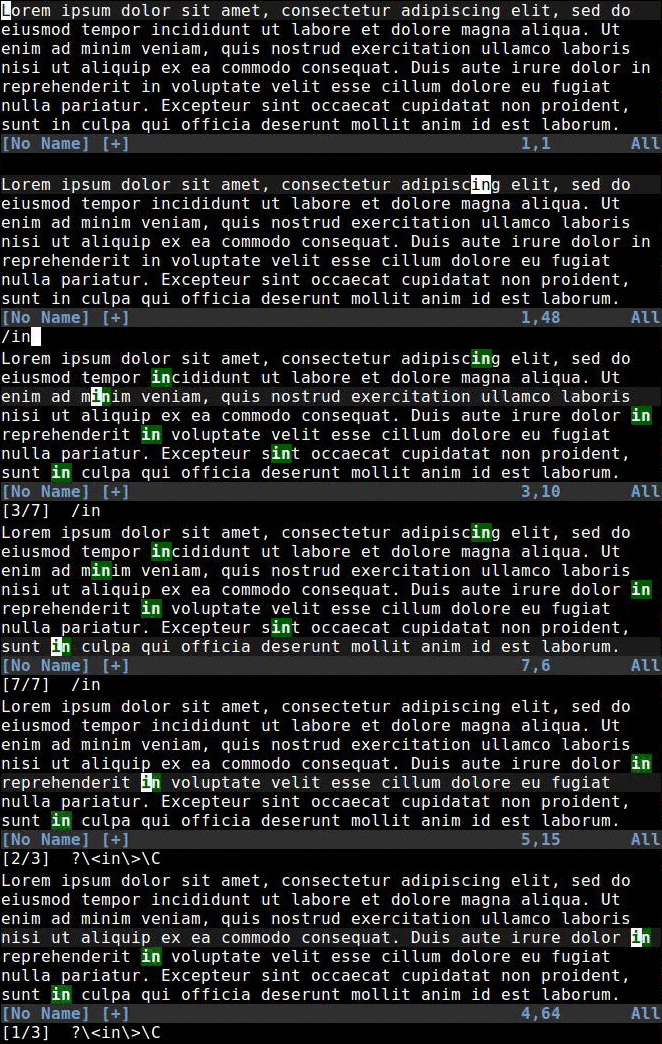
You can also press g/ to display search index for the last search term at the
current cursor position.
That's it! The plugin is as simple and unobtrusive as possible. It works out of
the box with all built-in search commands, and stays fast even on huge files
thanks to caching. For full documentation (including extensibility and
configuration options), see :help searchindex.
Installation
Note: This behavior is now supported natively in Vim 8.1.1270 and Neovim
0.4.0 (requires set shortmess-=S to enable on vim). Prefer updating your
editor if possible instead of using this plugin.
If you don't have a preferred installation method, I recommend
installing pathogen.vim, and
then simply copy and paste:
cd ~/.vim/bundle
git clone https://github.com/google/vim-searchindex.git
Once help tags have been generated, you can view the manual with:help searchindex.
*Disclaimer: This is not an official Google product. It is just an open source
code that happens to be owned by Google.*