Ⅰ. 插件描述
Vim plugin to control splits with visual selections or text objectsⅡ. 基本信息
|
Ⅲ. 安装方法
使用Vundle管理器安装
在你的.vimrc下添加:Plugin 'wellle/visual-split-vim':source %
:PluginInstall对于Vundle版本 < 0.10.2,请用上面的Bundle替换Plugin。
使用NeoBundle管理器安装
在你的.vimrc下添加:NeoBundle 'wellle/visual-split-vim':source %
:NeoBundleInstall使用VimPlug管理器安装
在你的.vimrc下添加:Plug 'wellle/visual-split-vim':source %
:PlugInstall使用Pathogen管理器安装
在终端中运行以下命令:cd ~/.vim/bundle
git clone https://github.com/wellle/visual-split.vimⅣ. 文档说明
# visual-split.vim
Vim plugin to control splits with visual selections or text objects
Motivation
Ever found yourself scrolling back up to the same overview comment while reading
some complicated function? Or while referring to a similar implementation while
writing a new function?
This is a good use for Vim splits: You have one split for reference and another
one where you jump around and get work done.
But setting up the splits in the first place can be tiresome, especially if you
want to make the reference split as small as possible to not waste any precious
space.
Features
This plugin adds some convenient commands and mappings to resize an existing
split or create a new split showing exactly what you need to see.
Commands
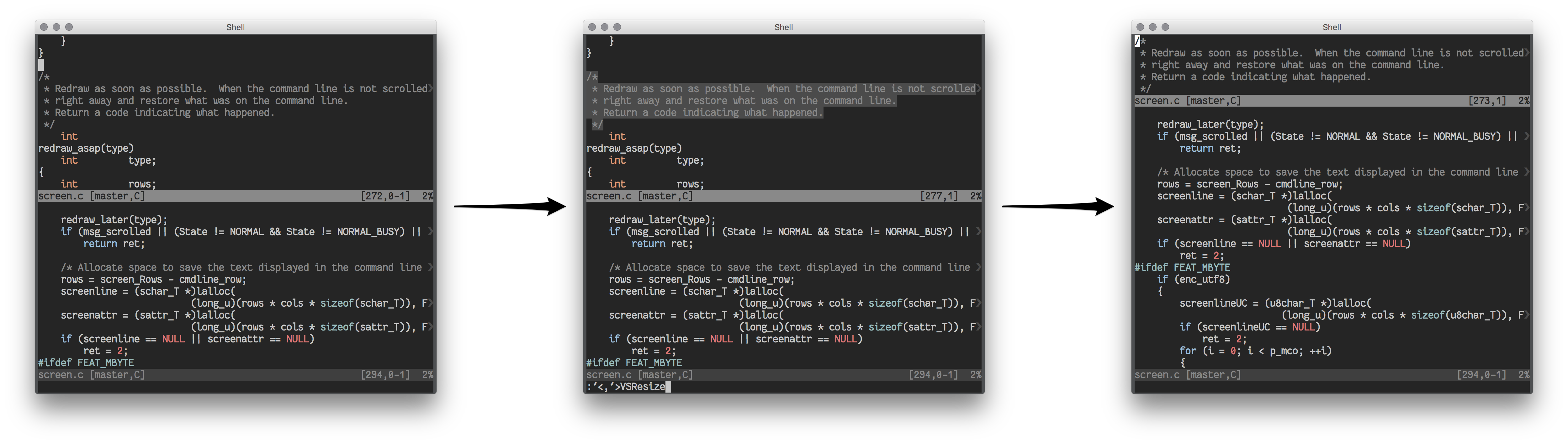
Resize
If you already have multiple splits open and want to resize one of them to only
show a certain range of lines, follow these steps:
- Visually select the lines you want to see
- Type
:VSResizeto execute theVSResizeex command on the selected range - The split will now only show those lines
Split
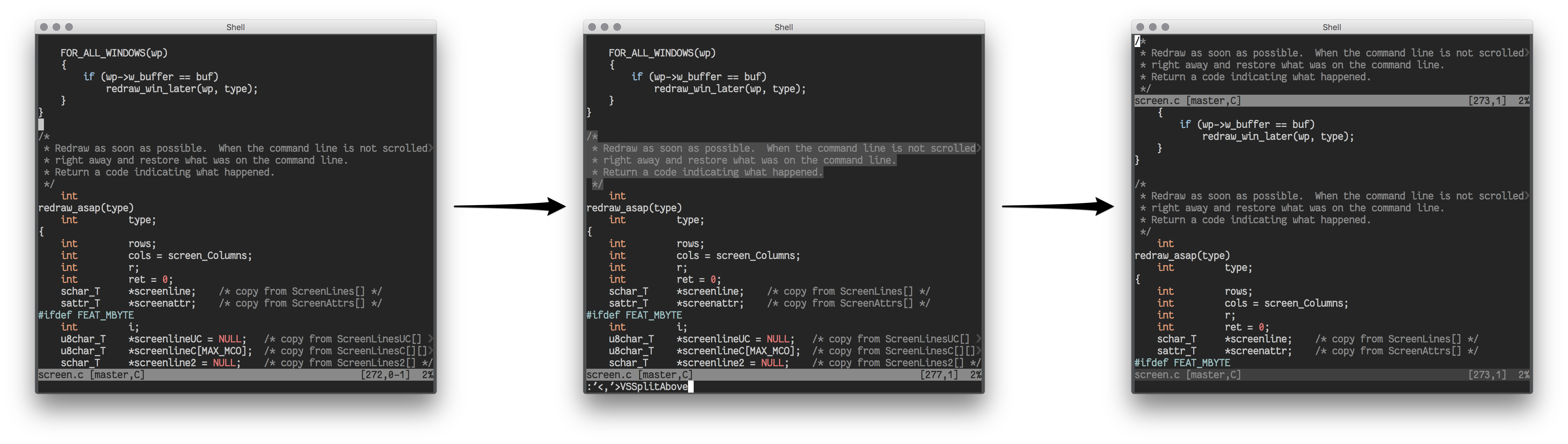
If you want to create a new split to show a certain range you could create a
split and then resize it as described above. But there is a quicker way:
- Visually select the lines you want to split out
- Type
:VSSplit,:VSSplitAboveor:VSSplitBelowto create the split - A new split will be created showing the selected lines
Notes on the different commands:
:VSSplitwill respect your'splitbelow'setting:VSSplitAbovewill always create a new split above the current window:VSSplitBelowwill always create a new split below the current window
As with all commands that work on ranges, invoking them on a visual selection
is only one way of many:
- Resize split to show everything between marks
aandbwith:'a,'bVSResize - Split out range between line above cursor containing
fooand line below
cursor containingbarwith:?foo?,/bar/VSSplit
Mappings
Mappings will not overwrite your existing mappings.
For the most common use case of working on visual selections there are some
visual mode mappings provided:
- <C-W>gr - resize split to visual selection
(similar to:VSResize) - <C-W>gss - split out visual selection
(similar to:VSSplit) - <C-W>gsa - split out visual selection above
(similar to:VSSplitAbove) - <C-W>gsb - split out visual selection below
(similar to:VSSplitBelow)
Note: <C-W> means press and hold the Control key while pressing W
(similar to other window related commands)
For example, to split out to the paragraph around the cursor, just type:
vip<C-W>gssTo work on text objects directly, the same mappings are provided in operator
pending mode. So this also works:
<C-W>gssipRemapping
For easier remapping, <Plug> mappings are provided. Change the key sequences
below and put them into your vimrc:
Visual-mode:
xmap <C-W>gr  <Plug>(Visual-Split-VSResize)
xmap <C-W>gss <Plug>(Visual-Split-VSSplit)
xmap <C-W>gsa <Plug>(Visual-Split-VSSplitAbove)
xmap <C-W>gsb <Plug>(Visual-Split-VSSplitBelow)
Operator-pending mode:
nmap <C-W>gr  <Plug>(Visual-Split-Resize)
nmap <C-W>gss <Plug>(Visual-Split-Split)
nmap <C-W>gsa <Plug>(Visual-Split-SplitAbove)
nmap <C-W>gsb <Plug>(Visual-Split-SplitBelow)
Installation
Use your favorite plugin manager.
NeoBundle 'wellle/visual-split.vim'Bundle 'wellle/visual-split.vim'Plug 'wellle/visual-split.vim'git clone git://github.com/wellle/visual-split.vim.git ~/.vim/bundle/visual-split.vim
What's next?
This plugin was written in an afternoon to fill a personal need. I might add
related functionality in the future that I consider useful and related
- If you like this plugin and want more of it, please open an issue
- let me know what you would like to see.
Especially suggestions for better command names or more concise mappings would
be very appreciated.