Ⅰ. 插件描述
Custom Haskell VimscriptsⅡ. 基本信息
|
Ⅲ. 安装方法
使用Vundle管理器安装
在你的.vimrc下添加:Plugin 'neovimhaskell/haskell-vim-sad-beautiful-tragic':source %
:PluginInstall对于Vundle版本 < 0.10.2,请用上面的Bundle替换Plugin。
使用NeoBundle管理器安装
在你的.vimrc下添加:NeoBundle 'neovimhaskell/haskell-vim-sad-beautiful-tragic':source %
:NeoBundleInstall使用VimPlug管理器安装
在你的.vimrc下添加:Plug 'neovimhaskell/haskell-vim-sad-beautiful-tragic':source %
:PlugInstall使用Pathogen管理器安装
在终端中运行以下命令:cd ~/.vim/bundle
git clone https://github.com/neovimhaskell/haskell-vimⅣ. 文档说明
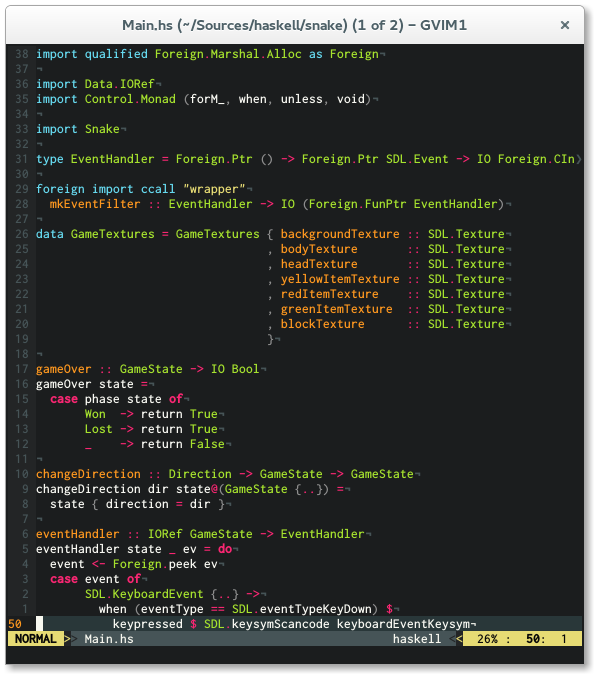
Syntax Highlighting and Indentation for Haskell and Cabal
I was unhappy with the Haskell scripts that are
shipped with vim, therefore I decided to make my
own based on [idris-vim][].
I hope you find this useful.
Features
- Covers a broader spectrum of keywords
- Highlighting for new features like type families, pattern synonyms, arrow syntax, recursive do, role annotations, QuasiQuotation
- More contextual highlighting (e.g. highlight 'as' or 'family' only in appropriate places)
- Smarter indentation
- Better Cabal support
Installation
I recommend using [Pathogen][] for installation. Simply clone
this repo into your ~/.vim/bundle directory and you are ready to go.
cd ~/.vim/bundle
git clone https://github.com/neovimhaskell/haskell-vim.git
Be sure that the following lines are in your.vimrc
syntax on
filetype plugin indent on
Manual Installation
Copy content into your ~/.vim directory.
Configuration
Features
To enable the features you would like to use, just add the according line to your.vimrc.
let g:haskell_enable_quantification = 1   " to enable highlighting of `forall`
let g:haskell_enable_recursivedo = 1      " to enable highlighting of `mdo` and `rec`
let g:haskell_enable_arrowsyntax = 1      " to enable highlighting of `proc`
let g:haskell_enable_pattern_synonyms = 1 " to enable highlighting of `pattern`
let g:haskell_enable_typeroles = 1        " to enable highlighting of type roles
let g:haskell_enable_static_pointers = 1  " to enable highlighting of `static`
let g:haskell_backpack = 1                " to enable highlighting of backpack keywords
Highlighting
haskell-vim has an opinionated highlighting. If you do not like that you can switch to
a more traditional mode by setting g:haskell_classic_highlighting to 1.
Disabling Template Haskell and Quasiquoting syntax is possible by settingg:haskell_disable_TH to 1.
Indentation
To configure indentation in haskell-vim you can use the following variables to change indentation depth, just add the according line to your .vimrc.
If you dislike how indentation works you can disable it by setting g:haskell_indent_disable to1.
Additionally you can use the
vim-hindent plugin to achieve automatic
indentation using hindent.
Haskell
let g:haskell_indent_if = 3if bool
then ...
else ...let g:haskell_indent_case = 2case xs of
[] -> ...
(y:ys) -> ...let g:haskell_indent_let = 4let x = 0 in
x
let g:haskell_indent_where = 6where f :: Int -> Int
f x = x
let g:haskell_indent_before_where = 2foo
where
let g:haskell_indent_after_bare_where = 2where
foo
let g:haskell_indent_do = 3do x <- a
y <- b
let g:haskell_indent_in = 1let x = 1
in x
let g:haskell_indent_guard = 2f x y
|
haskell-vim also supports an alterative style for case indentation.
let g:haskell_indent_case_alternative = 1f xs ys = case xs of
[] -> ...
(y:ys) -> ...
Cabal
let g:cabal_indent_section = 2(limited to max. 4 spaces)executable name
main-is: Main.hs