Ⅰ. 插件描述
Lightweight Toolbox for LaTeX - New Official repositoryⅡ. 基本信息
|
Ⅲ. 安装方法
使用Vundle管理器安装
在你的.vimrc下添加:Plugin 'latex-box-team/latex-box-mine':source %
:PluginInstall对于Vundle版本 < 0.10.2,请用上面的Bundle替换Plugin。
使用NeoBundle管理器安装
在你的.vimrc下添加:NeoBundle 'latex-box-team/latex-box-mine':source %
:NeoBundleInstall使用VimPlug管理器安装
在你的.vimrc下添加:Plug 'latex-box-team/latex-box-mine':source %
:PlugInstall使用Pathogen管理器安装
在终端中运行以下命令:cd ~/.vim/bundle
git clone https://github.com/latex-box-team/latex-boxⅣ. 文档说明
# LaTeX-BoX
This plugin provides:
- Background compilation using latexmk.
- Completion for commands, environments, labels, bibtex entries, and inline maths.
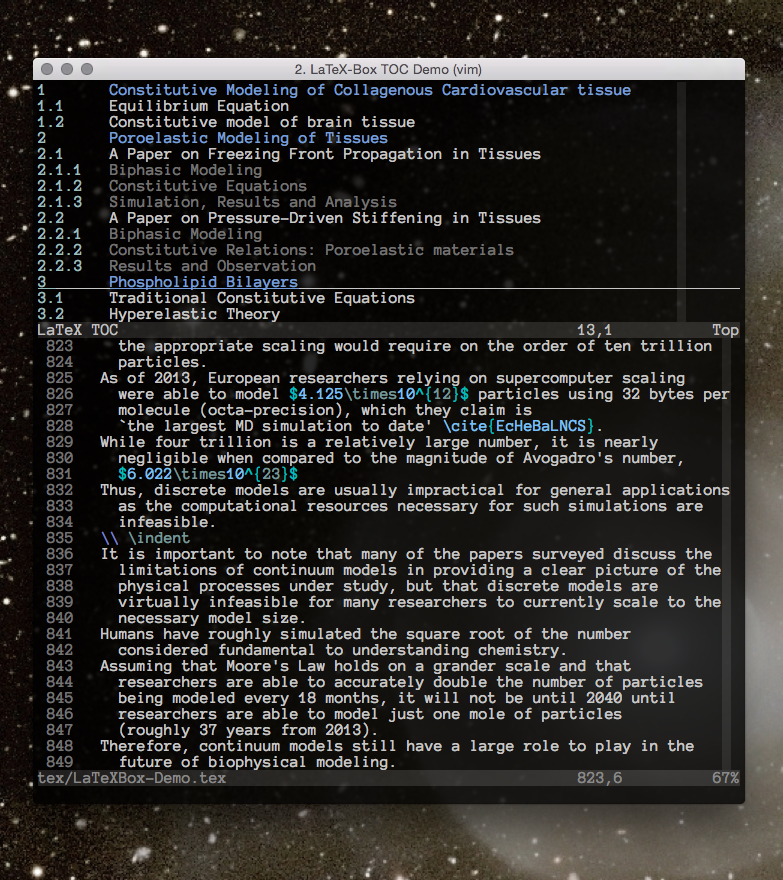
- A simple table of contents improving the navigation of large files.
- Smart indentation.
- Highlight matching begin/end and leftright pairs.
- Motion between begin/end and leftright pairs with the % key.
- Motion through brackets/braces (with user-defined keys).
- Environment objects (e.g., select environement with "vie" or "vae").
- Inline math objects (e.g., select inline math with "vi$" or "va$").
- Folding of parts (part/chapter/section/etc) and environments.
- OmniCompletion for bibliography entries respects BibLaTeX's
\addbibresource,\addglobalbiband\addsectionbibcommands. - The table of contents functionality does not depend anymore on the assumption
that\@writefile{toc}{\contentsline ...}entries in the*.auxfile always
occur at the start of some line.
- Completion of
\ref{...}commands was completely rewritten. It is now able
to handle\@newlabel{label}{{number}{page}...}entries in the*.auxfile
even if number or page contain arbitrary nested levels of braces. Labels
are additionally held in a cache per *.aux file, which is updated only if
the modification time of the file changes.
- The table of contents now opens files different from the one currently being
edited in a new buffer. (I actually think, that this behaviour was
implemented already, but I could not get it working.) To make this work,
LaTeX-Box is not loaded per buffer but globally.
This plugins aims at being lightweight and simple. For more fully-fledged
plugins, see:
- LaTeX-Suite: vimscript#475
- AutomaticTexPlugin: vimscript#2945
Installation
With gmarik vundle
https://github.com/gmarik/vundle
Add Plugin 'LaTeX-Box-Team/LaTeX-Box' to your ~/.vimrc and run:PluginInstall in a vim buffer. Add ! to the command to update.
With pathogen
https://github.com/tpope/vim-pathogen
Add the LaTeX-Box bundle to your bundle directory, for instance with `git
clone`. This will typically be enough:
cd ~/.vim/bundle
git clone git://github.com/LaTeX-Box-Team/LaTeX-Box.git
Without a plugin manager
Copy the directories to your .vim/ folder.
Windows users
Users working with (g)vim on Windows must have a Perl environment installed.
Such an environment can be downloaded at : http://strawberryperl.com/
Installation Notes
Make sure filetype plugin on is set in host .vimrc, else LaTeX-Box
will not load.
Note that there are configurable global variables that can be put in the.vimrc. These are documented, but as an example, one can have the
table of contents open as a horizontal split by utilizing this:
~/.vimrc
...
if s:extfname ==? "tex"
  ...
  let g:LatexBox_split_type="new"
  ...
endif
Mirror information
This is mirrored on
Example Table of Contents