Ⅰ. 插件描述
Vim plugin to work with RⅡ. 基本信息
|
Ⅲ. 安装方法
使用Vundle管理器安装
在你的.vimrc下添加:Plugin 'jalvesaq/nvim-r':source %
:PluginInstall对于Vundle版本 < 0.10.2,请用上面的Bundle替换Plugin。
使用NeoBundle管理器安装
在你的.vimrc下添加:NeoBundle 'jalvesaq/nvim-r':source %
:NeoBundleInstall使用VimPlug管理器安装
在你的.vimrc下添加:Plug 'jalvesaq/nvim-r':source %
:PlugInstall使用Pathogen管理器安装
在终端中运行以下命令:cd ~/.vim/bundle
git clone https://github.com/jalvesaq/nvim-rⅣ. 文档说明
### Nvim-R
This is the development code of Nvim-R which improves Vim's support to edit
R code.
Installation
If you use a plugin manager, such as [vim-plug], [Vundle] or [Pathogen],
follow its instructions on how to install plugins from github.
To install a stable version of the plugin, either download the Vim package from
Nvim-R/releases
or the Vimball from
vim.org.
Please, read the section Installation from the
plugin's documentation
for details.
Please, read the plugin's documentation for instructions on usage.
Screenshots
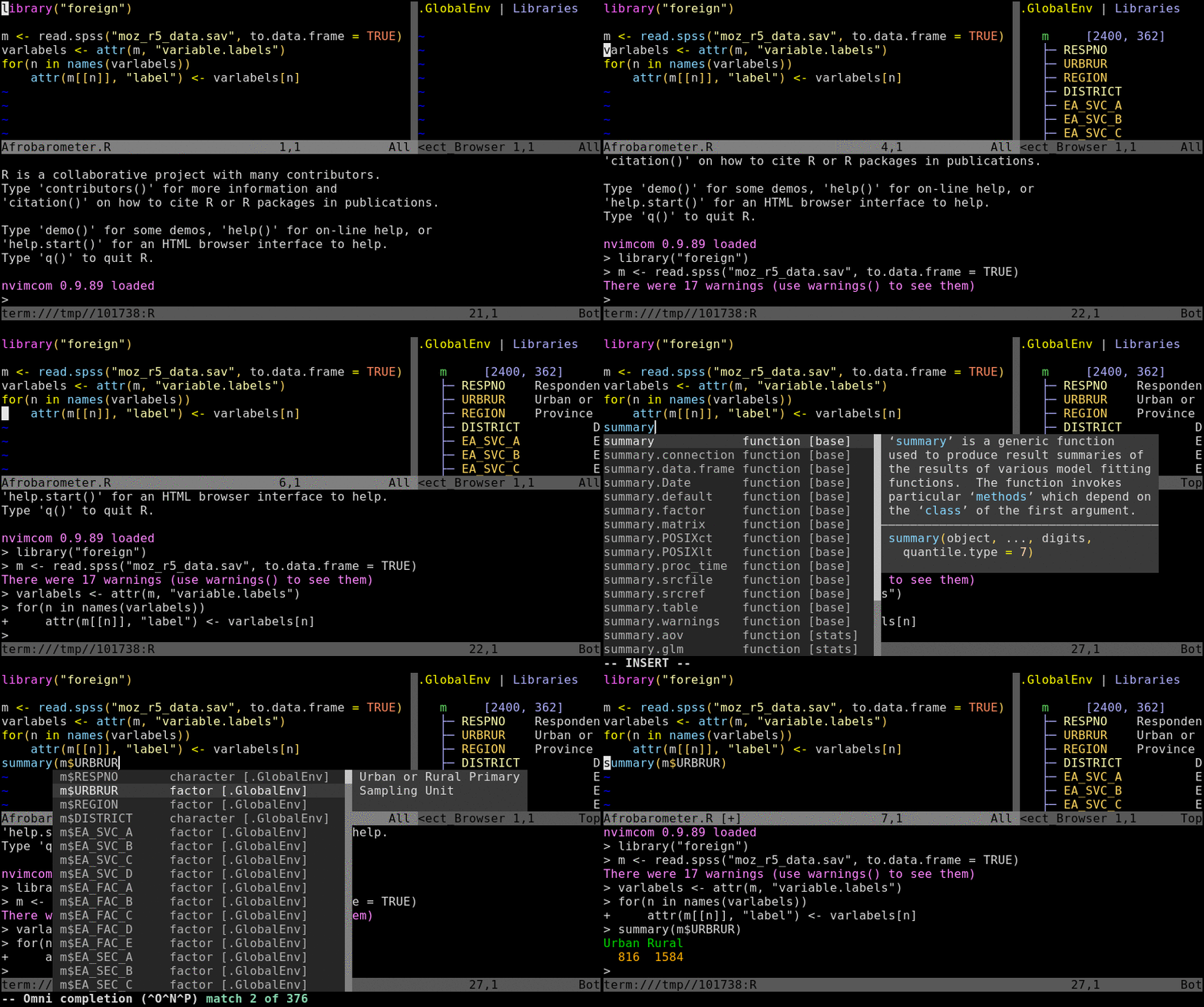
The animated GIF below shows R running in a Neovim terminal buffer. We can note:
- The editor has some code to load Afrobarometer data on Mozambique, R is
running below the editor and the Object Browser is on the right side. On
the R Console, we can see messages inform some packages were loaded. The
messages are in blue because they were colorized by the package
[colorout]. - When the command
library("foreign")is sent to R, the string read.spss
turns blue because it is immediately recognized as a loaded function
(the Vim color scheme used is [southernlights]). - When Mozambique's data.frame is created, it is automatically displayed
in the Object Browser. Messages about unrecognized types are in blue
because they were sent to stderr, and the line Warning messages is in
red because colorout recognized it as a warning. - When the "label" attributes are applied to the data.frame elements, the
labels show up in the Object Browser. - The last slide shows the output of
summary. It also features omni
completion in action: we can see the elements of m that start with "D".
The communication between R and either Vim or Neovim
In addition to sending lines of code to R Console, Nvim-R and R communicate
with each other through TCP connections. The R package nvimcom runs a TCP
server that receives messages from Vim/Neovim, and it also sends messages
through a TCP connection to Vim/Neovim. Moreover, nvimcom includes the
application nclientserver which is never used by R itself, but is run by
Vim/Neovim, providing both a TCP client and a TCP server. The Diagram below
shows the three paths of communication between Vim/Neovim and R:
The black path is followed by all commands that you trigger in the editor
and that you can see being pasted into R Console. There are three
different ways of sending the commands to R Console:- When running R in a Neovim built-in terminal, the function
chansend()
is used to send code to R Console. - When running R in an external terminal emulator, Tmux is used to send
commands to R Console. - On Windows operating system, Nvim-R can send a message to R (nvimcom)
which forwards the command to R Console.
- When running R in a Neovim built-in terminal, the function
- The blue path is followed by the few commands that you trigger, but that
are not pasted into R Console and do not output anything in R Console;
their results are seen in the editor itself. These are the commands to do
omnicompletion (of names of objects and function arguments), start and
manipulate the Object Browser (\ro,\r=and\r-), call R help (\rh
or:Rhelp), insert the output of an R command (:Rinsert) and format
selected text (:Rformat). - The red path is followed by R messages that tell the editor to update the
Object Browser, update the syntax highlight to include newly loaded
libraries and open the PDF output after knitting an Rnoweb file and
compiling the LaTeX result.
