Ⅰ. 插件描述
Vim plugin for ruby editing. Quick jump to method, class, module defenitions in buffers.Ⅱ. 基本信息
|
Ⅲ. 安装方法
使用Vundle管理器安装
在你的.vimrc下添加:Plugin 'xmisao/rubyjump':source %
:PluginInstall对于Vundle版本 < 0.10.2,请用上面的Bundle替换Plugin。
使用NeoBundle管理器安装
在你的.vimrc下添加:NeoBundle 'xmisao/rubyjump':source %
:NeoBundleInstall使用VimPlug管理器安装
在你的.vimrc下添加:Plug 'xmisao/rubyjump':source %
:PlugInstall使用Pathogen管理器安装
在终端中运行以下命令:cd ~/.vim/bundle
git clone https://github.com/xmisao/rubyjump.vimⅣ. 文档说明
English / Japanese
RubyJump
Vim plugin for ruby editing. Quick jump to method, class, module defenitions in buffers.
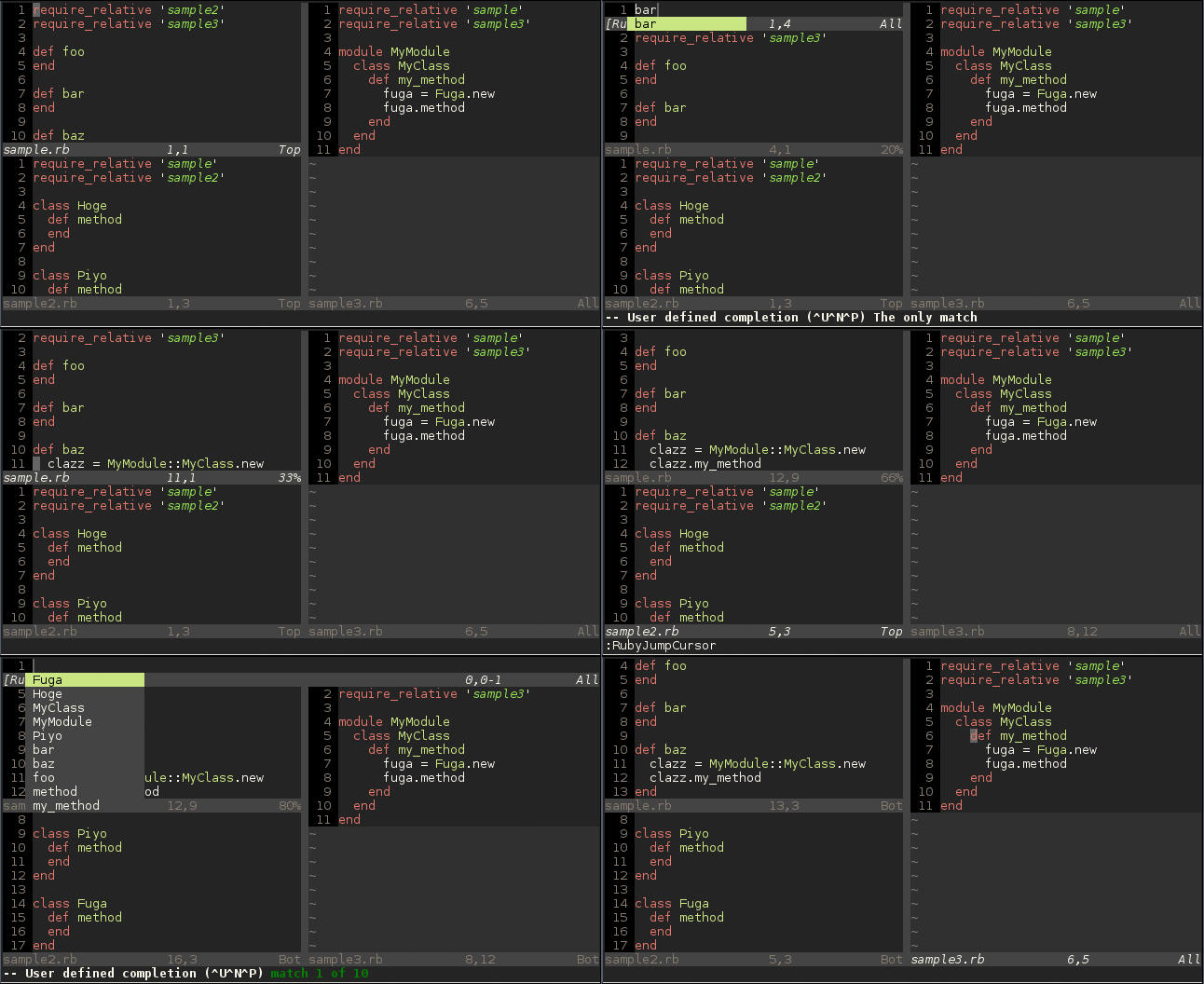
Demo
Installation
Manual Install
copy rubyjump.vim to your ~/.vim/plugin directory.
Vundle
write bellow to your ~/.vimrc. And execute :BundleInstall.
Bundle 'xmisao/rubyjump.vim'Requirements
RubyJump is tested on Vim 7.4.
Ruby interface(if_ruby) is required.
Usage
Commands
RubyJump add these comamnds to Vim.
- RubyJump
- RubyJumpLocal
- RubyJumpCursor
- RubyJumpNext
- RubyJumpPrev
- RubyJumpForward
- RubyJumpBackward
- RubyJumpNextForward
- RubyJumpPrevBackward
- RubyJumpVersion
RubyJump
Jump to a definition in all windows.
Once this command executed, selection window is open above.
Enter key pressed, jump to the definition.
In selection window, you can use ambiguous completion.
For example, method named foobar is matches foo, bar, fb or oo.
RubyJumpLocal
Jump to a definition in current window.
RubyJumpCursor
execute RubyJump with under cursor word.
RubyJumpNext
after RubyJump or RubyJumpLocal, if same name definitions are there, jump to next definition.
RubyJumpPrev
after RubyJump or RubyJumpLocal, if same name definitions are there, jump to previous definition.
RubyJumpFoward
This is support command for cursor moving.
Move to forward definition.
RubyJumpBackward
Move to backward definition.
RubyJumpNextForward
After jump, this command behaves RubyJumpNext.
Else, this command behaves RubyJumpForward.
This command is recommended to move to forward.
RubyJumpPrevBackward
After jump, this command behaves RubyJumpPrev.
Else, this command behaves RubyJumpBackward.
This command is recommended to move to backward.
RubyJumpVersion
Show RubyJump's version information.
Keymaps
RubyJump provides these keymaps to Vim.
Keymaps are obverse commands.
| Keymap | Command |
|---|---|
| <Plug>(rubyjump) | RubyJump |
| <Plug>(rubyjump_local) | RubyJumpLocal |
| <Plug>(rubyjump_cursor) | RubyJumpCursor |
| <Plug>(rubyjump_next) | RubyJumpNext |
| <Plug>(rubyjump_prev) | RubyJumpPrev |
| <Plug>(rubyjump_forward) | RubyJumpForward |
| <Plug>(rubyjump_backward) | RubyJumpBackward |
| <Plug>(rubyjump_next_forward) | RubyJumpNextForward |
| <Plug>(rubyjump_prev_backward) | RubyJumpPrevBackward |
Variables
RubyJump use these variables.
- g:rubyjump#debug
- g:rubyjump#enable_ripper
- g:rubyjump#filetypes
g:rubyjump#debug
If set to 1, debug mode is enabled.
Default value is 0.
g:rubyjump#enable_ripper
If set to 1, RubyJump use ripper. ripper is parser of Ruby.
If this option enabled, first RubyJump challenge parsing by ripper, if parse error detected, then parse by regular expression.
This option requires over Ruby 1.9.
Default value is 1 in over Ruby 1.9 environment, 0 in under Ruby 1.8 environment.
g:rubyjump#filetypes
Specify buffer filetypes that jump target as string array.
Default value is ['ruby'].
Configuration Example
" for RubyJump

" Disable debug mode
g:rubyjump#debug = 0

" Keymaps
" <Space> execute RubyJump
" ; execute RubyJumpCursor
" Ctrl + n Move to next or forward definition
" Ctrl + p Move to previous or backward definition
nmap <silent> <Space> <Plug>(rubyjump)
nmap <silent> <C-n> <Plug>(rubyjump_next_forward)
nmap <silent> <C-p> <Plug>(rubyjump_prev_backward)
nmap <silent> ; <Plug>(rubyjump_cursor)