Ⅰ. 插件描述
Vim runtime files for SwiftⅡ. 基本信息
|
Ⅲ. 安装方法
使用Vundle管理器安装
在你的.vimrc下添加:Plugin 'keith/swift-vim-red':source %
:PluginInstall对于Vundle版本 < 0.10.2,请用上面的Bundle替换Plugin。
使用NeoBundle管理器安装
在你的.vimrc下添加:NeoBundle 'keith/swift-vim-red':source %
:NeoBundleInstall使用VimPlug管理器安装
在你的.vimrc下添加:Plug 'keith/swift-vim-red':source %
:PlugInstall使用Pathogen管理器安装
在终端中运行以下命令:cd ~/.vim/bundle
git clone https://github.com/keith/swift.vimⅣ. 文档说明
# Swift.vim
Syntax and indent files for Swift
If you don't have a preferred installation method check out
vim-plug.
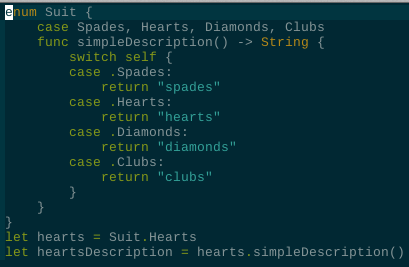
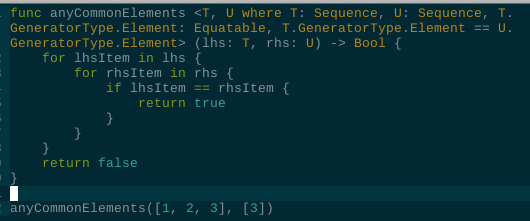
Examples
Syntastic Integration
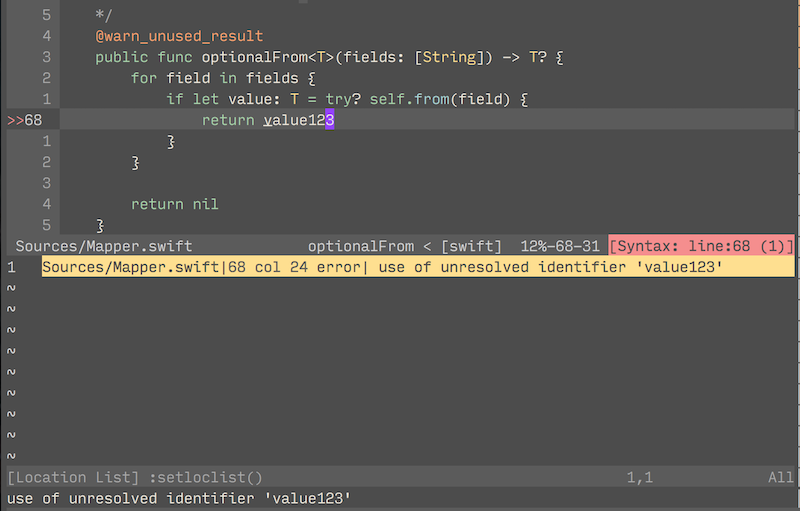
swift.vim can show errors inline from
swift package manager
or from swiftlint using
syntastic.
Usage
- Install syntastic
- swiftpm integration will be automatically enabled if you're running vim
- a directory containing a
Package.swiftfile.
- SwiftLint integration will be automatically enabled if you have
SwiftLint installed and if you're running vim from a directory
containing a .swiftlint.yml file.
- To enable both at once add this to your vimrc:
let g:syntastic_swift_checkers = ['swiftpm', 'swiftlint']