Ⅰ. 插件描述
A text object for Laravel's Blade directivesⅡ. 基本信息
|
Ⅲ. 安装方法
使用Vundle管理器安装
在你的.vimrc下添加:Plugin 'adriaanzon/vim-textobj-blade-directive':source %
:PluginInstall对于Vundle版本 < 0.10.2,请用上面的Bundle替换Plugin。
使用NeoBundle管理器安装
在你的.vimrc下添加:NeoBundle 'adriaanzon/vim-textobj-blade-directive':source %
:NeoBundleInstall使用VimPlug管理器安装
在你的.vimrc下添加:Plug 'adriaanzon/vim-textobj-blade-directive':source %
:PlugInstall使用Pathogen管理器安装
在终端中运行以下命令:cd ~/.vim/bundle
git clone https://github.com/adriaanzon/vim-textobj-blade-directiveⅣ. 文档说明
_Ever felt like using this text object in a different filetype?
I did, so I created this other one._
vim-textobj-blade-directive
A text object for Laravel's Blade
directives.
Installation
Depends on vim-textobj-user and
vim-blade.
Plug 'kana/vim-textobj-user'
Plug 'jwalton512/vim-blade'
Plug 'adriaanzon/vim-textobj-blade-directive'
Also requires the matchit.vim plugin to be enabled. You can check if it's
enabled by running :echo g:loaded_matchit, it should return 1.
If it's not enabled yet, you can do so by putting the following in your vimrc:
runtime macros/matchit.vimUsage
When textobj-blade-directive is installed you will gain two new text objects,
which are triggered by ad and id
- These follow Vim convention, so that ad
- all of a Blade directive, and id selects the
inner portion of a Blade directive.
Tips
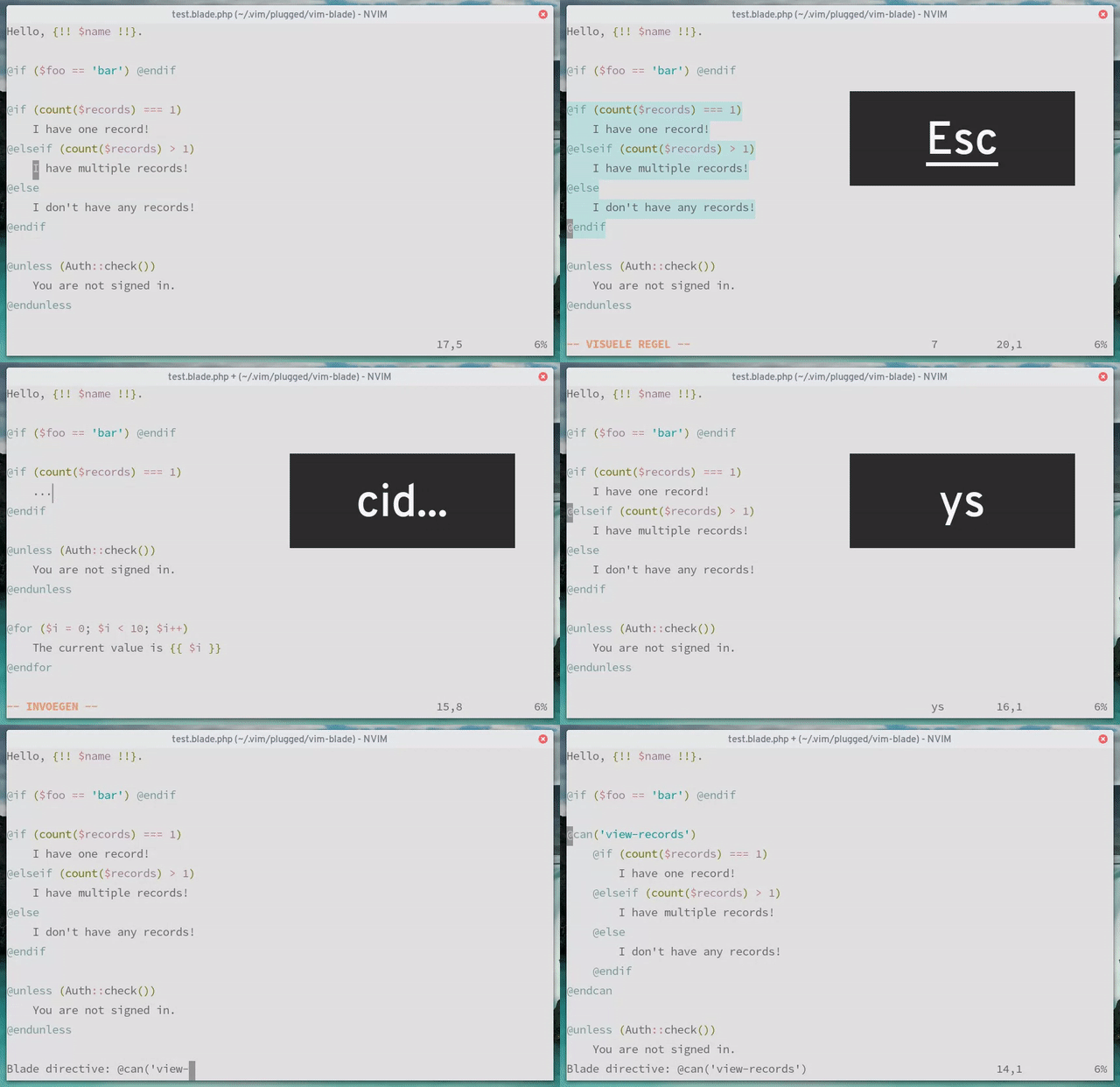
In the example GIF, the @if statement got surrounded with a @can statement.
This isn't directly related to this plugin, but it was achieved using the
vim-surround plugin, with the
following configuration in after/ftplugin/blade.vim:
" Use 'd' to surround with a Blade directive.
let b:surround_{char2nr("d")} = "@\1Blade directive: @\1 \r @end\1\r\[( \]\\+.*\r\1"
" Some aliases for convenience.
let b:surround_{char2nr("D")} = b:surround_{char2nr("d")}
let b:surround_{char2nr("@")} = b:surround_{char2nr("d")}
Now you can surround anything with a Blade directive. For example, if you
wanted to surround a paragraph, you could select the paragraph with
vip, followed by an S to activate
vim-surround, followed by a d. This will open a prompt where you may
type your blade directive.
Limitations
- Operations are done line wise, so this text object doesn't work for
statements on a single line. - Some text objects in Vim respond to a count. For example, the
a{ text object will select all of the current{}
delimited block, but if you prefix it with the number 2 (e.g.
v2i{) then it will select all of
the block that contains the current block. The Blade directive text object
does not respond in this way if you prefix a count. This is due to a
limitation in the textobj-user plugin.
However, you can achieve a similar effect by repeating the Blade directive
text-object manually. So if you press vad to
select the current Blade directive, you can expand your selection outwards by
repeating ad, or contract your selection inwards by
repeating id.
Credits
Thanks to Drew Neil for his plugin
vim-textobj-rubyblock.
This plugin was made by simply changing the search patterns in his plugin.
I also thank Kana Natsuno for providing
a framework to build custom text
objects.
License
Copyright © Adriaan Zonnenberg. Distributed under the same terms as Vim itself.
See :help license.