Ⅰ. 插件描述
The wanted outliner!Ⅱ. 基本信息
|
Ⅲ. 安装方法
使用Vundle管理器安装
在你的.vimrc下添加:Plugin 'lifepillar/outlaw':source %
:PluginInstall对于Vundle版本 < 0.10.2,请用上面的Bundle替换Plugin。
使用NeoBundle管理器安装
在你的.vimrc下添加:NeoBundle 'lifepillar/outlaw':source %
:NeoBundleInstall使用VimPlug管理器安装
在你的.vimrc下添加:Plug 'lifepillar/outlaw':source %
:PlugInstall使用Pathogen管理器安装
在终端中运行以下命令:cd ~/.vim/bundle
git clone https://github.com/lifepillar/vim-outlawⅣ. 文档说明

Vim Outlaw: The Wanted Outliner!
Hi, I am Outlaw, and I am wanted.
I am wanted because I am an outliner, and although many outliners
are already available for Vim, I am different. Striving for the same
minimalist philosophy followed by plugins like
Commentary,
Dirvish or
Sneak, I do not try to
reinvent the wheel. The price on my head is about 250 LoC.
Here is a very simple outline which you may start playing with.
Open Vim with vim beauregard.outlaw and start typing:
=== My biography
    The secret of a long life is trying not to shorten it.
    === Travel to the East
        === The telegram
            === Meeting with Nobody
            === The bomb
        === Searching for a brother
            === The Wild Bunch

=== Things to do
    [x] Clean boots
    [ ] Brush the horse
        You may lead him to the water if you want, but don't
        expect him to drink.
    [ ] Wear the sheriff's badge
I interpret lines starting with ===, [x], [-] or [ ], followed
by a space, as topics. Each topic must be on a single line. The
pattern defining a topic may be fully customized by settingg:outlaw_topic_mark, shouldn't you like my admittedly biased choice.
If you are the task-oriented kind of guy, you may prefer the
TaskPaper format, rather than the above.
I can't blame you. Just save your document with a .taskpaper
suffix and I will format each topic as a project or task.
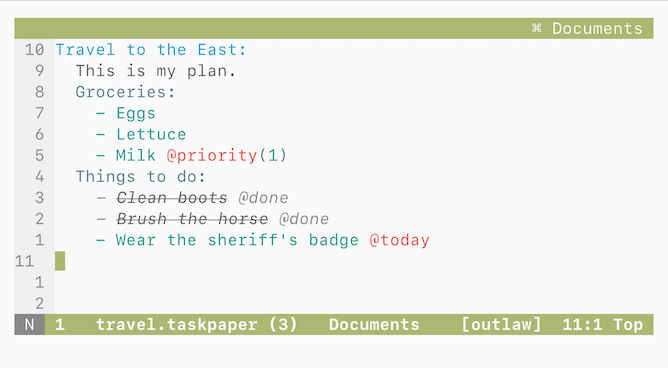
Whatever patterns you adopt, topics may be indented to form
a hierarchy or outline. I support up to nineteen levels (ten are
highlighted by default, see g:outlaw_levels). I don't care whether'expandtab' is set or not. You only need to set your preferred
indentation level with g:outlaw_indent (if you don't define that
variable in your vimrc I will use the current value of'shiftwidth').
For me, everything that does not look like a topic (including blank
lines) is body text (notes). I couldn't care less about the format
or indentation of your notes (although I can help you aligning them
with :OutlawAlignNotes): each block of body text always belongs to
the topic immediately before it. But don't call it a son of a topic:
you'd better think of body text as being at the same level as the
topic it belongs to (it is possible to fold notes independently,
though: see g:outlaw_note_fold_level and gy).
Notes are just Normal text, but lines starting with > or | are
highlighted (use > for quotations and | for verbatim text or
code). Words preceded by @ are highlighted as tags anywhere. You may
also use ~~~ or ` `` tags to embed any configured filetype (seeg:outlaw_fenced_filetypes). The delimiters may be changed, if you
want (see g:outlaw_fenced_tag). Hyperlinks are highlighted, too.
I let you jump over topics quickly: to the previous or next topic
(<up> and <down>), to the previous or next sibling/cousin
(<left> and <right>), parent or uncle (- and +). Press<enter> in Normal mode to quickly add a new sibling below the
current topic, or <c-k> to add a new sibling above the current
- Use
<c-j>to make a new child.
Besides, I help you move pieces of your outline around using the
arrow keys in Visual mode (they accept a count, of course). Fix the
indentation with the usual mappings (=, ==, …) if necessary
(your notes will be unaffected).
Folding and unfolding are performed using Vim's default mappings and
controlled using Vim's options (see :h fold-options). In addition,
I provide gl to set the fold level according to the level of the
current topic (so that all subtopics are closed), andg:outlaw_auto_close (toggled with gA) as a better suited
alternative to setting 'foldclose'.
There's not much else you need to know about me. But if you want to
know all the details, see :help outlaw.txt. Ah, I require Vim
7.4.984 or later.
Tips from Nobody
- Hyperlinks should be underlined (if they are not, blame your color
scheme): put the cursor over a link and typegxto open it,
usually in your browser (requires Vim's Netrw).
- You may easily use me to build a wiki. Put each “wiki” page in
a separate text file (with a.outl,.outlawor.txtsuffix)
and keep the files in the same folder. Now, say you want to link
A.outlaw from B.outlaw: just write ./A.outlaw or even just A
or @A somewhere inside B.outlaw: then, when you put the cursor
over A and type gf you will jump to A.outlaw. Jump back and
forth with CTRL-O and CTRL-I.
- Never underestimate how much you can accomplish using only Vim core
features.