Ⅰ. 插件描述
Vim-airline extension to show weather in the status line.Ⅱ. 基本信息
|
Ⅲ. 安装方法
使用Vundle管理器安装
在你的.vimrc下添加:Plugin 'wildog/airline-weather-vim':source %
:PluginInstall对于Vundle版本 < 0.10.2,请用上面的Bundle替换Plugin。
使用NeoBundle管理器安装
在你的.vimrc下添加:NeoBundle 'wildog/airline-weather-vim':source %
:NeoBundleInstall使用VimPlug管理器安装
在你的.vimrc下添加:Plug 'wildog/airline-weather-vim':source %
:PlugInstall使用Pathogen管理器安装
在终端中运行以下命令:cd ~/.vim/bundle
git clone https://github.com/wildog/airline-weather.vimⅣ. 文档说明
#airline-weather.vim
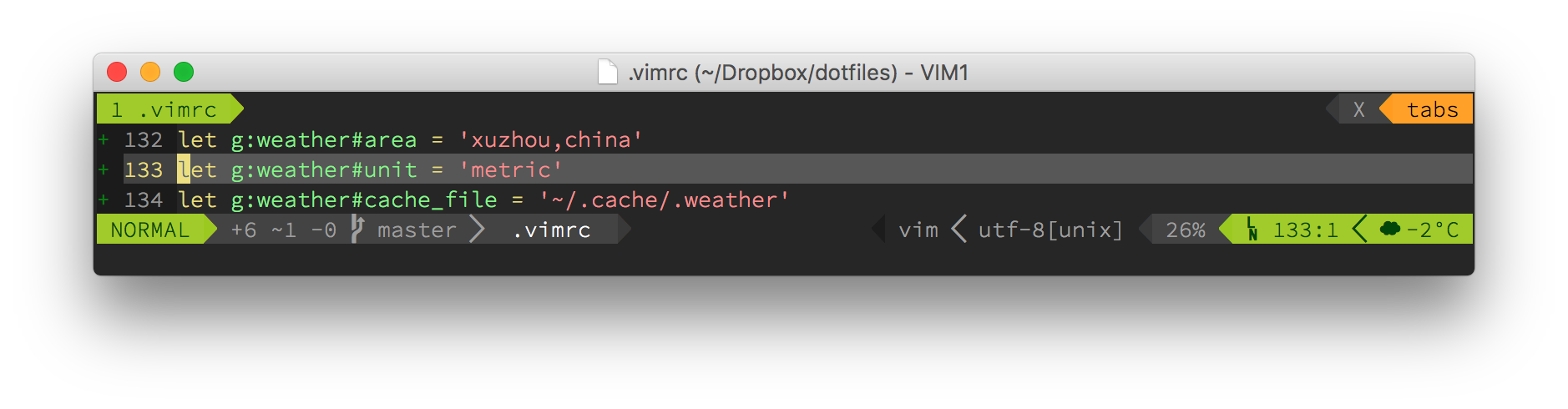
This is a vim-airline extension to show current weather on the right end of the status line, just like the weather segment in Powerline.
This extension depends on vim-airline and webapi-vim, you should install them first.
Installation
Use Vundle
Make sure you have these lines in your .vimrc

    Plugin 'bling/vim-airline'
    Plugin 'mattn/webapi-vim'
    Plugin 'Wildog/airline-weather.vim'

:PluginInstall
Manually
Make sure you have installed vim-airline and webapi-vim, then put files to corresponding directories.
Usage
- Set location
let g:weather#area = 'newyorkcity,us'
- Set unit ('metric' for ºC, 'imperial' for ºF.):
let g:weather#unit = 'metric'
- Set API Key, default key is provided but it'd be better if you use your own OpenWeatherMap API key, you can apply for it here for free:
let g:weather#appid = '2de143494c0b295cca9337e1e96b00e0'
- This extension use a cache file to store weather informations, and update the weather information every hour as default, you may change it with caution, update too frequently will slow down vim.
let g:weather#cache_file = '~/.cache/.weather'
let g:weather#cache_ttl = '3600' - Configure the format, %s for weather icon, %f for temperature.
let g:weather#format = '%s %.0f'
- Configure weather icons, suffix 'd' for the day and 'n' for the night, you can find informations about weather icon code here
let g:weather#status_map = {
"01d": "☀",
"02d": "☁",
"03d": "☁",
"04d": "☁",
"09d": "☂",
"10d": "☂",
"11d": "☈",
"13d": "❅",
"50d": "≡",
"01n": "☽",
"02n": "☁",
"03n": "☁",
"04n": "☁",
"09n": "☂",
"10n": "☂",
"11n": "☈",
"13n": "❅",
"50n": "≡",
} - Plus, you can force refresh the weather by
:call RefreshWeather()
LICENSE
MIT