Ⅰ. 插件描述
Base16 for ShellsⅡ. 基本信息
|
Ⅲ. 安装方法
使用Vundle管理器安装
在你的.vimrc下添加:Plugin 'chriskempson/base16-shell':source %
:PluginInstall对于Vundle版本 < 0.10.2,请用上面的Bundle替换Plugin。
使用NeoBundle管理器安装
在你的.vimrc下添加:NeoBundle 'chriskempson/base16-shell':source %
:NeoBundleInstall使用VimPlug管理器安装
在你的.vimrc下添加:Plug 'chriskempson/base16-shell':source %
:PlugInstall使用Pathogen管理器安装
在终端中运行以下命令:cd ~/.vim/bundle
git clone https://github.com/chriskempson/base16-shellⅣ. 文档说明
# Base16 Shell
See the Base16 repository for more information.
These scripts were built with Base16 Builder PHP.
A shell script to change your shell's default ANSI colors but most importantly, colors 17 to 21 of your shell's 256 colorspace (if supported by your terminal). This script makes it possible to honor the original bright colors of your shell (e.g. bright green is still green and so on) while providing additional base16 colors to applications such as Vim.
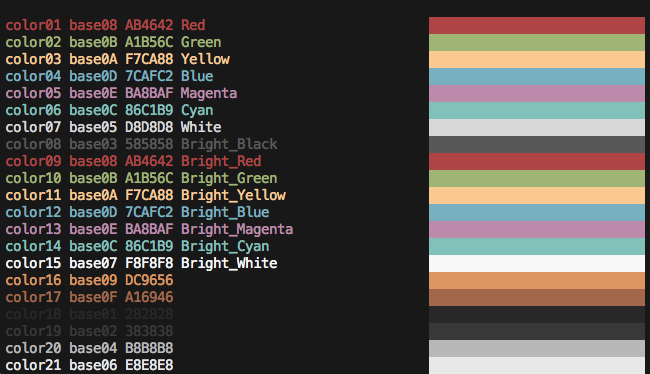
Use Cases
- You want to use a
*.256.*variant of a Terminal theme designed to honor the original bright colors. - You prefer to use a script instead of a terminal emulator theme to color your shell.
- You use this script to have different colorschemes appear on different SSH sessions.
Installation
git clone https://github.com/chriskempson/base16-shell.git ~/.config/base16-shellConfiguration
Bash/ZSH
Add following lines to ~/.bashrc or ~/.zshrc:
# Base16 Shell
BASE16_SHELL="$HOME/.config/base16-shell/"
[ -n "$PS1" ] && \
    [ -s "$BASE16_SHELL/profile_helper.sh" ] && \
        eval "$("$BASE16_SHELL/profile_helper.sh")"
Open a new shell and type base16 followed by a tab to perform tab completion.
Fish
Add following lines to ~/.config/fish/config.fish:
# Base16 Shell
if status --is-interactive
    set BASE16_SHELL "$HOME/.config/base16-shell/"
    source "$BASE16_SHELL/profile_helper.fish"
end
Open a new shell and type base16 followed by a tab to perform tab completion.
Base16-Vim Users
the profile_helper will update a ~/.vimrc_background file that will have your current the colorscheme, you just need to source this file in your vimrc: i.e. (remove the base16colorspace line if not needed)
if filereadable(expand("~/.vimrc_background"))
  let base16colorspace=256
  source ~/.vimrc_background
endif
Troubleshooting
Run the included colortest script and check that your colour assignments appear correct. If your teminal does not support the setting of colours in within the 256 colorspace (e.g. Apple Terminal), colours 17 to 21 will appear blue.

If colortest is run without any arguments e.g. ./colortest the hex values shown will correspond to the default scheme. If you'd like to see the hex values for a particular scheme pass the file name of the theme as the arguement e.g. ./colortest base16-ocean.sh.
Inverted blacks and whites
This is the expected behaviour when using a light theme:
https://github.com/chriskempson/base16-shell/issues/150