Ⅰ. 插件描述
Enhanced searching for VimⅡ. 基本信息
|
Ⅲ. 安装方法
使用Vundle管理器安装
在你的.vimrc下添加:Plugin 'mihaifm/bck':source %
:PluginInstall对于Vundle版本 < 0.10.2,请用上面的Bundle替换Plugin。
使用NeoBundle管理器安装
在你的.vimrc下添加:NeoBundle 'mihaifm/bck':source %
:NeoBundleInstall使用VimPlug管理器安装
在你的.vimrc下添加:Plug 'mihaifm/bck':source %
:PlugInstall使用Pathogen管理器安装
在终端中运行以下命令:cd ~/.vim/bundle
git clone https://github.com/mihaifm/bckⅣ. 文档说明
### Bck
Bck is a plugin that enhances searching in Vim. It puts bits and pieces
together to make searching a better experience in Vim.
Searching is powered by ack, which needs to be installed first. This plugin
is similar to ack.vim but it brings several improvements:
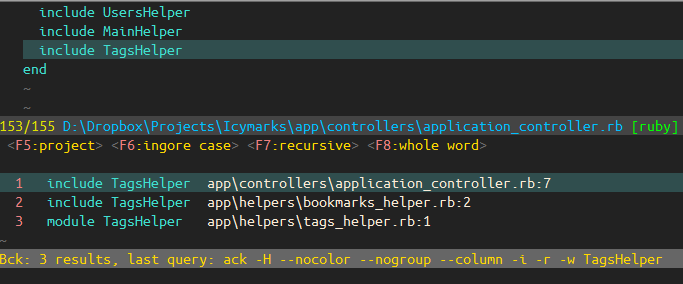
- You can specify search options using hotkeys which are displayed at the top of the Bck window
- Each search result has an associated hotkey which can be used to view it
- Cursorline is used to highlight the result
- Results are displayed in the Bck window, but are available in the quickfix
- as well
Bck provides a unified way to search in the following locations:
- project - the closest parent dir which contains a .git folder (or .svn, .hg etc., configurable)
- parent dir - relative to the current file
- file - search only in the current file
- current dir - in Vim's current working directory
- buffers - all listed buffers
Other search options are:
- ignore case / match case
- recursive / non-recursive
- whole word / substring
Installation
This plugin uses ack for the search, which is a Perl script better that
- Download and install from http://betterthangrep.com/
To install this plugin just copy bck.vim in the plugin directory
of your vim installation, or install via pathogen or vundle.
Commands
:Bck [options] [{pattern}]
Perform a search using ack and the preconfigured search options.
Additional options can be specified for the command, which are the same as forack. Results are displayed in the Bck window and are present in the quickfix
window as well.
If pattern is not specified, it searches for the word under cursor.
Search options can be toggled before the actual search, by using the :BckOpen
command below. Default search options can be specified using the g:BckOptions
variable.
The following key mappings are present in the |Bck| window:
<CR>     Open the selected result. cursorline is used for highlighting
<Esc>    Dismiss the Bck window
k,j      Move up/down
<F5>     Toggle the search location
<F6>     Toggle ignore/match case
<F7>     Toggle recursive/non-recursive
<F8>     Toggle whole word/substring
<Space>  Toggle the display of the search options
:BckOpen
Open the Bck window without making a search. This is useful for setting the
search options and reviewing the previous search results.
:ChangeToRoot
Changes Vim's working directory to the project root directory. Project root
markers are definded by the g:BckRoots variable.
If you wish to cd back to the previous directory before the change, you can
use the cd- command.
Configuration
g:BckRoots
Defines project root markers used for the project search.
A project is considered the closest parent with which contains one of these
files or folders.
Defaults:
['.git/', '.git', '_darcs/', '.hg/', '.bzr/', '.svn/', 'Gemfile']
Note: a slash / at the end identifies a directory.
g:BckPreserveCWD
After performing a search, the current working directory (CWD) inside Vim is
changed to either the project dir of the parent of the current file. Set this
variable to 1 to prevent this behavior.
Default: 0
g:BckKeys
A string containing all the keys associated with the search results. Each
result will have an associated key displayed besides it. Set this to an
empty string to disable this feature.
Default: "12345asfcvzxqwertyuiopbnm6789ABCEFGHIKLMNOPQRSTUVXZ"
g:BckSplit
The location of the Bck window.
Default: "botright"
g:BckOptions
A string that compacts together all search options. Each character represents
an option, and position matters. Here are all the available options, based on
character position:
[0]
  p - project
  d - parent dir
  c - current dir
  f - current file
  b - buffers

[1]
  i - ignore case
  m - match case

[2]
  r - recurse into subdirectories
  n - non recursive

[3]
  w - entire word
  s - substring
Default: "pirw"
Note: This variable can be set dinamically even after the plugin has been
- This allows custom searches to be defined on the fly. Lets say you want
- hotkey to find the current word in all open buffers, case sensitive. You can
do:
fun! CustSearch()
  let g:BckOptions = "bmnw"
  :Bck
endfun
map <leader>sb  :call CustSearch()<cr>
g:BckHidden
When set to 1, the search is performed without displaying any results. The
results can be found in the quickfix window, using :copen. You can still set
the search options with the :BckOpen command.
Default: 0
g:BckPrg
Allows another grep-like utility to be used instead of ack.
Default: ack -H --nocolor --nogroup --column
Recommended mappings
You can put these in your vimrc to make things easier:
nmap <F4> :Bck<CR>
map <leader>q :BckOpen<CR>