Ⅰ. 插件描述
Quickly go back to a parent directory in linux instead of typing "cd ../../.." repeatedlyⅡ. 基本信息
|
Ⅲ. 安装方法
使用Vundle管理器安装
在你的.vimrc下添加:Plugin 'vigneshwaranr/bd':source %
:PluginInstall对于Vundle版本 < 0.10.2,请用上面的Bundle替换Plugin。
使用NeoBundle管理器安装
在你的.vimrc下添加:NeoBundle 'vigneshwaranr/bd':source %
:NeoBundleInstall使用VimPlug管理器安装
在你的.vimrc下添加:Plug 'vigneshwaranr/bd':source %
:PlugInstall使用Pathogen管理器安装
在终端中运行以下命令:cd ~/.vim/bundle
git clone https://github.com/vigneshwaranr/bdⅣ. 文档说明
# bd
Description
Quickly go back to a specific parent directory in bash instead of typing "cd ../../.." redundantly.
Installation
For Debian/Ubuntu
Packages available here:
https://tracker.debian.org/pkg/bd
https://launchpad.net/ubuntu/+source/bd
For other OS
wget --no-check-certificate -O /usr/local/bin/bd https://raw.github.com/vigneshwaranr/bd/master/bd
chmod +rx /usr/local/bin/bd
echo 'alias bd=". bd -si"' >> ~/.bashrc
source ~/.bashrc

# If you need autocomplete support, follow these two steps
wget -O /etc/bash_completion.d/bd https://raw.github.com/vigneshwaranr/bd/master/bash_completion.d/bd
source /etc/bash_completion.d/bd
To enable case-sensitive directory name matching, use -s instead of -si in the alias.
How to use:
If you are in this path /home/user/project/src/org/main/site/utils/file/reader/whatever
and you want to go to site directory quickly,
then just type:
`bd site`
In fact, You can simply type bd <starting few letters> like bd s or bd si
If there are more than one directories with same name up in the hierarchy, bd will take you to the closest. (Not considering the immediate parent.)
Other uses:
Using bd within backticks (`bd <letter(s)>`) prints out the path without changing the current directory.
You can take advantage of that by combining `bd <letter(s)>` with other commands such as ls, ln, echo, zip, tar etc..
Example:
If you just want to list the contents of a parent directory,
without going there, then you can use:<code>ls \`bd p\`</code>in the given example, it will list the contents of
`/home/user/project/`If you want to execute a file somewhere in a parent directory,
<code>\`bd p\`/build.sh</code>will execute
/home/user/project/build.shwhile not changing the
current directory.
If you reside in
/home/user/project/src/org/main/site/utils/file/reader/whatever
and want to change to/home/user/project/test, then try<code>cd \`bd p\`/test</code>
Screenshot: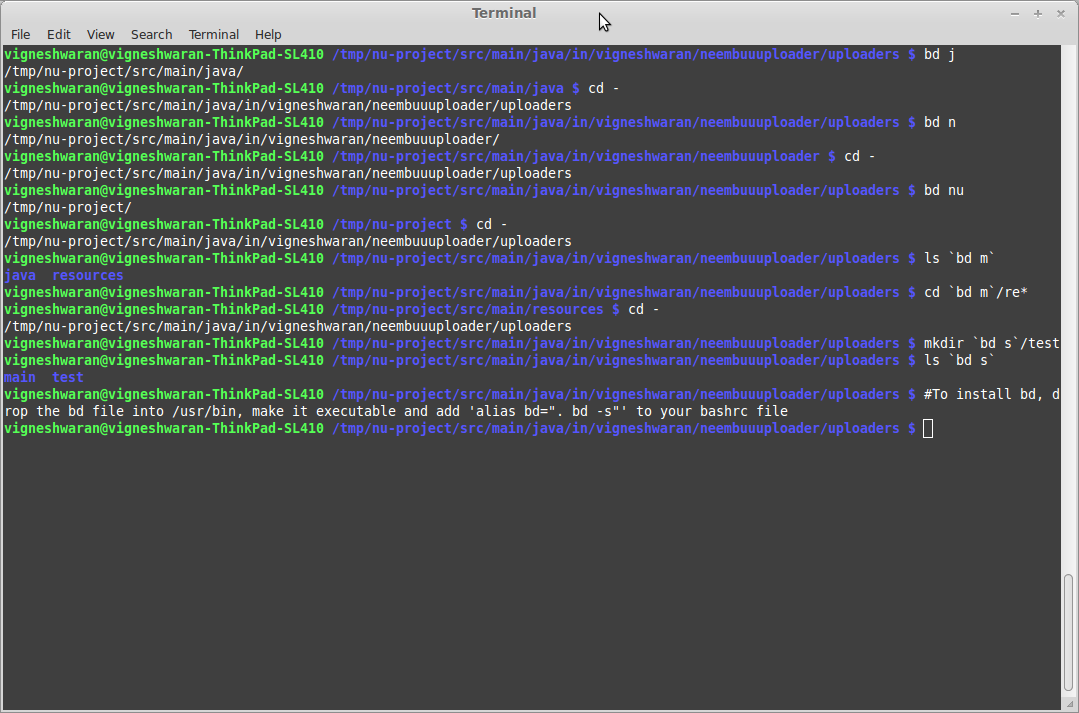
Thanks:
- @jaysh - Autocomplete support
- @rmhsilva - Case-Insensitive directory name matching
- @janosgyerik - Test cases, BSD support
- @phls - Packaging bd for Debian
See also:
- Tarrasch/zsh-bd - bd for zsh
- 0rax/fish-bd - bd for fish shell
- rvraghav93/win-bd - bd for command prompt
- peterwvj/eshell-up - bd inspired command for Emacs' eshell
- alebcay/awesome-shell - A curated list of awesome command-line frameworks, toolkits, guides and gizmos