Ⅰ. 插件描述
add an element of nyan cat to vimⅡ. 基本信息
|
Ⅲ. 安装方法
使用Vundle管理器安装
在你的.vimrc下添加:Plugin 'edvb54/catium-vim':source %
:PluginInstall对于Vundle版本 < 0.10.2,请用上面的Bundle替换Plugin。
使用NeoBundle管理器安装
在你的.vimrc下添加:NeoBundle 'edvb54/catium-vim':source %
:NeoBundleInstall使用VimPlug管理器安装
在你的.vimrc下添加:Plug 'edvb54/catium-vim':source %
:PlugInstall使用Pathogen管理器安装
在终端中运行以下命令:cd ~/.vim/bundle
git clone https://github.com/edvb54/catium.vimⅣ. 文档说明
# catium.vim
How come there is nyan-mode for Emacs,
and yet nothing similar for Vim? Well fear no longer! Introducing catium.vim!
Screenshots
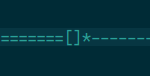

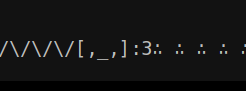
Installation
Before you install this plug-in you have to make sure that your Vim install has
the necessary components installed. To check run vim --version, then look formulti_byte and statusline. If there is a + in front of both of them, then
you're good to go.
To install any Vim plug-in you have a few options:
1. Put Files Into Root of the .vim Directory (Not Recommended)
Without a plug-in manger (like the ones below) you have to manually put each
file/folder (plugin/, doc/, autoload/, etc.) into the root of your .vim folder.
I highly recommend that you use one of the plug-in mangers below for less
manual work and easier organization.
2. Pathogen, by tpope
To use Pathogen you first have to
install it. After the installation process, type the following command
into a terminal, assuming you have git installed:
cd ~/.vim/bundle
git clone https://gitlab.com/edvb/catium.vim
3. Vundle, by gmarik
To use Vundle you first have to
install it by following the instructions on the repository. After the
installation process, insert the following into your .vimrc file:
Plugin 'edvb/catium.vim'
And then type this while inside Vim:
:source %
:PluginInstall
4. NeoBundle, by Shougo
To use NeoBundle you first have to
install it by following the instructions on the repository. After the
installation process, insert the following into your .vimrc file:
NeoBundle 'edvb/catium.vim'
And then type this while inside Vim:
:source %
:NeoBundleInstall
Setup
To Have Nyan Cat appear on your status line put the following line in your.vimrc file:
set statusline+=%{g:Catium()}
Make sure to have this in your .vimrc as well:
set laststatus=2
Configuration
There are 4 different "components" of Nyan Cat that you can change:
<component> | Example | Description |
|---|---|---|
trail | ====== | The rainbow that Nyan Cat leaves behind him |
body | [] | The poptart/body of Nyan Cat |
head | * | The face of Nyan Cat |
space | ------ | The empty space in front of Nyan Cat |
You can change each component by using the following command where
<component> is the type of component from the list above and
<componentNum> is the option for the component (default 0) from the list
below:
let g:catium#<component> = <componentNum>
Trail
<componetNum> | Preview |
|---|---|
| 0 | = |
| 1 | / |
| 2 | \ |
| 3 | /\ |
Body
<componetNum> | Preview |
|---|---|
| 0 | [] |
| 1 | ▩ |
| 2 | □ |
| 3 | [∴] |
| 4 | [,_,] |
Face
<componetNum> | Preview |
|---|---|
| 0 | * |
| 1 | ه |
| 2 | :3 |
Space
<componetNum> | Preview |
|---|---|
| 0 | - |
| 1 | _ |
| 2 | ∴ |
| 3 | ∵ |
| 4 | ∴∵ |
Note: Some of the text above is Unicode, so if you are seeing weird letters
then you are not loading Unicode correctly (should be fine in Vim).
Author
Ed van Bruggen <edvb54@gmail.com>
Licence
Vim License. See :help license