Ⅰ. 插件描述
Vim plugin for jumping between buffers, files, directories and (on Mac OS X) Spotlight search resultsⅡ. 基本信息
|
Ⅲ. 安装方法
使用Vundle管理器安装
在你的.vimrc下添加:Plugin 'adaszko/chbuf-vim':source %
:PluginInstall对于Vundle版本 < 0.10.2,请用上面的Bundle替换Plugin。
使用NeoBundle管理器安装
在你的.vimrc下添加:NeoBundle 'adaszko/chbuf-vim':source %
:NeoBundleInstall使用VimPlug管理器安装
在你的.vimrc下添加:Plug 'adaszko/chbuf-vim':source %
:PlugInstall使用Pathogen管理器安装
在终端中运行以下命令:cd ~/.vim/bundle
git clone https://github.com/adaszko/chbuf.vimⅣ. 文档说明
# chbuf.vim
Introduction
chbuf provides several functionalities:
- Jumping to loaded buffers (like
:buffercommand, but neater) — see:help :ChangeBuffer - Jumping to recently edited files —
:help :ChangeMixed - Jumping to files in current directory subtree —
:help :ChangeFile - Quickly and interactively changing current working directory —
:help :ChangeDirectory - And on Mac OS X, jumping to a file that comes from a result of Spotlight search —
:help :Spotlight
All of the above share a common user interface which is that of getline
library (see :help getline.txt). The philosophy is that user should be
presented with minimum information required. Prior to calling getline,
choices are filtered (each of mentioned commands takes a regex argument) and
segment-wise shortest unique suffix is computed. In case of file system
paths, it means file base name (the last segment of a path) if it’s unique or
last two path segments if that’s unique, or last three if that’s unique and so
on until all of the path segments are taken into account, which is guaranteed
to be unique by the file system. Illustrating this on an example, the
shortest unique suffixes of:
/home/adaszko/foo
/home/adaszko/bar
/home/adaszko/baz/quux
/home/adaszko/quux/quux
are
foo
bar
baz/quux
quux/quux
and this what the user is asked to choose from.
User input is interpreted as a series of simple substrings (not a pattern of
any kind) separated by whitespace characters. Only choices containing all of
the input substrings simultaneously are shown. At any time, user may select
the first displayed choice by hitting <CR> or abort by hitting <Esc>. All
available keys are listed at :help chbuf-keys.
Note that chbuf does not introduce any mappings by default (again, a design
philosophy). Scroll to the Setup section for this.
Additional Features
- Pure VimScript, no external interpreters required
- Cross-platform: Linux, Mac OS X, Windows
- Comes with library designed specifically for reuse —
getline(think readline for Vim)
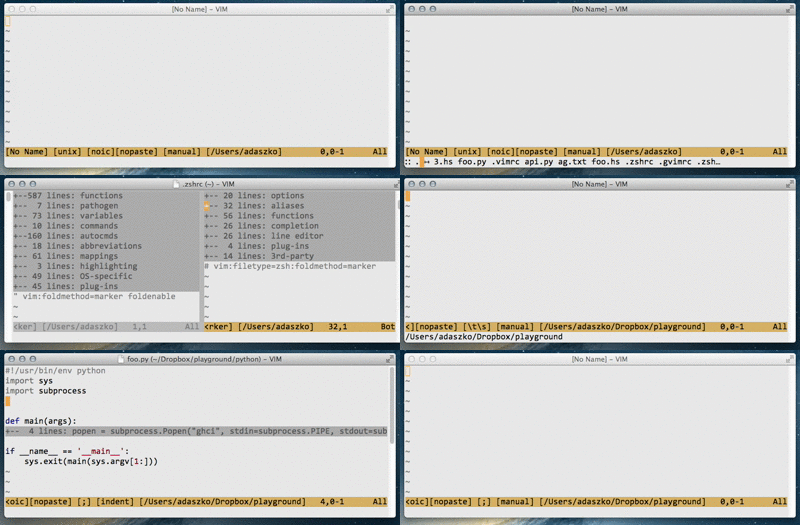
Demo
Installation
Assuming you have Pathogen up and running:
$ cd ~/.vim/bundle
$ git clone git://github.com/adaszko/chbuf.vim
$ vim -c :Helptags -c :q
Setup
Simply add a mapping of your choice to your .vimrc, e.g.:
noremap <silent> <Leader>b :ChangeBuffer<CR>
noremap <silent> <Leader>B :ChangeMixed<CR>
noremap <silent> <Leader>f :ChangeFile<CR>
noremap <silent> <Leader>c :ChangeDirectory<CR>
Note that functions above respect ignorecase, wildignore and suffixes
where appropriate.
Thanks
@tpope for his excellent taste for Vim plugin design and much code to learn
from.
History
chbuf came into existence as a simple demo of getline, which in turn has
been created for the needs of orgdt. I realised at some point that no other
plug-in of this kind is compatible with my work flow and design requirements.
Also, I get the impression that Spotlight (and its mdfind command line
counterpart) is under-utilised for such a fast and powerful tool.
Known Problems
It's generally slower and “flickers” on Windows.
Author
Adam Szkoda <adaszko@gmail.com>
License
BSD3