Ⅰ. 插件描述
Good-lookin' diffs. Actually… nah… The best-lookin' diffs. :tada:Ⅱ. 基本信息
|
Ⅲ. 安装方法
使用Vundle管理器安装
在你的.vimrc下添加:Plugin 'so-fancy/diff-so-fancy':source %
:PluginInstall对于Vundle版本 < 0.10.2,请用上面的Bundle替换Plugin。
使用NeoBundle管理器安装
在你的.vimrc下添加:NeoBundle 'so-fancy/diff-so-fancy':source %
:NeoBundleInstall使用VimPlug管理器安装
在你的.vimrc下添加:Plug 'so-fancy/diff-so-fancy':source %
:PlugInstall使用Pathogen管理器安装
在终端中运行以下命令:cd ~/.vim/bundle
git clone https://github.com/so-fancy/diff-so-fancyⅣ. 文档说明
# diff-so-fancy 

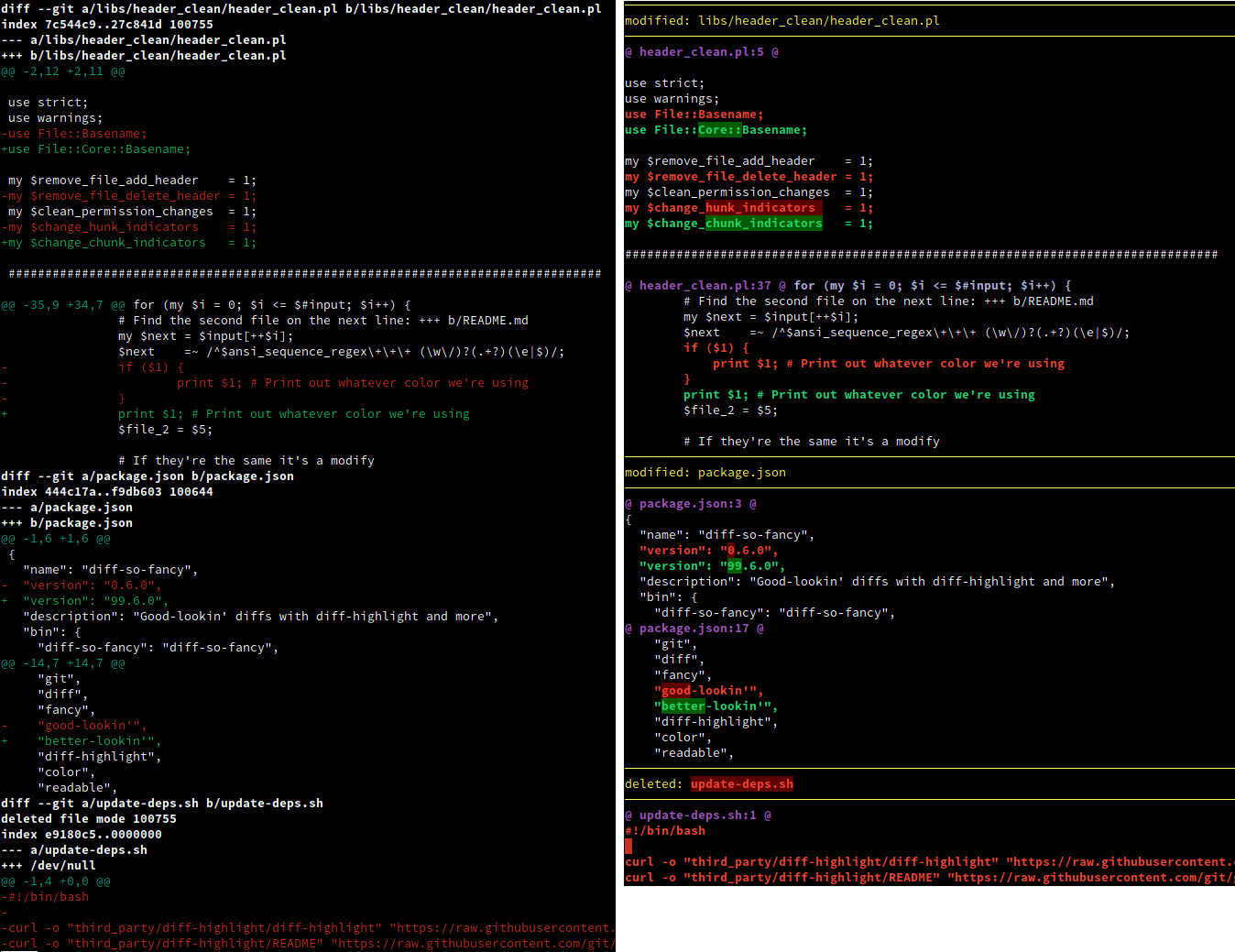
diff-so-fancy strives to make your diffs human readable instead of machine readable. This helps improve code quality and helps you spot defects faster.
Screenshot
Vanilla git diff vs git and diff-so-fancy
Install
Installation is as simple as downloading the diff-so-fancy script to a directory in your path.
Windows users may need to install MinGW or the Windows subsystem for Linux.
diff-so-fancy is also available from NPM, Nix, brew, and as a package on Arch Linux.
Usage
Configure git to use diff-so-fancy for all diff output:
git config --global core.pager "diff-so-fancy | less --tabs=4 -RFX"Improved colors for the highlighted bits
The default Git colors are not optimal. The colors used for the screenshot above were:
git config --global color.ui true

git config --global color.diff-highlight.oldNormal    "red bold"
git config --global color.diff-highlight.oldHighlight "red bold 52"
git config --global color.diff-highlight.newNormal    "green bold"
git config --global color.diff-highlight.newHighlight "green bold 22"

git config --global color.diff.meta       "11"
git config --global color.diff.frag       "magenta bold"
git config --global color.diff.commit     "yellow bold"
git config --global color.diff.old        "red bold"
git config --global color.diff.new        "green bold"
git config --global color.diff.whitespace "red reverse"
Options
markEmptyLines
Should the first block of an empty line be colored. (Default: true)
git config --bool --global diff-so-fancy.markEmptyLines falsechangeHunkIndicators
Simplify git header chunks to a more human readable format. (Default: true)
git config --bool --global diff-so-fancy.changeHunkIndicators falsestripLeadingSymbols
Should the pesky + or - at line-start be removed. (Default: true)
git config --bool --global diff-so-fancy.stripLeadingSymbols falseuseUnicodeRuler
By default, the separator for the file header uses Unicode line-drawing characters. If this is causing output errors on your terminal, set this to false to use ASCII characters instead. (Default: true)
git config --bool --global diff-so-fancy.useUnicodeRuler falserulerWidth
By default, the separator for the file header spans the full width of the terminal. Use this setting to set the width of the file header manually.
git config --global diff-so-fancy.rulerWidth 47 # git log's commit header widthContributing
Pull requests are quite welcome, and should target the next branch. We are also looking for any feedback or ideas on how to make diff-so-fancy even fancier.
Other documentation
License
MIT