Ⅰ. 插件描述
A light low-contrast Vim colorscheme.Ⅱ. 基本信息
|
Ⅲ. 安装方法
使用Vundle管理器安装
在你的.vimrc下添加:Plugin 'romainl/disciple':source %
:PluginInstall对于Vundle版本 < 0.10.2,请用上面的Bundle替换Plugin。
使用NeoBundle管理器安装
在你的.vimrc下添加:NeoBundle 'romainl/disciple':source %
:NeoBundleInstall使用VimPlug管理器安装
在你的.vimrc下添加:Plug 'romainl/disciple':source %
:PlugInstall使用Pathogen管理器安装
在终端中运行以下命令:cd ~/.vim/bundle
git clone https://github.com/romainl/discipleⅣ. 文档说明
# Disciple
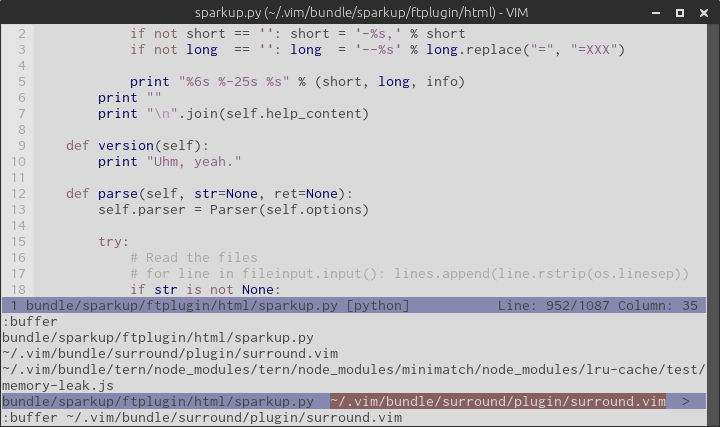
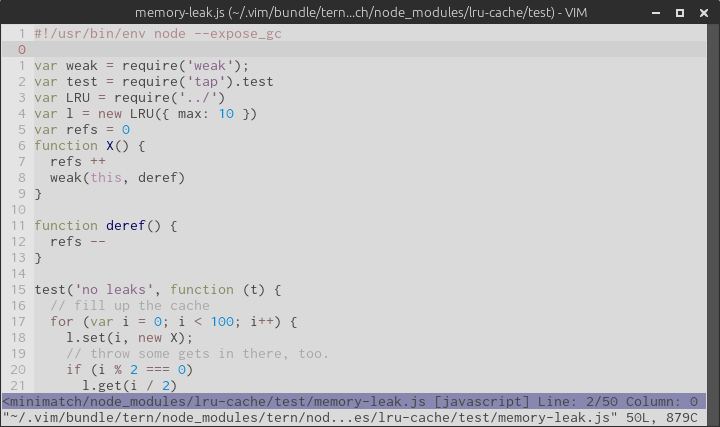
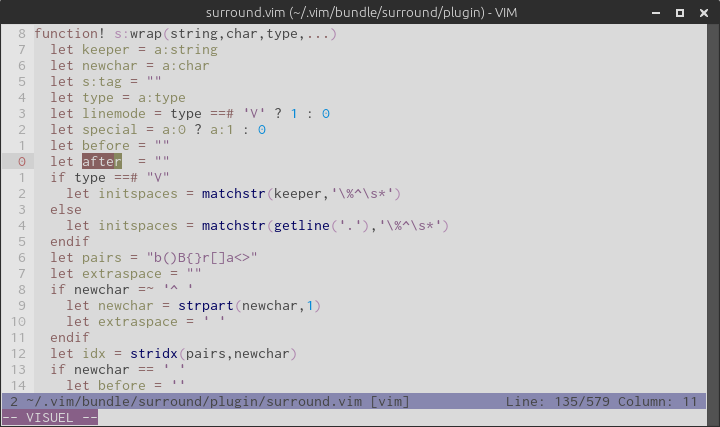
Disciple is a low-contrast Vim colorscheme based on Apprentice.
Its palette is the negative of Apprentice’s palette, restricted to the xterm palette to ensure a similar look in 256 colors-ready terminal emulators and GUI Vim.
Python:
JavaScript:
Vim:
Please note that this colorscheme is more of a thought experiment than an attempt to build a working colorscheme. Don't expect any further development.
Preparing your environment.
Disciple is designed first and foremost to look “good” in terminal emulators supporting 256 colors and GUI Vim (GVim/MacVim). It supports lesser terminal emulators in the sense that it doesn’t break but it will definitely look “better” in more powerful environments.
GVim/MacVim
There’s nothing to do for GVim/MacVim as GUI Vim supports millions of colors by default.
Terminal emulators
Most terminal emulators in use nowadays can display 256 colors but most of them use a default TERM that tells Vim otherwise. Assuming your terminal emulator actually supports 256 colors, you must instruct it to brag about its terminalhood by setting the correct TERM environment variable.
Here are a bunch of common terminal emulators and their “ideal” TERM:
| Environment | Terminal emulator | Default TERM | ”Ideal” TERM |
|---|---|---|---|
| Mac OS X | iTerm2.app | xterm | xterm-256color |
| Mac OS X | Terminal.app | xterm | xterm-256color |
| X11 | xterm | xterm | xterm-256color |
| X11 | URxvt | rxvt-unicode | rxvt-unicode-256color |
| X11/Gnome | Gnome terminal | xterm | xterm-256color |
| X11/Gnome | Terminator | xterm | xterm-256color |
| X11/KDE | Konsole (KDE) | xterm | xterm-256color |
Please refer to your terminal emulator’s manual for how to set it up properly.
Terminal multiplexers
Screen and tmux don't respect your terminal emulator’s settings and set their own TERM. The recommended TERM for both multiplexers is screen-256color.
tmux
Put this line in ~/.tmux.conf:
set -g default-terminal "screen-256color"
screen
Put this line in ~/.screenrc:
term "screen-256color"
Installing Disciple.
A colorscheme must be placed in a directory named colors that’s somewhere in Vim’s runtimepath:
~/.vim/colors/disciple.vim
~/.vim/bundle/disciple/colors/disciple.vim
…
How it ends up there is for you to decide.
Enabling Disciple.
To test Disciple, just type this command from normal mode and hit Enter:
:colorscheme disciple
If you like what you see and want to make Disciple your default colorscheme, add this line to your ~/.vimrc:
colorscheme disciple