Ⅰ. 插件描述
A django template editor completion appⅡ. 基本信息
|
Ⅲ. 安装方法
使用Vundle管理器安装
在你的.vimrc下添加:Plugin 'mjbrownie/django-completeme':source %
:PluginInstall对于Vundle版本 < 0.10.2,请用上面的Bundle替换Plugin。
使用NeoBundle管理器安装
在你的.vimrc下添加:NeoBundle 'mjbrownie/django-completeme':source %
:NeoBundleInstall使用VimPlug管理器安装
在你的.vimrc下添加:Plug 'mjbrownie/django-completeme':source %
:PlugInstall使用Pathogen管理器安装
在终端中运行以下命令:cd ~/.vim/bundle
git clone https://github.com/mjbrownie/django_completemeⅣ. 文档说明
# Django Template Editor Competion Engine

This is a rerwite of the htmldjango-omnicomplete vim plugin I released a while
- I've set it up an app rather than as a vim plugin so vim no longer has to
- the django python code running inside it.
https://github.com/mjbrownie/vim-htmldjango_omnicomplete
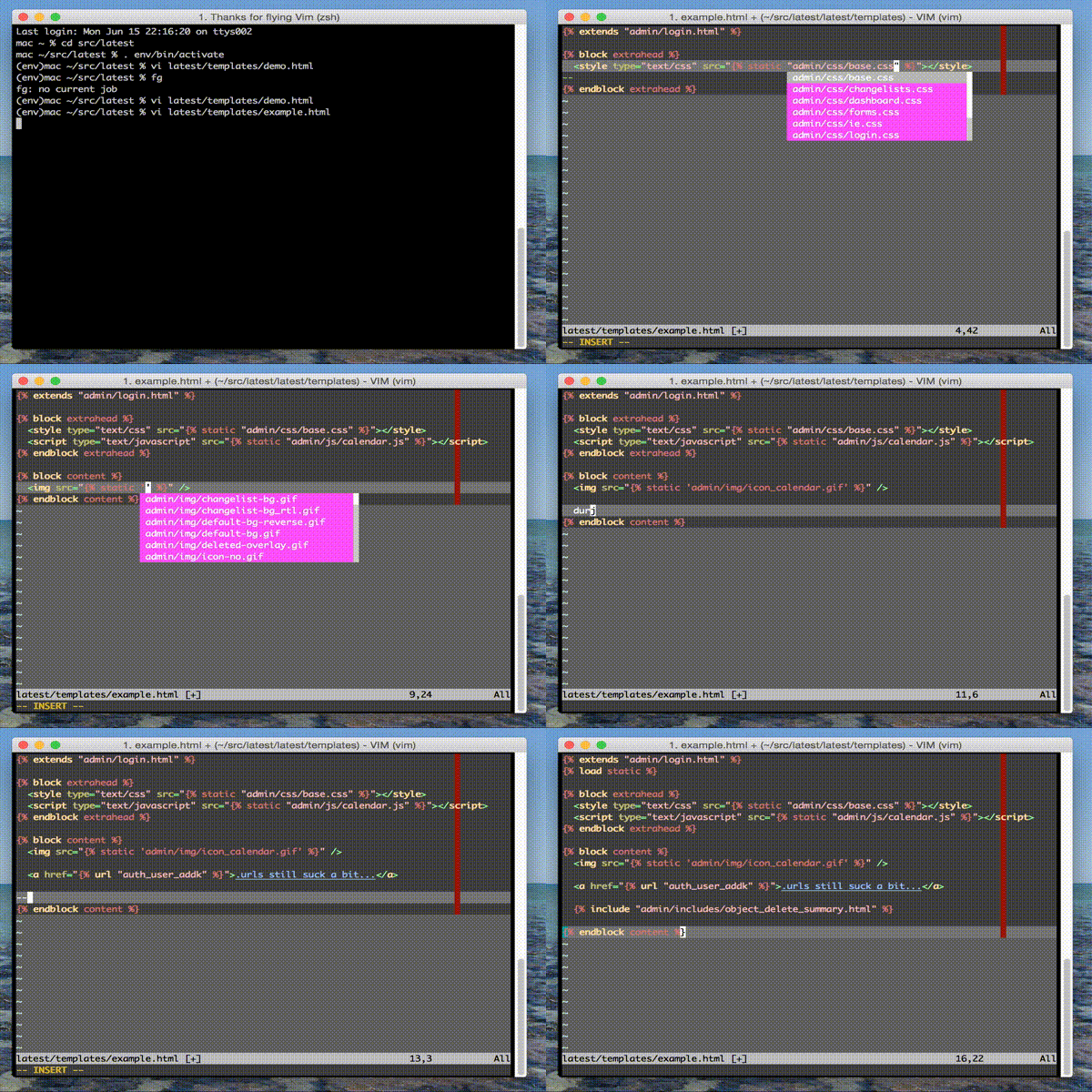
An omnicomplete tailored to django templates "tags/variables/filters/templates"
Screenshots:
Installation
Easy method using vim plugged.
You can use my fork of valloric/YouCompleteMe (up to date / ahead with master as of writing).
Note I'm not looking to offer a pull request to main repository unless there is a lot of demand for me to do so.
function! BuildYCM(info)
  " info is a dictionary with 3 fields
  " - name:   name of the plugin
  " - status: 'installed', 'updated', or 'unchanged'
  " - force:  set on PlugInstall! or PlugUpdate!
  if a:info.status == 'installed' || a:info.force
    !./install.py
  endif
endfunction

call plug#begin()
...
Plug 'mjbrownie/YouCompleteMe', { 'do': function('BuildYCM') }
...
call plug#end()
also you'll need to set your DJANGO_SETTINGS_MODULE eg from the command line.
(django-env) ~/project/ % DJANGO_SETTINGS_MODULE=project.settings vi <file>
and set your desired python3 exe.
let g:python3_host_prog='/your/venv/bin/python3'
Manual Installation
The old school but explicit way.
https://github.com/Valloric/YouCompleteMe#Installation
Once you are comfortable with youcompleteme working on your system (eg. with
python jedi), swap the daemon remote with my fork as follows.
cd ~/.vim/bundle/youcompleteme/third_party/ycmd
git remote add mjbrownie https://github.com/mjbrownie/ycmd.git
git checkout --track -b mjbrownie mjbrownie/master
git submodule init
git submodule update
git submodule foreach git pull origin master
git submodule foreach git submodule init
git submodule foreach git submodule update
Once Completed the directory structure should be as follows.
~/.vim/bundle/youcompleteme <--vim plugin (https://github.com/Valloric/YouCompleteMe.git)
~/.vim/bundle/youcompleteme/third_party/ycmd <-- backend (https://github.com/mjbrownie/ycmd.git)
~/.vim/bundle/youcompleteme/third_party/ycmd/third_party/django_completeme <-- djangoplugin (https://github.com/mjbrownie/django_completeme.git)
Features
Eg.
1. Filters

    {{ somevar|a<c-x><c-o>}} should complete 'add' , 'addslashes'

2. Tags

    {% cy<c-x><x-o> %} should complete 'cycle'

3. Load statements

    It also should grab any libs you have {% load tag_lib %} in the file.
    Although it needs them in INSTALLED_APPS.

    {% load <c-x><c-o> %} will complete libraries (eg. 'cache', 'humanize')

4. template filenames

    {% extends '<c-x><c-o>' %} will list base.html ... etc

5. url complete

    {% url <c-x><c-o> %} should complete views and named urls

6. super block complete

    eg {% block c<c-x><c-o> %} to complete 'content' or something defined
    in an extended template.

7. static files complete

    eg {% static "r<c-x><c-o>" %}

    <script src="{% static "<c-x><c-o>" %}" /> - completes js files in static
    <style src="{% static "<c-x><c-o>" %}" /> - completes css files in static
    <img src="{% static "<c-x><c-o>" %}" /> - completes img files in static

8. optional variable name completion (placeholder)

    {{ s<c-x><x-o> }}

    will complete any maps defined in the python htmldjango_opts['variable']
    dict list. See below for info.
Where possible info panels show the functions __doc__. Most of the
internal ones are decent.
Limited Jinja Support.
I've added some jinja support for {% include '' %} {% extend "" %} and {% static "" %}
TESTING
django needs to be in sys.path along with DJANGO_SETTINGS_MODULE in your
environment.

To test...

:python import django

should not result in an error

:python from django.conf import settings; print settings.INSTALLED_APPS
:python from django.conf import settings; print settings.TEMPLATE_DIRS

should show the apps template dirs you need

I've only tested this on a mac with vim 7.3 and django 1.4
If stuff like django python/jedi is working fine but the template completion isn't try

:YcmDebugInfo

And tail -f the logs specified.

Useful error messages related to failed imports will appear