Ⅰ. 插件描述
A file browser focus on your current working directoryⅡ. 基本信息
|
Ⅲ. 安装方法
使用Vundle管理器安装
在你的.vimrc下添加:Plugin 'exvim/ex-project':source %
:PluginInstall对于Vundle版本 < 0.10.2,请用上面的Bundle替换Plugin。
使用NeoBundle管理器安装
在你的.vimrc下添加:NeoBundle 'exvim/ex-project':source %
:NeoBundleInstall使用VimPlug管理器安装
在你的.vimrc下添加:Plug 'exvim/ex-project':source %
:PlugInstall使用Pathogen管理器安装
在终端中运行以下命令:cd ~/.vim/bundle
git clone https://github.com/exvim/ex-projectⅣ. 文档说明
- -
For more details, check exVim's Docs: Project Window
- -
Intro
ex-project is a file browser focus on your current working directory. It provides a tree view
window and allow you to manipulate folders and files directly in it.
Many Vim users thought ex-project is yet another NERDTree. But actually they have different scope.
ex-project is more focus on your current project ( or working directory ). It provides folder
and file filter with it and building the whole project tree very fast first time you working the
- It also allow you create folders, files directly in the tree view window.
More over that, ex-project can be working with NERDTree seamlessly by its window swapping functions.
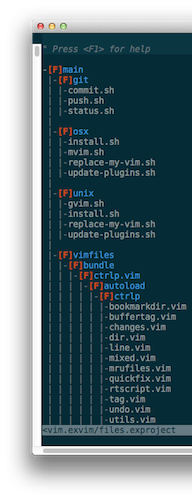
ex-project is also a part of exVim project.
Requirements
- Vim 6.0 or higher.
- exvim/ex-utility
Installation
Install ex-utility
ex-project is written based on exvim/ex-utility. This
is the basic library of ex-vim-plugins. Follow the readme file in ex-utility to install it first.
Install ex-project
ex-project follows the standard runtime path structure, and as such it can
be installed with a variety of plugin managers:
To install using Vundle:
# add this line to your .vimrc file
Bundle 'exvim/ex-project'
To install using Pathogen:
cd ~/.vim/bundle
git clone https://github.com/exvim/ex-project
To install using NeoBundle:
# add this line to your .vimrc file
NeoBundle 'exvim/ex-project'
cd ~/.vim
unzip ex-project-master.zip
copy all of the files into your ~/.vim directory
Usage
Open your Vim, type :EXProject your_project_file.exproject create your project.
Go to the project window and type <leader>R to build the project tree. Now you
can start your project!
More details, check exVim's Docs: Project-Window Usage
and :help exproject in Vim.