Ⅰ. 插件描述
hot dog stand colorscheme for vimⅡ. 基本信息
|
Ⅲ. 安装方法
使用Vundle管理器安装
在你的.vimrc下添加:Plugin 'keyboardfire/hotdog-vim':source %
:PluginInstall对于Vundle版本 < 0.10.2,请用上面的Bundle替换Plugin。
使用NeoBundle管理器安装
在你的.vimrc下添加:NeoBundle 'keyboardfire/hotdog-vim':source %
:NeoBundleInstall使用VimPlug管理器安装
在你的.vimrc下添加:Plug 'keyboardfire/hotdog-vim':source %
:PlugInstall使用Pathogen管理器安装
在终端中运行以下命令:cd ~/.vim/bundle
git clone https://github.com/keyboardfire/hotdog.vimⅣ. 文档说明
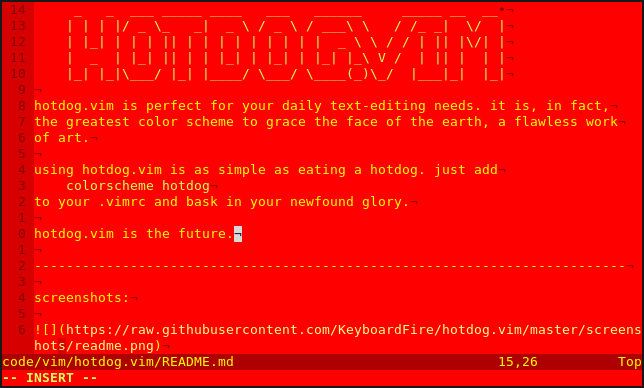
_ _ __
| | | |/ _ \_   _|  _ \ / _ \ / ___\ \   / /_ _|  \/  |
| |_| | | | || | | | | | | | | |  _ \ \ / / | || |\/| |
|  _  | |_| || | | |_| | |_| | |_| |_\ V /  | || |  | |
|_| |_|\___/ |_| |____/ \___/ \____(_)\_/  |___|_|  |_|
hotdog.vim is perfect for your daily text-editing needs. it is, in fact,
the greatest color scheme to grace the face of the earth, a flawless work
of art.
using hotdog.vim is as simple as eating a hotdog. just add
colorscheme hotdog
to your .vimrc and bask in your newfound glory.
hotdog.vim is the future.
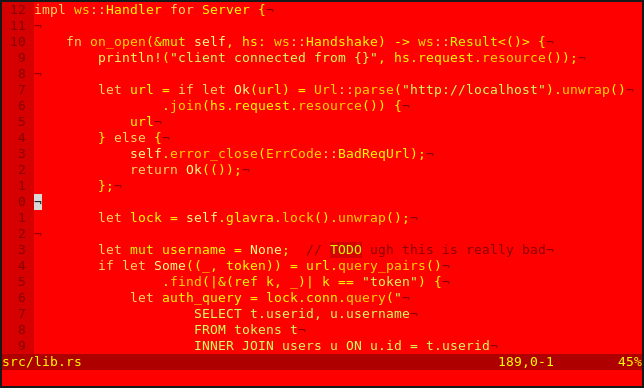
screenshots:
user testimonials:
the subtle hints of red really add a sense of urgency to my editing,
motivating me to complete my current project
MY EYES
— @poi830