Ⅰ. 插件描述
A Vim plugin to calculate visual selected expressionsⅡ. 基本信息
|
Ⅲ. 安装方法
使用Vundle管理器安装
在你的.vimrc下添加:Plugin 'sk1418/howmuch':source %
:PluginInstall对于Vundle版本 < 0.10.2,请用上面的Bundle替换Plugin。
使用NeoBundle管理器安装
在你的.vimrc下添加:NeoBundle 'sk1418/howmuch':source %
:NeoBundleInstall使用VimPlug管理器安装
在你的.vimrc下添加:Plug 'sk1418/howmuch':source %
:PlugInstall使用Pathogen管理器安装
在终端中运行以下命令:cd ~/.vim/bundle
git clone https://github.com/sk1418/howmuchⅣ. 文档说明
HowMuch README file
    __  __              __  ___           __       ___
   / / / /___ _      __/  |/  /_  _______/ /_     /__ \
  / /_/ / __ \ | /| / / /|_/ / / / / ___/ __ \     / _/
 / __  / /_/ / |/ |/ / /  / / /_/ / /__/ / / /    /_/
/_/ /_/\____/|__/|__/_/  /_/\__,_/\___/_/ /_/    (_)

  - A Vim calculator for visual selections
(http://www.vim.org/scripts/script.php?script_id=4761)
Table of contents
(toc is generated by ghtoc)
Introduction
HowMuch is a Vim plugin to calculate visual selected mathematical formulars (vim or bc expressions). It will add the result(or replace the selected expressions) in the current edit text. For details check next section: Features
Features
- Supports all visual selection modes (char-/line-/block-wise)
Supports two output formats:
- append result with/out
=after the expression - replace the selected expressions with result
- append result with/out
- Supports sum total result in line-(
V) and block-wise (Ctrl-V)selection - You can create custom mapping to invoke
HowMuch Evaluation "Engines" (The expression evaluator)
HowMuchsupportsGNU bc,pythonandnative vimexpressions evaluation engines,- You can choose which engine should be used to evaluate current visual section.
- You can define the order of the engines, and let
HowMuchdo evaluation automatically. E.g. ifbcfails, tryvimagain. - You can add your own engines or modify the built-in engines. read documentation for details.
!Please read plugin documentation (HowMuch-config section) for options, mappings
Command
HowMuch can be invoked by command as well. There is a :HowMuch [flags] command. We can first visual select the expressions, then for example do :HowMuch s= to append result with = sign to the end of selection, also add a sum at the bottom of selection. :HowMuch command only work for 'autoCalc' mode Read :h :HowMuch for the available flags.
Examples & Screencasts
Examples and screencasts would be the best way to explain how does HowMuch does its job. In the demo section, only Auto-Calc will be demoed. The calculation can be done by certain engine. E.g
<leader>b?forbc<leader>v?forvim<leader>p?forpython
Details please check plugin documentation.
All demos were made with following settings.
"The scale of the result:
let g:HowMuch_scale = 2
"the engine order for auto-calculation
let g:HowMuch_auto_engines = ['bc', 'vim', 'py']
Auto-Calc Demo
Auto-calc will evaluate each expression with each engine in turn, taking order from g:HowMuch_auto_engines, till a result without error comes out. If all engines give Err. E.g an expression like ##+foo, result is Err.
As long as there was an Err, the result of sum would be Err
Demo 1:
- block-wise selection (
Ctrl-V) - Append result after each expression, separated with '=',
- default mapping:
<Leader>?=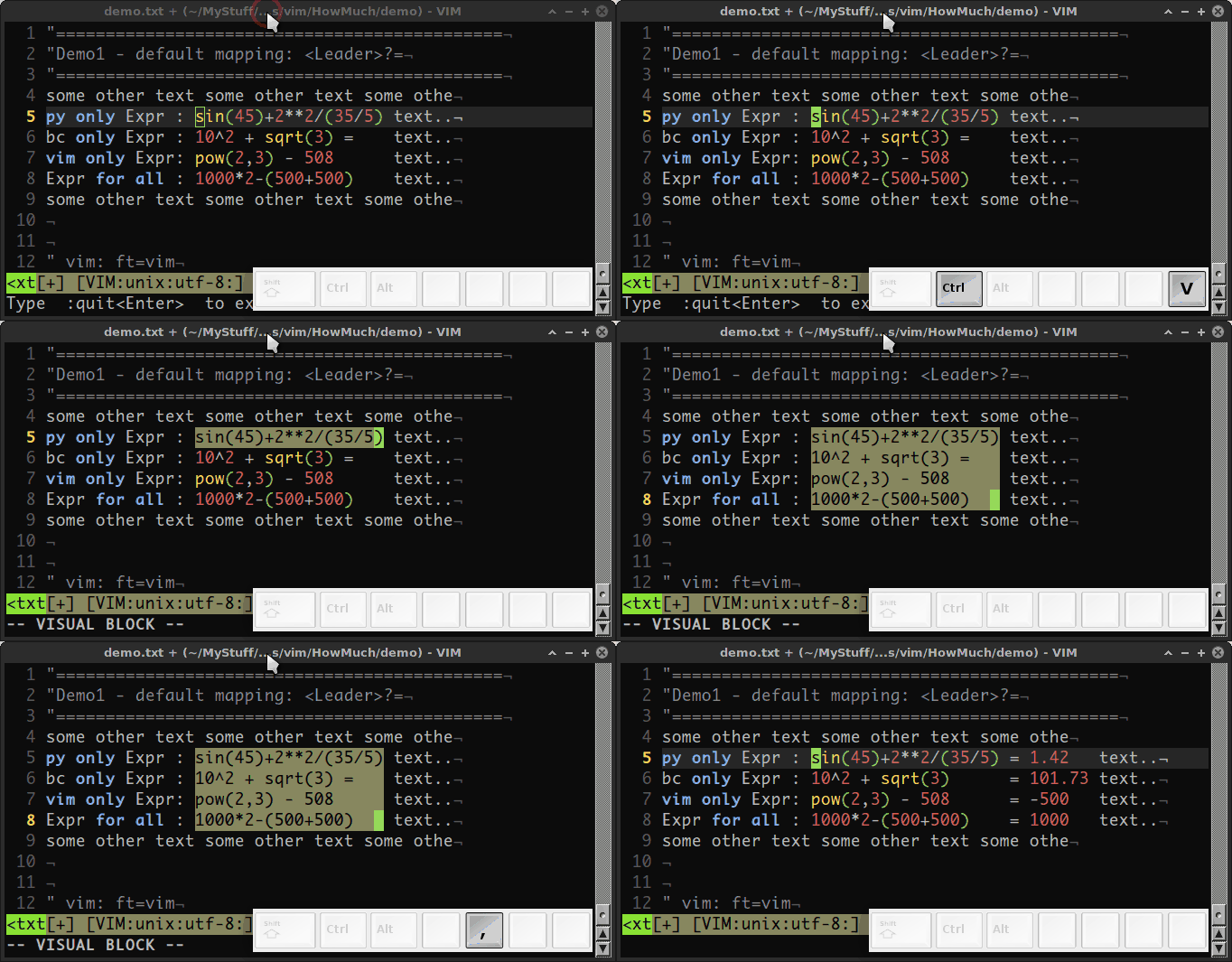
Demo 2:
- block-wise selection (
Ctrl-V) - replace selected expressions with result
- default mapping:
<leader><Leader>?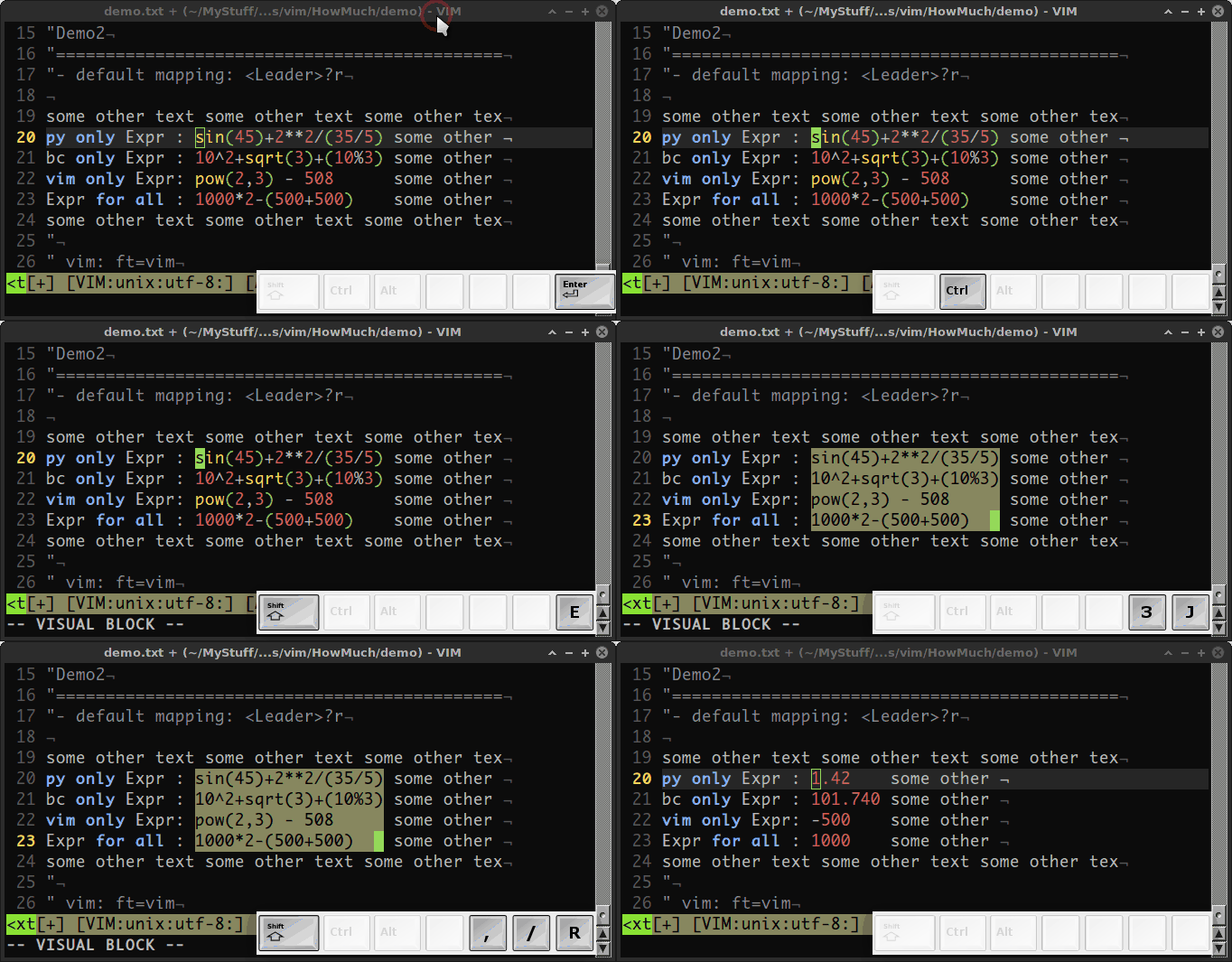
Demo 3:
- block-wise selection (
Ctrl-V) - append result after each expressions (with Err)
- do sum (with Err)
- default mapping:
<Leader>?s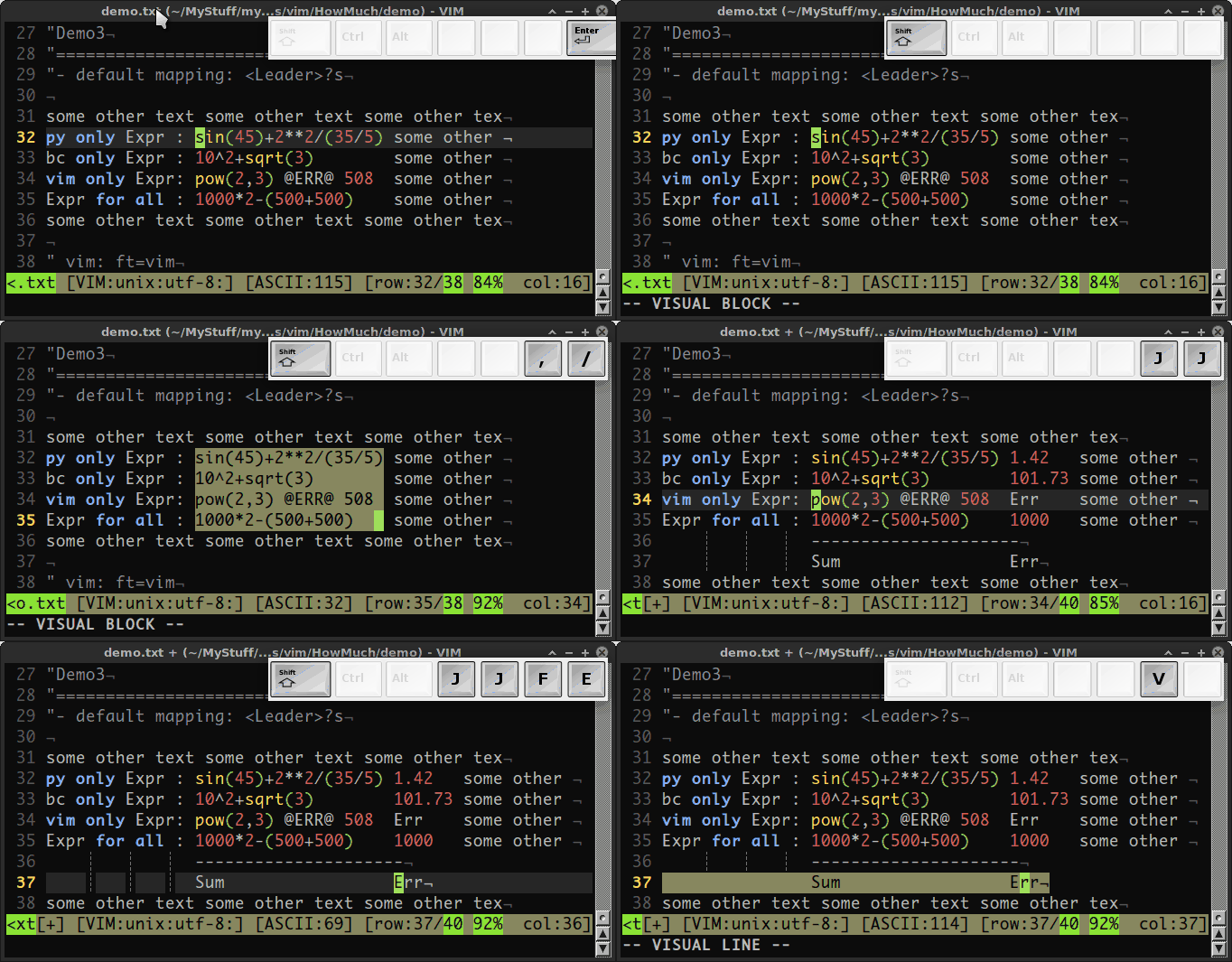
Demo 4:
- block-wise selection (
Ctrl-V) - replace selected expressions with result
- do sum
- default mapping:
<Leader><Leader>?s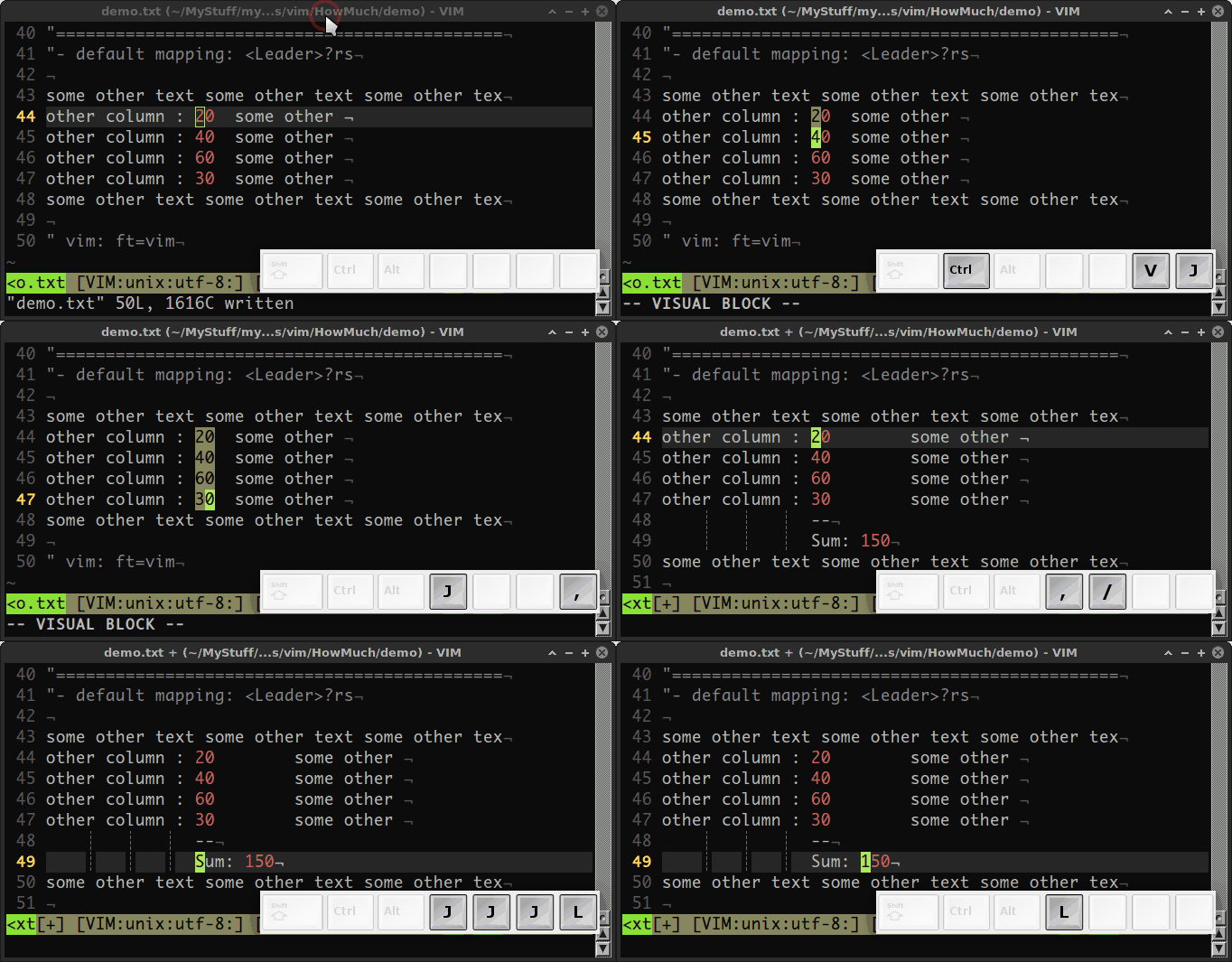
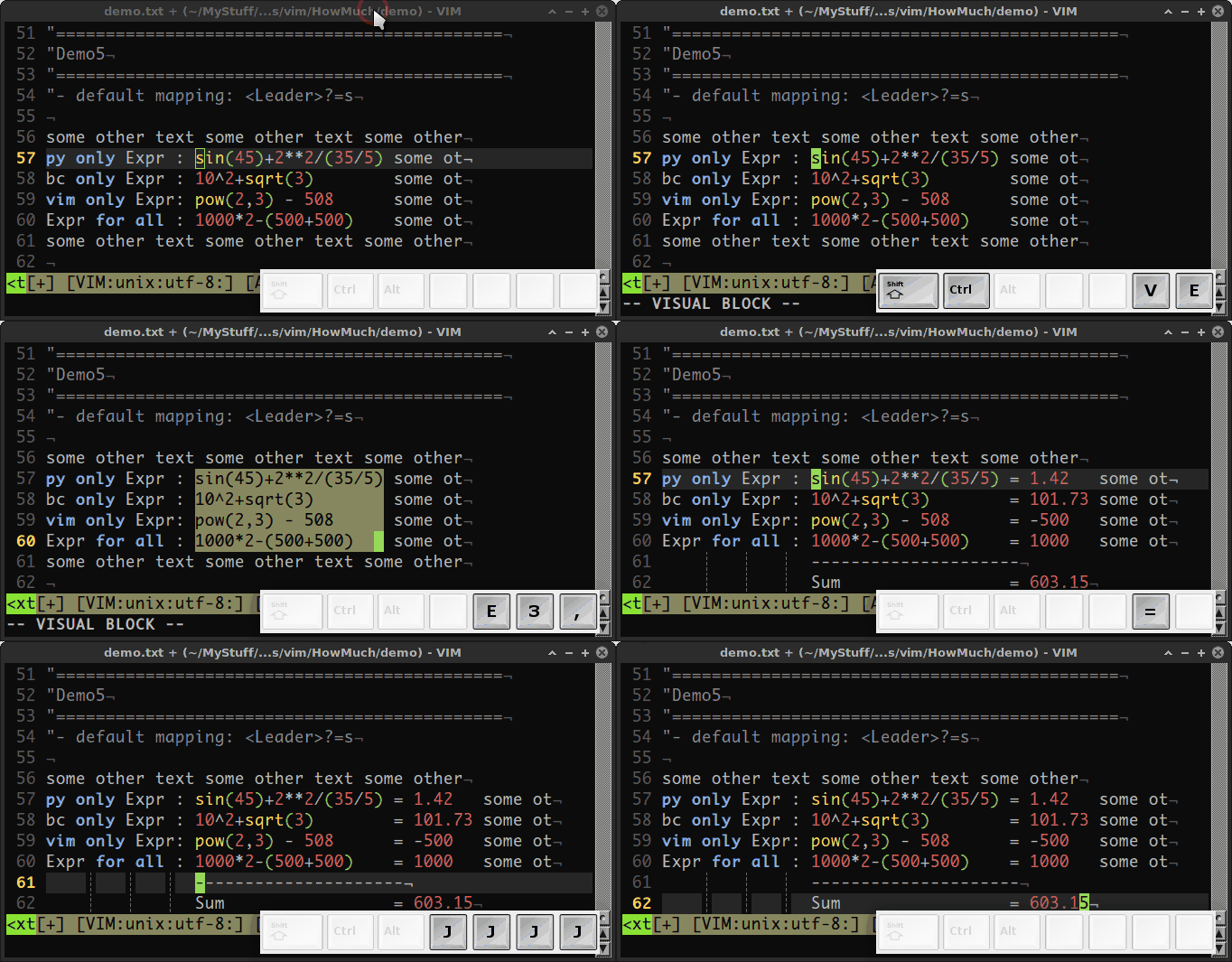
Demo 5:
- block-wise selection (
Ctrl-V) - Append result after each expression, separated with '=',
- do sum
- default mapping:
<Leader>?=s