Ⅰ. 插件描述
This is an extra HTML syntax file which removes the annoying underlining from leading and trailing whitespace in tags.Ⅱ. 基本信息
|
Ⅲ. 安装方法
使用Vundle管理器安装
在你的.vimrc下添加:Plugin 'tudorprodan/html-annoyance':source %
:PluginInstall对于Vundle版本 < 0.10.2,请用上面的Bundle替换Plugin。
使用NeoBundle管理器安装
在你的.vimrc下添加:NeoBundle 'tudorprodan/html-annoyance':source %
:NeoBundleInstall使用VimPlug管理器安装
在你的.vimrc下添加:Plug 'tudorprodan/html-annoyance':source %
:PlugInstall使用Pathogen管理器安装
在终端中运行以下命令:cd ~/.vim/bundle
git clone https://github.com/tudorprodan/html_annoyance.vimⅣ. 文档说明
# Html <A>nnoyance
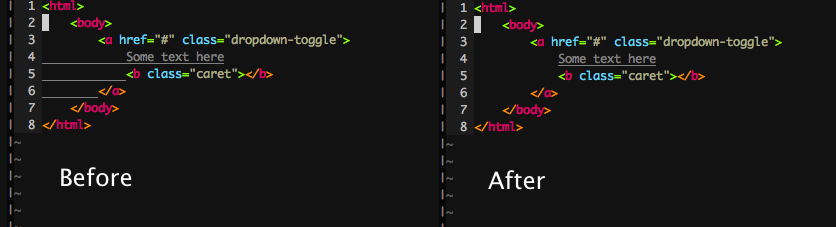
This is an extra HTML syntax file which fixes one of vim's annoyances:
It removes the underlining from leading and trailing whitespace in <A> tags.
Manual installation
Copy after/syntax/html.vim to ~/.vim/after/syntax/html.vim.
Using pathogen
Place the content of this repository in a new bundle. git clone <this_repository> ~/.vim/bundle/html_annoyance
-or- git submodule add <this_repo> ~/.vim/bundle/html_annoyance`
Info
This is me learning vim syntax files.
So if you see something that's not done right, please open an issue on GitHub about it, I'd love to hear what I could have done better.