Ⅰ. 插件描述
Idris mode for vimⅡ. 基本信息
|
Ⅲ. 安装方法
使用Vundle管理器安装
在你的.vimrc下添加:Plugin 'idris-hackers/idris-vim':source %
:PluginInstall对于Vundle版本 < 0.10.2,请用上面的Bundle替换Plugin。
使用NeoBundle管理器安装
在你的.vimrc下添加:NeoBundle 'idris-hackers/idris-vim':source %
:NeoBundleInstall使用VimPlug管理器安装
在你的.vimrc下添加:Plug 'idris-hackers/idris-vim':source %
:PlugInstall使用Pathogen管理器安装
在终端中运行以下命令:cd ~/.vim/bundle
git clone https://github.com/idris-hackers/idris-vimⅣ. 文档说明
Idris mode for vim
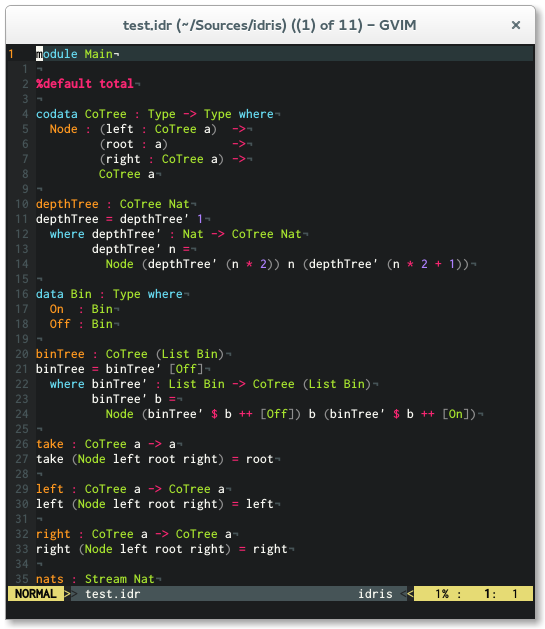
This is an [Idris][] mode for vim which features syntax highlighting, indentation
and optional syntax checking via [Syntastic][]. If you need a REPL I recommend using
[Vimshell][].
Installation
I recommend using [Pathogen][] for installation. Simply clone
this repo into your ~/.vim/bundle directory and you are ready to go.
cd ~/.vim/bundle
git clone https://github.com/idris-hackers/idris-vim.git
Manual Installation
Copy content into your ~/.vim directory.
Be sure that the following lines are in your.vimrc
syntax on
filetype on
filetype plugin indent on
Features
Apart from syntax highlighting, indentation, and unicode character concealing,
idris-vim offers some neat interactive editing features. For more information on
how to use it, read this blog article by Edwin Brady on [Interactive Idris editing with vim][].
Interactive Editing Commands
[Idris][] mode for vim offers interactive editing capabilities, the following
commands are supported.
<LocalLeader>r reload file
<LocalLeader>t show type
<LocalLeader>d Create an initial clause for a type declaration.
<LocalLeader>b Same as d but for an initial typeclass method impl.
<LocalLeader>md Same as d but for a proof clause
<LocalLeader>c case split
<LocalLeader>mc make case
<LocalLeader>w add with clause
<LocalLeader>e evaluate expression
<LocalLeader>l make lemma
<LocalLeader>m add missing clause
<LocalLeader>f refine item
<LocalLeader>o obvious proof search
<LocalLeader>p proof search
<LocalLeader>i open idris response window
<LocalLeader>h show documentation
Configuration
Indentation
To configure indentation in idris-vim you can use the following variables:
let g:idris_indent_if = 3if bool
then ...
else ...let g:idris_indent_case = 5case xs of
[] => ...
(y::ys) => ...let g:idris_indent_let = 4let x = 0 in
x
let g:idris_indent_where = 6where f : Int -> Int
f x = x
let g:idris_indent_do = 3do x <- a
y <- b
let g:idris_indent_rewrite = 8rewrite prf in expr
x
Concealing
Concealing with unicode characters is off by default, but let g:idris_conceal = 1 turns it on.
Tab Characters
If you simply must use tab characters, and would prefer that the ftplugin not set expandtab add let g:idris_allow_tabchar = 1.