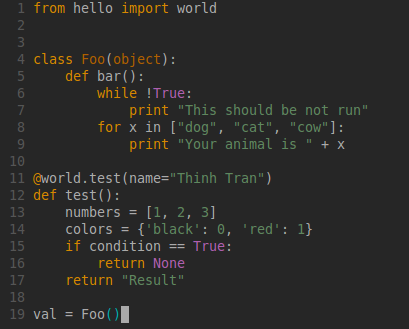
Ⅰ. 插件描述
A beautiful vim colorsheme based on terminal's 256 colorsⅡ. 基本信息
|
Ⅲ. 安装方法
使用Vundle管理器安装
在你的.vimrc下添加:Plugin 'duythinht/inori':source %
:PluginInstall对于Vundle版本 < 0.10.2,请用上面的Bundle替换Plugin。
使用NeoBundle管理器安装
在你的.vimrc下添加:NeoBundle 'duythinht/inori':source %
:NeoBundleInstall使用VimPlug管理器安装
在你的.vimrc下添加:Plug 'duythinht/inori':source %
:PlugInstall使用Pathogen管理器安装
在终端中运行以下命令:cd ~/.vim/bundle
git clone https://github.com/duythinht/inoriⅣ. 文档说明
## The Inori colors scheme for vim
This colorscheme based on 256colors-terminal, working perfectly on gnome-terminal, iterm, tmux, screen-256colors, MacVim, gvim...
You don't need to import terminal's colors pallete
Help me improve it (please take a screen shot for bug or something you want change): https://github.com/duythinht/inori/issues
If you use terminal, setup with xterm-256color or something like that
# example for using gnome-terminal
export TERM=xterm-256color
For better experience, you should set terminal background to #262626 and text color to #c0c0c0
Install using Pathogen:
cd ~/.vim/bundle
git clone https://github.com/duythinht/inori
Install using Vundle
Plugin 'duythinht/inori'
Modify .vimrc
syntax enable
silent! colorscheme inori
Previews: