Ⅰ. 插件描述
A Vim plugin that lets you interactively choose replacement text while you search/replaceⅡ. 基本信息
|
Ⅲ. 安装方法
使用Vundle管理器安装
在你的.vimrc下添加:Plugin 'hwrod/interactive-replace':source %
:PluginInstall对于Vundle版本 < 0.10.2,请用上面的Bundle替换Plugin。
使用NeoBundle管理器安装
在你的.vimrc下添加:NeoBundle 'hwrod/interactive-replace':source %
:NeoBundleInstall使用VimPlug管理器安装
在你的.vimrc下添加:Plug 'hwrod/interactive-replace':source %
:PlugInstall使用Pathogen管理器安装
在终端中运行以下命令:cd ~/.vim/bundle
git clone https://github.com/hwrod/interactive-replaceⅣ. 文档说明
## About
[InteractiveReplace] is a [Vim] plugin that lets you interactively choose replacement text while you search/replace.
Usage
Just type
:InteractiveReplace
at the Vim console, or type the shortcut binding in normal mode:
<leader>r
(on my system that's \r). While searching; to skip the current term, press enter without a replace term, and to abort press Ctrl-c.
Install
Assuming you have [Git] and [Pathogen] installed, which you should, just run:
$ git clone https://github.com/hwrod/interactive-replace.git ~/.vim/bundle/interactive-replace
Optionally, to configure a different key binding, add this line to your .vimrc file:
let g:InteractiveReplace_map = 'X'
where X is something like <F5> or i
To set the highlighting for the search term, define the highlight groupIntSearchHL in your .vimrc file. Ex.: (the default)
hi IntSearchHL ctermbg=blue guibg=blue
Examples
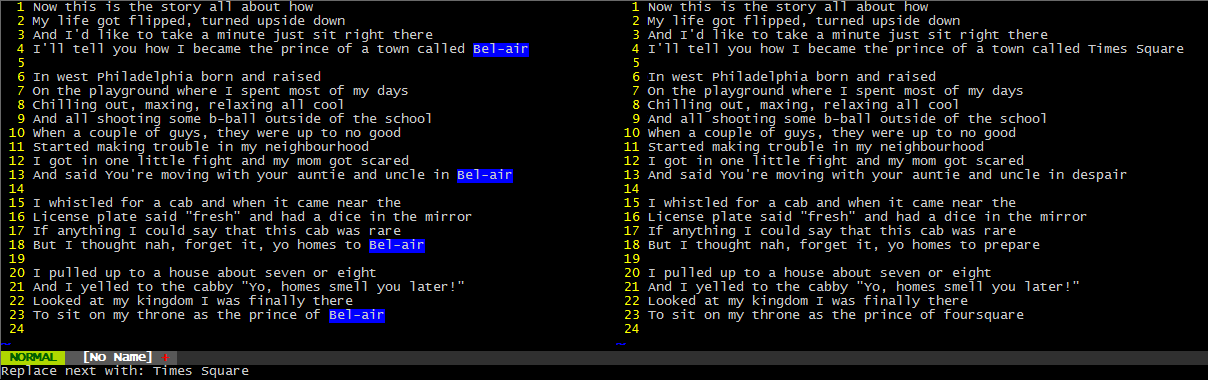
Say you wanted to find and replace all occurrences of Bel-air in a text file, but you wanted to specify what the replacement text is each time without having to redo a substitution or create a very complicated regex.
With a search performed (e.g. /Bel-air), type \r to bring up InteractiveReplace. Then for each highlighted term, type the replacement text and press Enter.
Easy consecutive substitutions
In a programming context, you can easily substitute variable names stemming from one opened line.
For example, to write out a skeleton for your replaces, you could type (with the cursor on line 6):
7odrawChart data.tmp[Esc]
to get:
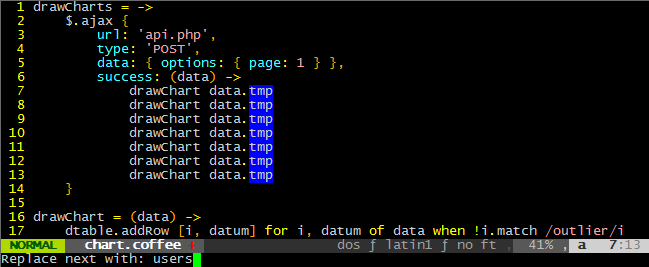
Now use InteractiveReplace on /tmp to sequentially replace variable names:

In this way, Interactive-Replace works like a block-select that lets you choose replacement text for each line.
F.A.Q.
How do I install Pathogen?
Just put [pathogen.vim] into your ~/.vim/autoload folder. Then put these two lines in your .vimrc file:
- filetype plugin indent on
- execute pathogen#infect()
How do I install InteractiveReplace without using Pathogen?
- If you wanna be really dirty about it, download the [zipball] and extract the contents to your Vim directory.
How do I update InteractiveReplace?
- The beauty of installing with Pathogen is that you
cdinto~/.vim/bundle/interactive-replace/and type$ git pullto get the latest updates.
- The beauty of installing with Pathogen is that you
Todo
There are a few ways InteractiveReplace can be improved, including:
- highlighting the current search term in a different color
Pull requests are highly encouraged. Questions/comments [welcome] too.
