Ⅰ. 插件描述
Give the power of Jupyter to your vim (EXPERIMENTAL).Ⅱ. 基本信息
|
Ⅲ. 安装方法
使用Vundle管理器安装
在你的.vimrc下添加:Plugin 'hisaknown/jupyterkernel-vim':source %
:PluginInstall对于Vundle版本 < 0.10.2,请用上面的Bundle替换Plugin。
使用NeoBundle管理器安装
在你的.vimrc下添加:NeoBundle 'hisaknown/jupyterkernel-vim':source %
:NeoBundleInstall使用VimPlug管理器安装
在你的.vimrc下添加:Plug 'hisaknown/jupyterkernel-vim':source %
:PlugInstall使用Pathogen管理器安装
在终端中运行以下命令:cd ~/.vim/bundle
git clone https://github.com/hisaknown/jupyterkernel.vimⅣ. 文档说明
# Jupyterkernel.vim
Give the power of Jupyter to your vim.
Note: This plugin is EXPERIMENTAL so far.
Requirements
Vim 8
+pythonor+python3
Python 3 (as
python)jupyterjupyter_kernel_gatewaypsutil
Try it out
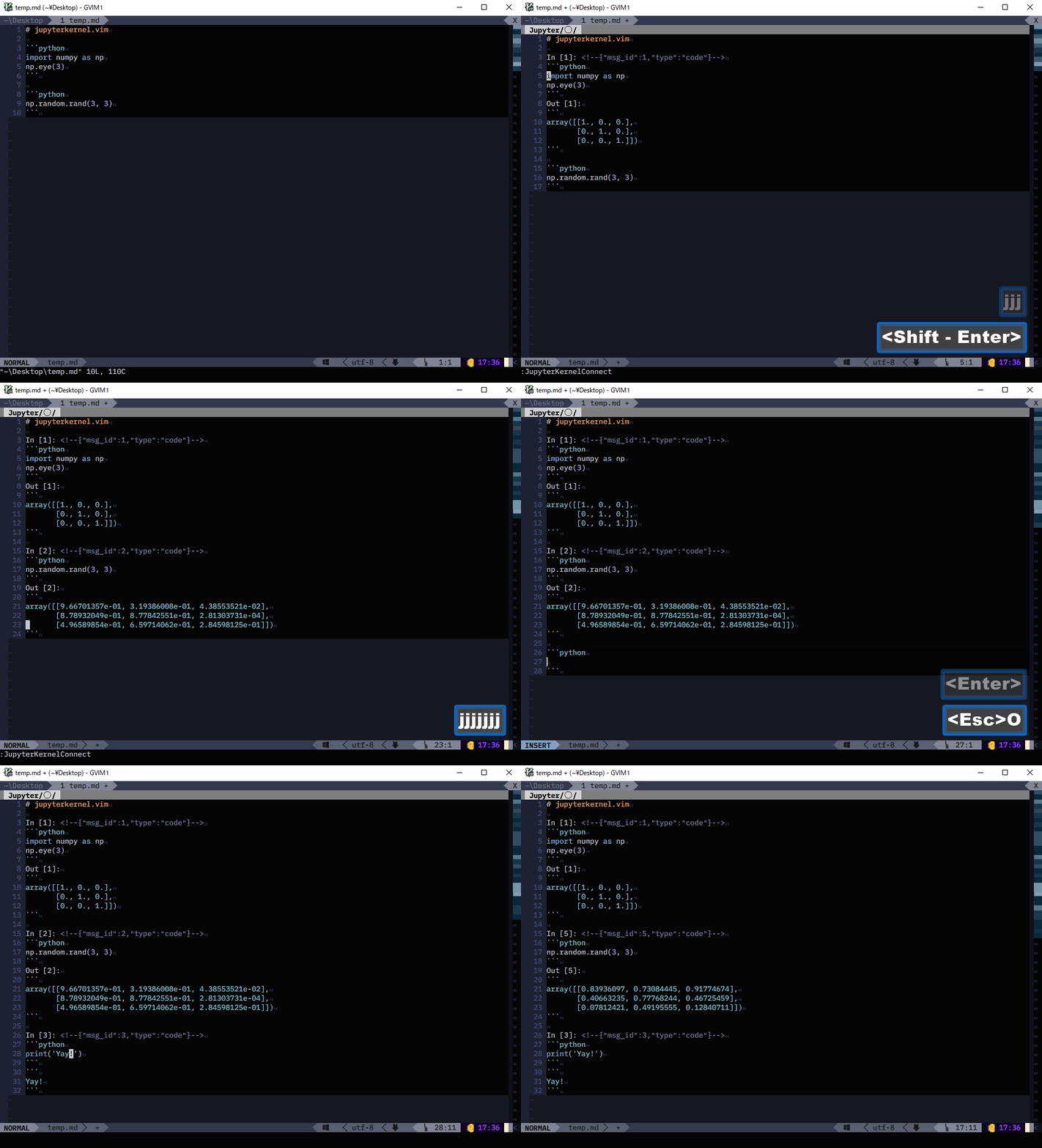
:JupyterKernelConnectWrite some code within code fence.
- NOTE: Language must be specified in the upper fence.
- Press
<S-Return>(Shift+Return) in the code fence. - Yay!
- Example:
Commands
JupyterKernelConnect [address:port] [kernel][address:port](optional): Address and port (e.g.localhost:8888)[kernel](optional): Kernel name (e.g.python)
Variables
g:jupyterkernel_address: Default address to Jupyter Kernel Gateway. Defaults tolocalhost.g:jupyterkernel_port: Default port to Jupyter Kernel Gateway. Defaults to0.g:jupyterkernel_kernel: Default kernel
NOTE: If g:jupyterkernel_address == 'localhost' and g:jupyterkernel_port == 0, an instance of Jupyter Kernel Gateway is launched on localhost:[random port] with the first call of JupyterKernelConnect.
Debugging
Launch (Vim)-(Jupyter Kernel Gateway) connecter manually.
- Can be interrupt by
Ctrl-C.
- Can be interrupt by
python autoload/jupyterkernel/jupyterkernel_client.py --vim_port 55555- Launch Vim, and execute command
JupyterKernelConnect localhost:55555. - Run some code.
- Log should show in the terminal which runs
jupyterkernel_client.py.
TODOs
- Save to, and load from
.ipynb - Notify disconnect
Explicit quitting, other than closing buffer
- Closing buffer is only a way to close session (i.e. kill kernel), so far.