Ⅰ. 插件描述
Tiling window manager with focus follows mouse for OSXⅡ. 基本信息
|
Ⅲ. 安装方法
使用Vundle管理器安装
在你的.vimrc下添加:Plugin 'koekeishiya/kwm':source %
:PluginInstall对于Vundle版本 < 0.10.2,请用上面的Bundle替换Plugin。
使用NeoBundle管理器安装
在你的.vimrc下添加:NeoBundle 'koekeishiya/kwm':source %
:NeoBundleInstall使用VimPlug管理器安装
在你的.vimrc下添加:Plug 'koekeishiya/kwm':source %
:PlugInstall使用Pathogen管理器安装
在终端中运行以下命令:cd ~/.vim/bundle
git clone https://github.com/koekeishiya/kwmⅣ. 文档说明
## PROJECT DEPRECATED
Main development was shifted to a new window manager early 2017.
Kwm was a nice proof of concept, but had many faults in its architecture.
The experience gained while working on kwm has been huge, and so I found that starting a complete re-write
from scratch was necessary to create a stable window manager of higher quality.
Despite the time and effort this requires, it would be worth it in the end.
This repository and the currently available documentation will remain as is, but I highly suggest using the new
chunkwm instead.
Description 
Kwm started as a simple project to get true focus-follows-mouse support on OSX through event tapping.
It is now a tiling window manager that represents windows as the leaves of a binary tree.
Kwm supports binary space partitioned, monocle and floating spaces.
Kwm uses the event taps API (Quartz Event Services) to observe, filter and alter user input events prior
to their delivery to a foreground application.
Kwm runs a local daemon to read messages and trigger functions.
Kwmc is used to write to Kwm's socket, and must be used when interacting with and configuring how Kwm works.
Khd can be used to create keybindings to perform some Kwmc command.
More info can be found in the example dir.
For in depth information, click here.
For sample configurations and other useful scripts, check out the wiki.
You can also drop by the channel ##kwm on freenode.
Kwm requires access to the OSX accessibility API.
Tested on El Capitan (10.11.1 - 10.11.6).

For more screenshots, click here.
The bar seen in the above screenshot can be found here.
Install
A codesigned binary release is available through Homebrew
brew install koekeishiya/formulae/kwm
Manage Kwm using brew services
brew services start kwm
Copy the example config to ~/.kwm/kwmrc as described in the brew caveat section. If you'd like to use a different config file path: instead of using brew services, start Kwm using a custom launchd launch agent as described below in Starting *Kwm* on login through launchd.
Usage
NOTE: Kwm requires 'Displays have separate spaces' to be enabled.
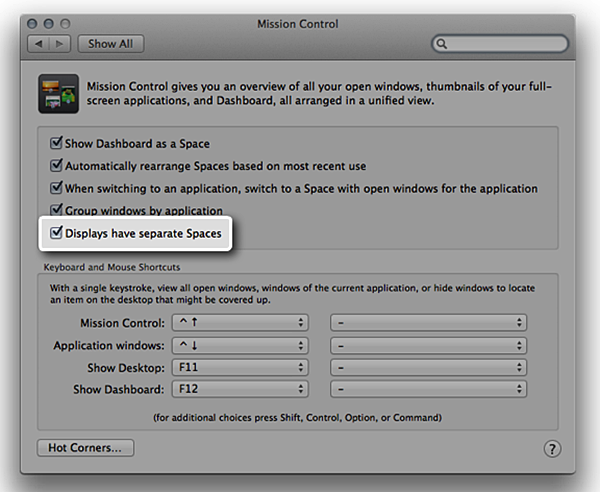
Set directories used by Kwm for various settings.
Arguments:
-v | --version: Print version number to stdout
    kwm -v

-c | --config: Specify location of config file
    kwm -c ~/.kwmrc
Configuration
NOTE: Documentation of available commands
The default configuration file is $HOME/.kwm/kwmrc and is a script that contains kwmc commands
to be executed when Kwm starts.
A sample config file can be found within the examples directory.
Any error that occur during parsing of the config file will be written to stderr.
Syntax highlighting for configuration files
vim
Copy the vim syntax files to your vim config:
cp -r syntax/vim/* ~/.vim/Or using pathogen:
cp -r syntax/vim ~/.vim/bundle/kwmDevelopment
NOTE: Requires Xcode-8 command line tools
Build AXLib only
  make install-lib  # release version, runs cleanlib
  make lib          # debug version
Build Kwm (also builds AXLib if required)
  make install      # release version, runs cleankwm
  make              # debug version
Remove temporary build artifacts
  make clean        # runs cleanlib and cleankwm
  make cleanlib     # remove axlib artifacts
  make cleankwm     # remove kwm artifacts
Start Kwm on login using launchd as described below.
Starting Kwm on login through launchd
Provide your own custom launch agent
  edit /path/to/kwm on line 9 of examples/com.koekeishiya.kwm.plist
  cp examples/com.koekeishiya.kwm.plist ~/Library/LaunchAgents/
Manually manage Kwm using launchctl
launchctl load -w ~/Library/LaunchAgents/com.koekeishiya.kwm.plist
Donate
Kwm will always be free and open source, however, some users have expressed interest in some way to show their support.
If you wish to do so, I have set up a patreon here.