Ⅰ. 插件描述
A vim plugin for the LanguageTool grammar checkerⅡ. 基本信息
|
Ⅲ. 安装方法
使用Vundle管理器安装
在你的.vimrc下添加:Plugin 'dpelle/languagetool':source %
:PluginInstall对于Vundle版本 < 0.10.2,请用上面的Bundle替换Plugin。
使用NeoBundle管理器安装
在你的.vimrc下添加:NeoBundle 'dpelle/languagetool':source %
:NeoBundleInstall使用VimPlug管理器安装
在你的.vimrc下添加:Plug 'dpelle/languagetool':source %
:PlugInstall使用Pathogen管理器安装
在终端中运行以下命令:cd ~/.vim/bundle
git clone https://github.com/dpelle/vim-languagetoolⅣ. 文档说明
vim-LanguageTool
This plugin integrates the LanguageTool grammar checker into Vim.
LanguageTool is an Open Source style and grammar checker for English,
French, German, etc. See http://www.languagetool.org/languages/ for a
complete list of supported languages.
LanguageTool detects grammar mistakes that a spelling checker cannot detect
such as "it work" instead of "it works". LanguageTool can also detect spelling
mistakes using Hunspell dictionaries bundled with LanguageTool for several
languages or using morfologik for other languages.
Vim builtin spelling checker can also of course be used along with
LanguageTool. One advantage of the spelling checker of LanguageTool over
Vim spelling checker, is that it uses the native Hunspell dictionary directly,
so it works even with the latest Hunspell dictionaries containing features
not supported by Vim. For example, the latest French Hunspell dictionaries
from http://www.dicollecte.org are not supported by Vim but they work well
with LanguageTool. On the other hand, the Vim native spelling checker is
faster and better integrated with Vim.
See http://www.languagetool.org/ for more information about LanguageTool.
Screenshots
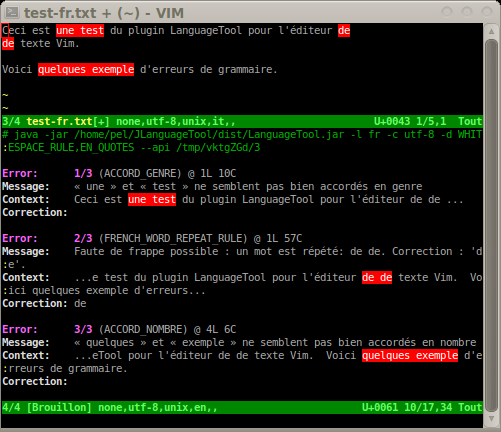
These screenshots will give you an idea of what the LanguageTool plugin does:
English

Usage
- Use
:LanguageToolCheckto check grammar in the current buffer.
This will check for grammar mistakes and highlight grammar or
spelling mistakes. It also opens a new scratch window with the
list of errors with further explanations about each error.
Pressing <Enter> in an error in the scratch buffer will jump to
that error in the text. The location list for the buffer being
checked is also populated, so you can use location commands
such as :lopen to open the location list window, :lne to
jump to the next error, etc.
The :LanguageToolCheck command accepts a range. You can for example check
grammar between lines 100 and 200 in buffer with :100,200LanguageToolCheck,
or check grammar in the visual selection with :<',>'LanguageToolCheck.
The default range is 1,$ (whole buffer).
- Use
:LanguageToolClearto remove highlighting of grammar
mistakes, close the scratch window containing the list of errors,
clear and close the location list.
- Use
:help LanguageToolto get more details on various commands
and configuration information.
The two commands are also available from the menu in gvim:
Plugin -> LanguageTool -> Check
                       -> Clear
Installing the Vim plugin
Installing vim-LanguageTool with a plugin manager
You can use any popular plugin manager according to your preference.
For example, with Vundle,
add this line in your .vimrc:
Plugin 'dpelle/vim-LanguageTool'
Installing vim-LanguageTool without a plugin manager
If you don't use a plugin manager, copy those files in your $HOME/.vim/
directory:
  .vim/plugin/LanguageTool.vim
  .vim/doc/LanguageToo.doc
And run vim -c 'helptags ~/.vim/doc'.
Download LanguageTool
To use this plugin, you need to install the Java LanguageTool grammar
- You can chose to:
- Download the stand-alone version of
LanguageTool(LanguageTool-*.zip) from
here using the orange button labeled
"LanguageTool for standalone for your desktop".
- or download a nightly build LanguageTool-.*-snapshot.zip from
http://www.languagetool.org/download/snapshots/. It contains a
more recent version than the stable version but it is not tested
as well.
- or checkout and build the latest LanguageTool from sources in git
from https://github.com/languagetool-org/languagetool
Recent versions of LanguageTool require Java-8.
Download the stand-alone version of LanguageTool
Download the stand-alone version of LanguageTool (LanguageTool-*.zip)
from http://www.languagetool.org/, click on "LanguageTool stand-alone
for your desktop" to download it. Unzip it:
$ unzip LanguageTool-3.6.zipThis should extract the file LanguageTool-3.6/languagetool-commandline.jar
among several other files.
Build LanguageTool from sources in git
If you prefer to build LanguageTool yourself from sources, you first need
to install the pre-requisite packages. On Ubuntu, you need to install the
following packages:
$ sudo apt-get install openjdk-8-jdk mvn gitLanguageTool can then be downloaded and built with Maven as follows:
  $ git clone https://github.com/languagetool-org/languagetool.git
  $ cd languagetool
  $ mvn clean package
After the build, the command line version of LanguageTool can be found in:
./languagetool-standalone/target/LanguageTool-3.7-SNAPSHOT/LanguageTool-3.7-SNAPSHOT/languagetool-commandline.jarThe version number in the path can vary.
Configuration
LanguageTool plugin uses the character encoding from the 'fenc' option or from
the 'enc' option if 'fenc' is empty.
Several global variables can be set in your .vimrc to configure the behavior
of the LanguageTool plugin.
g:languagetool_jar
This variable specifies the location of the LanguageTool java grammar
checker program. Default is empty.
Example:
:let g:languagetool_jar='$HOME/languagetool/languagetool-standalone/target/LanguageTool-3.7-SNAPSHOT/LanguageTool-3.7-SNAPSHOT/languagetool-commandline.jar'g:languagetool_lang
This variable specifies the language code to use for the language tool checker.
If undefined, plugin tries to guess the language of the Vim spelling checker
'spelllang' or v:lang. If neither works, plugin defaults to English US (en-US).
For languages with variants (currently English German and Portuguese), it is
necessary to specify the variant in order for LanguageTool to signal spelling
- In other words, with :set spelllang=en LanguageTool only signals
- mistakes whereas with :set spellllang=en_us LanguageTool signals
spelling mistakes and grammar mistakes. The valid language codes are:
ast    Asturian
be     Belarusian
br     Breton
ca     Catalan
cs     Czech
da     Danish
de     German
de-AT  German  (Austria)
de-CH  German  (Switzerland)
de-DE  German  (Germany)
el     Greek
en     English
en-AU  English (Australia)
en-CA  English (Canada)
en-GB  English (Great Britain)
en-NZ  English (New Zealand)
en-US  English (US)
en-ZA  English (South Africa)
eo     Esperanto
es     Spanish
fa     Persian
fr     French
gl     Galician
is     Icelandic
it     Italian
ja     Japanese
km     Khmer
lt     Lithuanian
ml     Malayalam
nl     Dutch
pl     Polish
pt     Portuguese
pt-BR  Portuguese (Brazil)
pt-PT  Portuguese (Portugal)
ro     Romanian
ru     Russian
sk     Slovak
sl     Slovenian
sv     Swedish
ta     Tamil
tl     Tagalog
uk     Ukrainian
zh     Chinese
g:languagetool_disable_rules
This variable specifies checker rules which are disabled. Each disabled
rule must be comma separated.
Default value set by plugin is: WHITESPACE_RULE,EN_QUOTES
g:languagetool_enable_rules
This variable specifies checker rules which are enabled.
g:languagetool_disable_categories
This variable specifies checker rule-categories which are disabled.
g:languagetool_enable_categories
This variable specifies checker rule-categories which are enabled.
g:languagetool_win_height
This variable specifies the height of the scratch window which contains
all grammatical mistakes with some explanations. You can use a negative
value to disable opening the scratch window. You can also make it empty ''
to let Vim pick a default size.
Default is: 14
Colors
You can customize the following syntax highlighting groups:
LanguageToolCmd
LanguageToolErrorCount
LanguageToolLabel
LanguageToolUrl
LanguageToolGrammarError
LanguageToolSpellingError
For example, to highlight grammar mistakes in blue, and spelling mistakes in
red, with a curly underline in vim GUIs that support it, add this into your
colorscheme:
hi LanguageToolGrammarError  guisp=blue gui=undercurl guifg=NONE guibg=NONE ctermfg=white ctermbg=blue term=underline cterm=none
hi LanguageToolSpellingError guisp=red  gui=undercurl guifg=NONE guibg=NONE ctermfg=white ctermbg=red  term=underline cterm=none
License
The VIM LICENSE applies to the LanguageTool.vim plugin (see :help copyright but replace "LanguageTool.vim with "Vim").
LanguageTool is freely available under LGPL.