Ⅰ. 插件描述
A buffer plugin for lightline.vimⅡ. 基本信息
|
Ⅲ. 安装方法
使用Vundle管理器安装
在你的.vimrc下添加:Plugin 'taohexxx/lightline-buffer-care-of-itself':source %
:PluginInstall对于Vundle版本 < 0.10.2,请用上面的Bundle替换Plugin。
使用NeoBundle管理器安装
在你的.vimrc下添加:NeoBundle 'taohexxx/lightline-buffer-care-of-itself':source %
:NeoBundleInstall使用VimPlug管理器安装
在你的.vimrc下添加:Plug 'taohexxx/lightline-buffer-care-of-itself':source %
:PlugInstall使用Pathogen管理器安装
在终端中运行以下命令:cd ~/.vim/bundle
git clone https://github.com/taohexxx/lightline-bufferⅣ. 文档说明
# lightline-buffer · 

A buffer plugin for lightline.vim
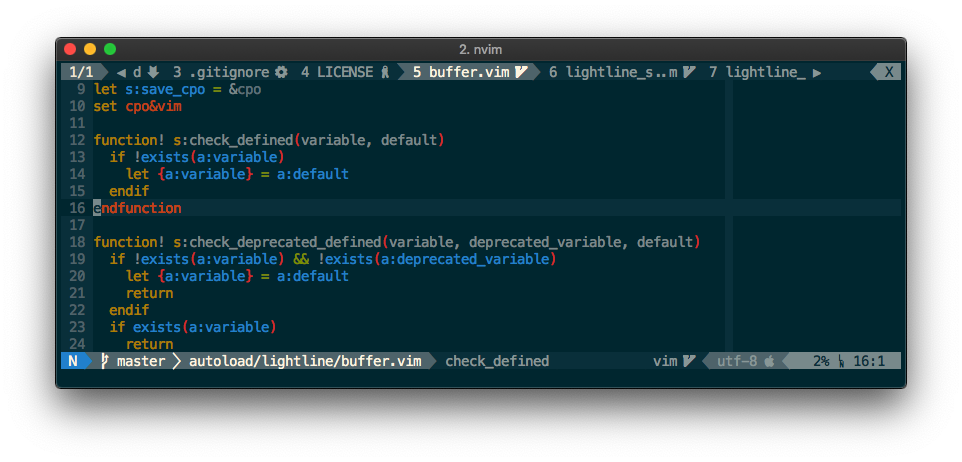
Main Features
- :star2: Clickable buffer switching
- :page_with_curl: Show file type icon with perfect UTF-8 support
- :pencil2: Show tab info and buffer info in tabline
- :left_right_arrow: Support using left / right arrow key for quickly switching buffer
- :mag: Auto-folding for long buffer name
- :triangular_ruler: Scrollable when tabline length overflow screen
Usage
- Make sure you've already installed lightline.vim
Add this repo to your favorite vim plugin manager
If you are using Dein.vim (recommended)
call dein#add('taohexxx/lightline-buffer')
If you are using [NeoBundle](https://github.com/Shougo/neobundle.vim)
NeoBundle 'taohexxx/lightline-buffer'Add this block to your init.vim (for neovim) or .vimrc (for vim)
set hidden " allow buffer switching without saving set showtabline=2 " always show tabline " use lightline-buffer in lightline let g:lightline = { \ 'tabline': { \ 'left': [ [ 'bufferinfo' ], \ [ 'separator' ], \ [ 'bufferbefore', 'buffercurrent', 'bufferafter' ], ], \ 'right': [ [ 'close' ], ], \ }, \ 'component_expand': { \ 'buffercurrent': 'lightline#buffer#buffercurrent', \ 'bufferbefore': 'lightline#buffer#bufferbefore', \ 'bufferafter': 'lightline#buffer#bufferafter', \ }, \ 'component_type': { \ 'buffercurrent': 'tabsel', \ 'bufferbefore': 'raw', \ 'bufferafter': 'raw', \ }, \ 'component_function': { \ 'bufferinfo': 'lightline#buffer#bufferinfo', \ }, \ 'component': { \ 'separator': '', \ }, \ } " remap arrow keys nnoremap <Left> :bprev<CR> nnoremap <Right> :bnext<CR> " lightline-buffer ui settings " replace these symbols with ascii characters if your environment does not support unicode let g:lightline_buffer_logo = ' ' let g:lightline_buffer_readonly_icon = '' let g:lightline_buffer_modified_icon = '✭' let g:lightline_buffer_git_icon = ' ' let g:lightline_buffer_ellipsis_icon = '..' let g:lightline_buffer_expand_left_icon = '◀ ' let g:lightline_buffer_expand_right_icon = ' ▶' let g:lightline_buffer_active_buffer_left_icon = '' let g:lightline_buffer_active_buffer_right_icon = '' let g:lightline_buffer_separator_icon = ' ' " enable devicons, only support utf-8 " require <https://github.com/ryanoasis/vim-devicons> let g:lightline_buffer_enable_devicons = 1 " lightline-buffer function settings let g:lightline_buffer_show_bufnr = 1 " :help filename-modifiers let g:lightline_buffer_fname_mod = ':t' " hide buffer list let g:lightline_buffer_excludes = ['vimfiler'] " max file name length let g:lightline_buffer_maxflen = 30 " max file extension length let g:lightline_buffer_maxfextlen = 3 " min file name length let g:lightline_buffer_minflen = 16 " min file extension length let g:lightline_buffer_minfextlen = 3 " reserve length for other component (e.g. info, close) let g:lightline_buffer_reservelen = 20- Show file type icons
Install VimDevIcons in your favorite vim plugin manager