Ⅰ. 插件描述
Comfortable examination of multiple parallel logfiles.Ⅱ. 基本信息
|
Ⅲ. 安装方法
使用Vundle管理器安装
在你的.vimrc下添加:Plugin 'inkarkat/logviewer':source %
:PluginInstall对于Vundle版本 < 0.10.2,请用上面的Bundle替换Plugin。
使用NeoBundle管理器安装
在你的.vimrc下添加:NeoBundle 'inkarkat/logviewer':source %
:NeoBundleInstall使用VimPlug管理器安装
在你的.vimrc下添加:Plug 'inkarkat/logviewer':source %
:PlugInstall使用Pathogen管理器安装
在终端中运行以下命令:cd ~/.vim/bundle
git clone https://github.com/vim-scripts/LogViewerⅣ. 文档说明
LOGVIEWER
by Ingo Karkat
DESCRIPTION
Many applications produce multiple log files; there may be one per component
or one production log and a separate debug log, or one from the server daemon
and one from the client application. During analysis, one may need to step
through them in tandem, when one provides details that the other doesn't.
Doing this manually in split windows is tedious; 'scrollbind' usually doesn't
help because different amounts of log lines are written to each file.
As long as each log file provides a timestamp or similar monotonically
increasing field, this plugin automatically syncs the cursor movement in one
log window to all other windows. When moving to another line in the current
window, all log lines that fall in the time range covered by the movement are
highlighted automatically.
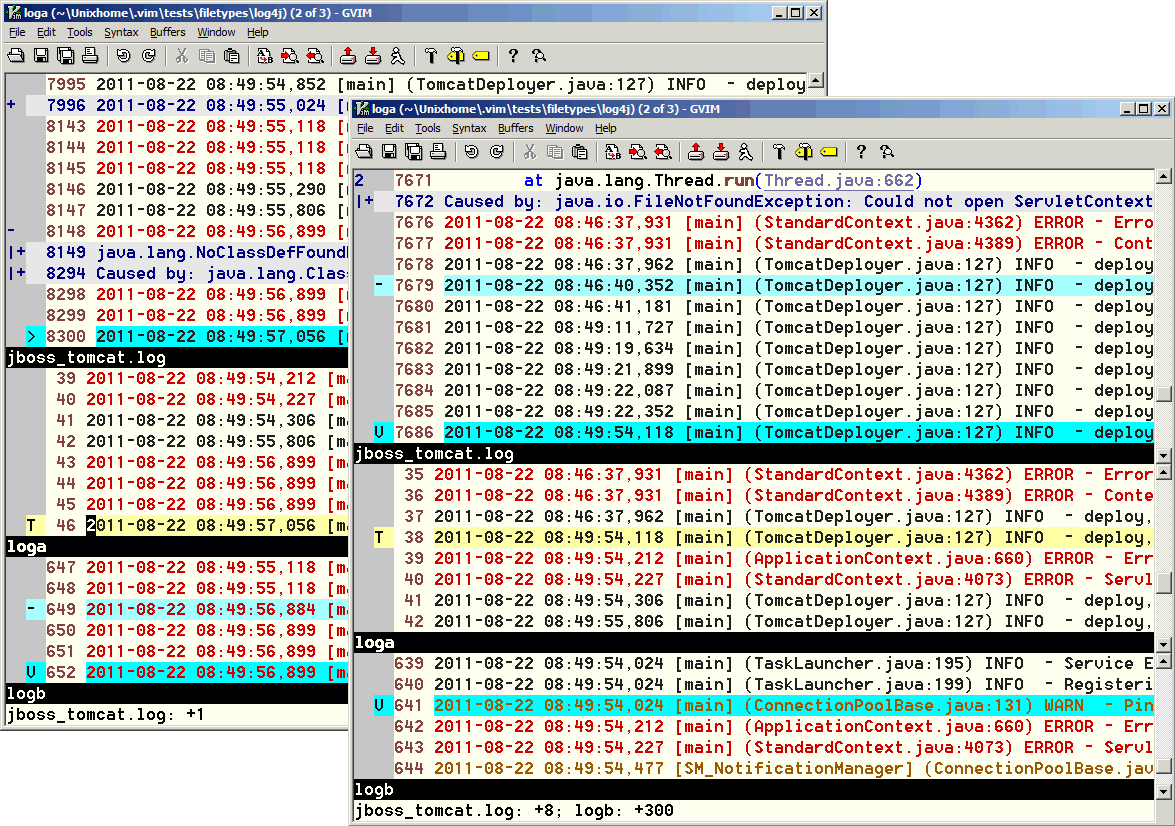
This screenshot shows the plugin in action:
USAGE
The plugin is either activated automatically for the 'filetype' values in
g:LogViewer_Filetypes, or it can be manually activated for any buffer with
the :LogViewerEnable command.
With the default automatic syncing, any log buffer will automatically set up
the corresponding autocommands; without it, you need to kick off syncing in
one buffer via :LogViewerMaster. The current line in the current buffer will
be highlighted and marked with the "T" (for target) sign:
T 2012-08-01 10:01:22.342

When you move to another line, the plugin will mark the synced move in other
buffers to an adjacent line like this:
  2012-08-01 10:01:22.342
> 2012-08-01 10:01:23.234
When the timespan in the current buffer covers multiple log lines in another
buffer, the start of the range is marked with "-" and the end of the range
with "V" (downward move) / "^" (upward move):
  2012-08-01 10:01:22.342
- 2012-08-01 10:01:23.234
  2012-08-01 10:01:23.250
V 2012-08-01 10:01:26.012

:LogViewerEnable        Consider the current buffer as a log (even though its
                        'filetype' does not automatically make it one).

:LogViewerDisable       Exclude the current buffer from the log syncing; any
                        signs and automatic updates are removed from it.

:LogViewerMaster        Designate the current buffer as the log master. Only
                        cursor movements in this buffer will sync to other
                        buffers; movements in other buffers won't affect the
                        markers any more.

:LogViewerUpdate CursorMoved | CursorHold | Manual
                        Set the trigger for the syncing to the passed event.
                        By default, each cursor movement will immediately
                        update all other log buffers. With CursorHold, this
                        will only happen after 'updatetime'. With Manual, it
                        has to be explicitly triggered with
                        :LogViewerTarget.

<Leader>tlv             Toggle syncing between the default update trigger
                        (g:LogViewer_SyncUpdate) and manual updating (or
                        CursorMoved if the default sync is set to manual).

:LogViewerTarget        Set the target log line (the basis for the
                        highlighting in all other log buffers) to the current
                        line in the current buffer.
:[count]LogViewerTarget Set the target log line to [count] timestamps down
                        from the current target timestamp.
:LogViewerTarget {timestamp}
                        Set the target log line to the first timestamp that
                        matches {timestamp}. Useful to proceed to the
                        beginning of a date when interesting things have
                        happened.
INSTALLATION
The code is hosted in a Git repo at
https://github.com/inkarkat/vim-LogViewerYou can use your favorite plugin manager, or "git clone" into a directory used
for Vim packages. Releases are on the "stable" branch, the latest unstable
development snapshot on "master".
This script is also packaged as a vimball. If you have the "gunzip"
decompressor in your PATH, simply edit the *.vmb.gz package in Vim; otherwise,
decompress the archive first, e.g. using WinZip. Inside Vim, install by
sourcing the vimball or via the :UseVimball command.
vim LogViewer*.vmb.gz
:so %
To uninstall, use the :RmVimball command.
DEPENDENCIES
- Requires Vim 7.0 or higher.
- Requires the ingo-library.vim plugin (vimscript #4433), version 1.032 or
higher.
CONFIGURATION
For a permanent configuration, put the following commands into your vimrc:
To change the default update trigger (that can be switched via
:LogViewerUpdate to Manual :
let g:LogViewer_SyncUpdate = 'Manual'
By default, there is no master log file; movements in any log buffer cause
syncing in the other buffers. To turn that off:
let g:LogViewer_SyncAll = 0
You will need to use :LogViewerMaster on one log buffer to start the
syncing.
Only buffers with certain filetypes are considered log files. The setting is a
comma-separated list of filetypes (autocmd-patterns):
let g:LogViewer_Filetypes = 'log4j,syslog'
By default, the timestamp is expected as a whitespace-separated decimal number
starting at the first column. You should define the appropriate timestamp
format for each log filetype (from g:LogViewer_Filetypes). Typically, this
is done in ~/.vim/ftplugin/{filetype}_LogViewer.vim. For example, the log4j
timestamp pattern corresponding to the "%d" format is:
let b:logTimestampExpr = '^\d\S\+\d \d\S\+\d\ze\s' " %d, e.g. 2011-08-17 13:08:30,509
If most / all of your logfiles have a differing timestamp format, you can
alternatively just redefine the global default as well.
To determine the chronological order, LogViewer uses a numerical compare for
integer timestamps, and case-sensitive string comparison for everything else.
To mark the current target logline and the corresponding log line ranges in
the other log buffers, LogViewer uses signs:
LogViewerTarget     The target log line at the current cursor position, or
                    set via :LogViewerTarget
LogViewerFrom       The (earliest when moving down towards later log
                    entries) log line corresponding to the move of the
                    target.
LogViewerTo         The last log line corresponding to the move of the
                    target.
You can redefine the sign definitions after the plugin/LogViewer.vim script
has been sourced, e.g.:
runtime plugin/LogViewer.vim
sign define LogViewerTarget   text=T linehl=CursorLine
The default signs use line highlighting for a |hl-CursorLine|-like visual
indication of the positions (the 'cursorline' setting is disabled
automatically for log windows); you can define you own colors for those, too:
highlight LogViewerTarget gui=underline guibg=Red
If you want to use a different mapping, map your keys to the
<Plug>(LogViewerToggle) mapping target before sourcing the script (e.g. in
your vimrc):
nmap <Leader>LV <Plug>(LogViewerToggle)
INTEGRATION
The plugin emits User events for each buffer that is considered (or not any
longer) by the plugin, via two LogViewerEnable and LogViewerDisable events:
augroup LogViewerCustomization
    autocmd!
    autocmd User LogViewerEnable  unsilent echomsg 'Enabled LogViewer for buffer'
    autocmd User LogViewerDisable unsilent echomsg 'Disabled LogViewer for buffer'
augroup END
IDEAS
- Compare and mark current lines that are identical in all logs. Keep those
lines so that a full picture emerges when moving along.
CONTRIBUTING
Report any bugs, send patches, or suggest features via the issue tracker at
https://github.com/inkarkat/vim-LogViewer/issues or email (address below).
HISTORY
1.20 03-Feb-2020
- ENH: Add <Leader>tlv mapping to quickly enable / disable sync updates.
- With Manual updating, don't automatically adapt the signs to show the
perspective from the current buffer. The user doesn't expect any change to
the displayed situation here, only do this when explicitly triggered via
:LogViewerTarget.
- ENH: Define user events LogViewerEnable and LogViewerDisable to allow
hooking into the plugin functionality. - ENH: The default extraction pattern for the timestamp can now also be
reconfigured globally (via g:LogViewer_TimestampExpr), not just for
individual buffers via b:logTimestampExpr.
1.11 03-Oct-2018
- ENH: Keep previous (last accessed) window on :windo.
- BUG: Movement in visual mode either causes beeps (at first selection) or
distorts the selection; need to exit visual mode before syncing to be able
to properly restore it.
- Don't override existing b:logTimestampExpr in ftplugin/log4j_LogViewer.vim.
This way, users don't necessarily need to use after/ftplugin to override
this with a custom value.
- Use first non-empty line in buffer to detect used log4j timestamp format.
- Add precise pattern for %d log4j format, and check that first.
You need to update to ingo-library (vimscript #4433) version 1.032!
1.10 29-Oct-2014
- Syncing on the CursorMoved event disturbs the selection, making it
impossible to select multiple log lines. Explicitly restore the visual
selection.
- Add b:logTimestampExpr definition for log4j filetype to the plugin.
- Add :LogViewerEnable / :LogViewerDisable commands to explicitly manage
individual buffers, and allow use of the plugin for filetypes that haven't
been included in g:LogViewer_Filetypes.
- Add dependency to ingo-library (vimscript #4433).
__You need to separately install ingo-library (vimscript #4433) version
1.008 (or higher)!__
1.00 01-Aug-2012
- First published version.
0.01 23-Aug-2011
- Started development.
Copyright: (C) 2011-2020 Ingo Karkat -
The VIM LICENSE applies to this plugin.
Maintainer: Ingo Karkat <ingo@karkat.de>