Ⅰ. 插件描述
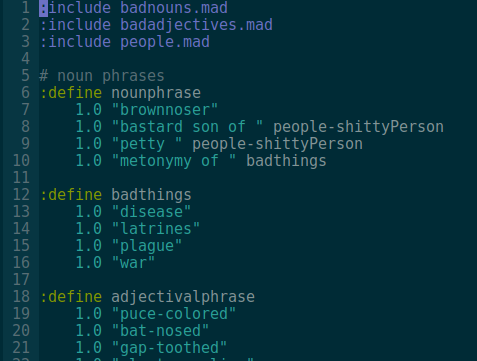
Vim syntax highlighting for the Madlibs templating DSLⅡ. 基本信息
|
Ⅲ. 安装方法
使用Vundle管理器安装
在你的.vimrc下添加:Plugin 'vmchale/madlang-vim':source %
:PluginInstall对于Vundle版本 < 0.10.2,请用上面的Bundle替换Plugin。
使用NeoBundle管理器安装
在你的.vimrc下添加:NeoBundle 'vmchale/madlang-vim':source %
:NeoBundleInstall使用VimPlug管理器安装
在你的.vimrc下添加:Plug 'vmchale/madlang-vim':source %
:PlugInstall使用Pathogen管理器安装
在终端中运行以下命令:cd ~/.vim/bundle
git clone https://github.com/vmchale/madlang-vimⅣ. 文档说明
# Overview
This provides vim syntax highlighting for the Madlang
text generation language.
Installation
Using vim-plug:
Plug 'vmchale/madlang-vim'You can also install with the madlang executable:
$ madlang vimConfiguration
If you want, you can add the following to your .vimrc:
autocmd BufWritePost *.mad MadlangCheckThis will automatically check syntax of madlang files every time you write the
- You can also set
g:syntastic_madlang_checkersmanually if you do not - the default linter to run.
Help
If you get stuck, typing
:h madlangwill bring up the help for this plugin.
Screenshots
The highlighting should look like the following: