Ⅰ. 插件描述
simple memo plugin for Vim.Ⅱ. 基本信息
|
Ⅲ. 安装方法
使用Vundle管理器安装
在你的.vimrc下添加:Plugin 'glidenote/memolist-vim':source %
:PluginInstall对于Vundle版本 < 0.10.2,请用上面的Bundle替换Plugin。
使用NeoBundle管理器安装
在你的.vimrc下添加:NeoBundle 'glidenote/memolist-vim':source %
:NeoBundleInstall使用VimPlug管理器安装
在你的.vimrc下添加:Plug 'glidenote/memolist-vim':source %
:PlugInstall使用Pathogen管理器安装
在终端中运行以下命令:cd ~/.vim/bundle
git clone https://github.com/glidenote/memolist.vimⅣ. 文档说明
# memolist.vim
This is a vimscript for create and manage memo.
memolist.vim is inspired by jekyll.vim.
Setup
Set the path to your memo directory in your .vimrc.(default directory $HOME/memo)
let g:memolist_path = "path/to/dir"You may also want to add a few mappings to stream line the behavior:
nnoremap <Leader>mn  :MemoNew<CR>
nnoremap <Leader>ml  :MemoList<CR>
nnoremap <Leader>mg  :MemoGrep<CR>
Commands
Create New Memo:
:MemoNewShow Memo List:
:MemoListGrep Memo Directory:
:MemoGrepOptions
" suffix type (default markdown)
let g:memolist_memo_suffix = "markdown"
let g:memolist_memo_suffix = "txt"

" date format (default %Y-%m-%d %H:%M)
let g:memolist_memo_date = "%Y-%m-%d %H:%M"
let g:memolist_memo_date = "epoch"
let g:memolist_memo_date = "%D %T"

" tags prompt (default 0)
let g:memolist_prompt_tags = 1

" categories prompt (default 0)
let g:memolist_prompt_categories = 1

" use qfixgrep (default 0)
let g:memolist_qfixgrep = 1

" use vimfiler (default 0)
let g:memolist_vimfiler = 1

" use fzf (default 0)
let g:memolist_fzf = 1

" remove filename prefix (default 0)
let g:memolist_filename_prefix_none = 1

" use unite (default 0)
let g:memolist_unite = 1

" use arbitrary unite source (default is 'file')
let g:memolist_unite_source = "file_rec"

" use arbitrary unite option (default is empty)
let g:memolist_unite_option = "-auto-preview -start-insert"

" use denite (default 0)
let g:memolist_denite = 1

" use arbitrary denite source (default is 'file_rec')
let g:memolist_denite_source = "anything"

" use arbitrary denite option (default is empty)
let g:memolist_denite_option = "anything"

" use various Ex commands (default '')
let g:memolist_ex_cmd = 'CtrlP'
let g:memolist_ex_cmd = 'NERDTree'
let g:memolist_ex_cmd = 'Defx'

" use delimiter of array in yaml front matter (default is ' ')
let g:memolist_delimiter_yaml_array = ','

" use when get items from yaml front matter
" first line string pattern of yaml front matter (default "==========")
let g:memolist_delimiter_yaml_start = "---"

" last line string pattern of yaml front matter (default "- - -")
let g:memolist_delimiter_yaml_end  = "---"
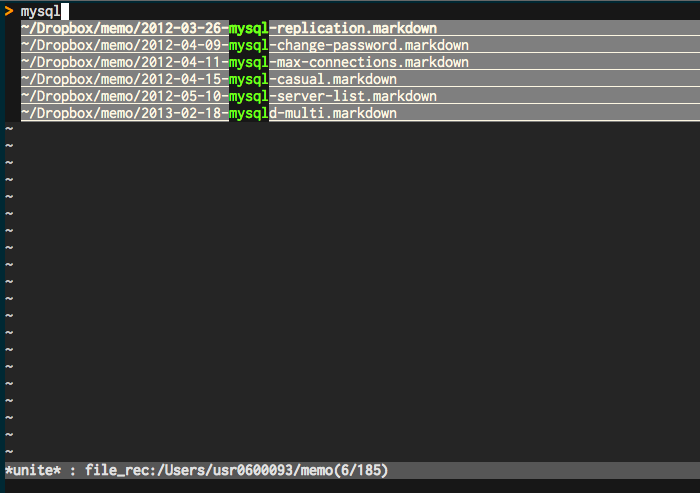
memolist.vim with unite.vim
Custom template
you can use other format and custom template.
(default memo format is markdown.)
if you use custom template file(~/memotemplates/rdoc.txt).
add the following lines to your .vimrc
let g:memolist_memo_suffix = "rdoc"
let g:memolist_template_dir_path = "~/memotemplates"
Install
Manually
Put all files under $VIM.
vim-plug (https://github.com/junegunn/vim-plug)
Add the following configuration to your .vimrc.
Plug 'glidenote/memolist.vim'Install with :PlugInstall.
Vundle (https://github.com/gmarik/vundle)
Add the following configuration to your .vimrc.
Bundle 'glidenote/memolist.vim'Install with :BundleInstall.
NeoBundle (https://github.com/Shougo/neobundle.vim)
Add the following configuration to your .vimrc.
NeoBundle 'glidenote/memolist.vim'Install with :NeoBundleInstall.
License
Lcense: Same terms as Vim itself (see license)