Ⅰ. 插件描述
A dark theme only modification of base16 vim themes to use fewer colors.Ⅱ. 基本信息
|
Ⅲ. 安装方法
使用Vundle管理器安装
在你的.vimrc下添加:Plugin 'easysid/mod8-vim':source %
:PluginInstall对于Vundle版本 < 0.10.2,请用上面的Bundle替换Plugin。
使用NeoBundle管理器安装
在你的.vimrc下添加:NeoBundle 'easysid/mod8-vim':source %
:NeoBundleInstall使用VimPlug管理器安装
在你的.vimrc下添加:Plug 'easysid/mod8-vim':source %
:PlugInstall使用Pathogen管理器安装
在终端中运行以下命令:cd ~/.vim/bundle
git clone https://github.com/easysid/mod8.vimⅣ. 文档说明
# mod8.vim
mod8 is a dark theme only modification of the base16
vim colorschemes. Since mod8 uses only the dark background, it requires fewer colors, thereby
freeing up certain terminal colors. This is useful for other terminal applications like ncmpcpp,
weechat, dircolors etc.
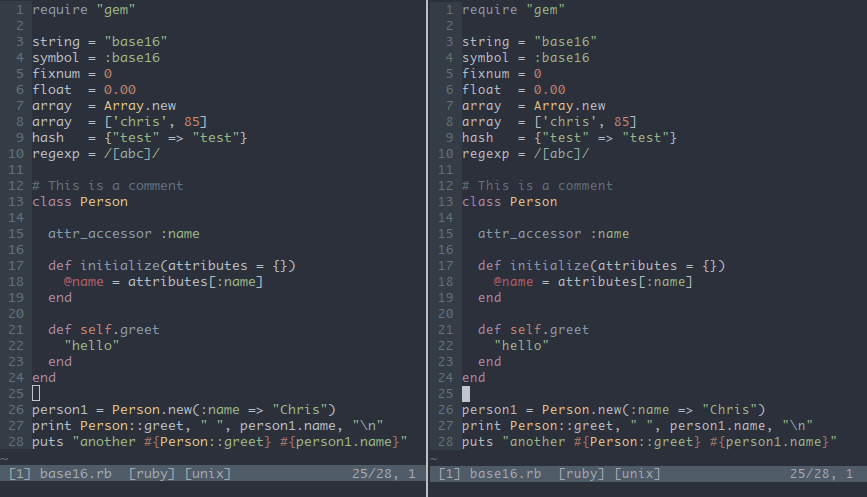
Here is a comparison of base16 and mod8 using the base16-ocean theme.
On the left is gvim with base16-ocean, and on the right is vim in urxvt, with mod8 using the base16-ocean palette.
Here is the comparison of the terminal colors. On top is mod8 using the base16-ocean palette,
and bottom is the default colors in base16-ocean.dark.Xresources file.
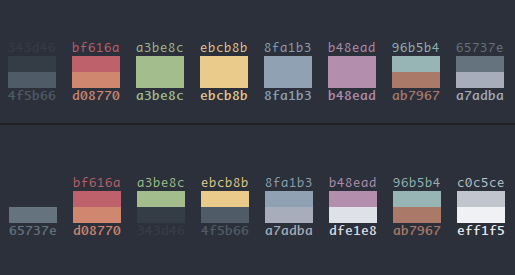
As you can see, mod8 frees up the colors from 10-13.
Usage
For generating the mod8 vim colorscheme from a base16 based scheme, run
$ ./genmod8.sh <base16-colorscheme.vim>This will generate the vim colorscheme, and an Xresources file to use for terminal colors.
Currently, Xresources is the only supported format for terminal emulators.
Note that generating a new vim theme is required only if you want to use the theme in gvim.
If you only wish to use it in terminal, just the new Xresources is required.
Tips
Head over to husl-colors.org to generate well behaved themes
based on base16. You can then run the genmod8.sh script to give you the terminal colors, and the mod8 theme.
Links & Credits
- base16 repo by Chris Kempson.
- HUSL - Random syntax colorschemes.
- harmonic16 - A color generator for harmonic base16 colorschemes.
TODO
- Integrate husl-colors generator.
- Make husl generator bound to a particular palette
- Use palette from images to automatically generate well behaved vim colorschemes, matching the wallpaper.