Ⅰ. 插件描述
You don't need NERDTree, you only need vimⅡ. 基本信息
|
Ⅲ. 安装方法
使用Vundle管理器安装
在你的.vimrc下添加:Plugin 'pablopunk/native-sidebar-vim':source %
:PluginInstall对于Vundle版本 < 0.10.2,请用上面的Bundle替换Plugin。
使用NeoBundle管理器安装
在你的.vimrc下添加:NeoBundle 'pablopunk/native-sidebar-vim':source %
:NeoBundleInstall使用VimPlug管理器安装
在你的.vimrc下添加:Plug 'pablopunk/native-sidebar-vim':source %
:PlugInstall使用Pathogen管理器安装
在终端中运行以下命令:cd ~/.vim/bundle
git clone https://github.com/pablopunk/native-sidebar.vimⅣ. 文档说明
# Native sidebar for VIM
Minimal plugin that makes
netrwmore intuitive
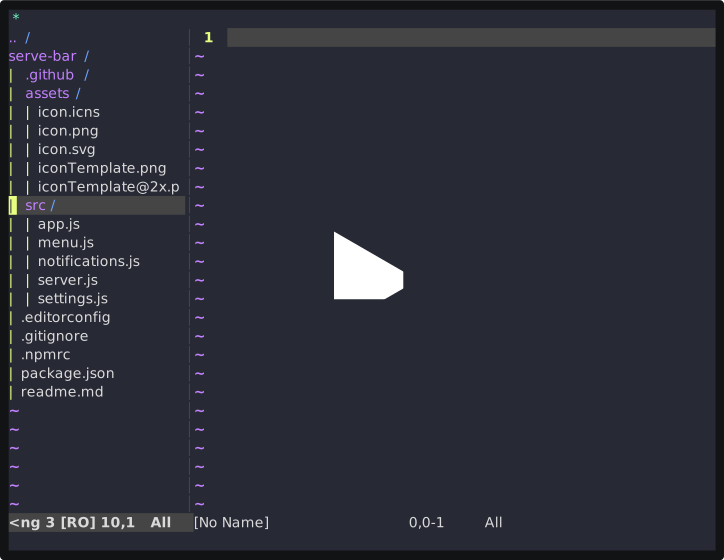
Use CONTROL+B to toggle a sidebar with your directory files, just like VSCode. This plugin only uses native netrw with some nice defaults and maps the keyboard shortcut. This means you don't need NERDTree because vim already has a nice file browser.
Install
I use vim-plug
Plug 'pablopunk/native-sidebar.vim'You can assign your own keyboard shortcut:
" Use ctrl+T
let g:native_sidebar_shortcut = '<c-t>'