Ⅰ. 插件描述
Highlight npm-debug.log and .npmrc for human readabilityⅡ. 基本信息
|
Ⅲ. 安装方法
使用Vundle管理器安装
在你的.vimrc下添加:Plugin 'rhysd/npm-debug-log-vim':source %
:PluginInstall对于Vundle版本 < 0.10.2,请用上面的Bundle替换Plugin。
使用NeoBundle管理器安装
在你的.vimrc下添加:NeoBundle 'rhysd/npm-debug-log-vim':source %
:NeoBundleInstall使用VimPlug管理器安装
在你的.vimrc下添加:Plug 'rhysd/npm-debug-log-vim':source %
:PlugInstall使用Pathogen管理器安装
在终端中运行以下命令:cd ~/.vim/bundle
git clone https://github.com/rhysd/npm-debug-log.vimⅣ. 文档说明
npm-filetypes.vim
Vim filetype plugin for npm package manager. Currently only supports some syntax highlights. If you have some feature request, please create an issue in GitHub repository.
- Highlight
npm-debug.log(Debug log dumped whennpmraise an error) - Highlight
~/.npmrc - Highlight
.npmignoreasconffiletype
Installation
Copy all directories in this repo to your .vim directory. If you use some plugin manager, please follow the instruction of it.
Screenshot
- npm-debug.log
| Before | After |
|---|---|
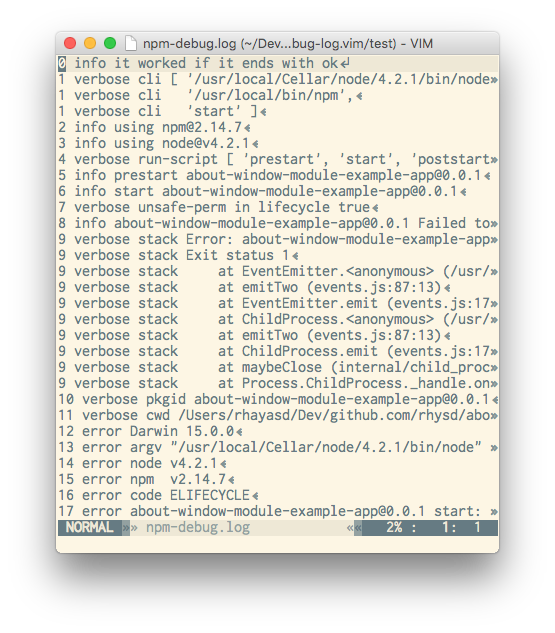 | 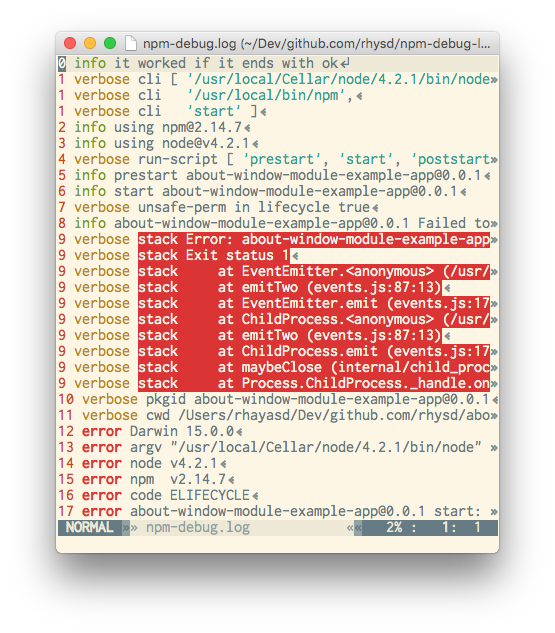 |
This plugin is distributed under the MIT License.