Ⅰ. 插件描述
showing marks using number array in color, easy to trace.Ⅱ. 基本信息
|
Ⅲ. 安装方法
使用Vundle管理器安装
在你的.vimrc下添加:Plugin '/number-marks':source %
:PluginInstall对于Vundle版本 < 0.10.2,请用上面的Bundle替换Plugin。
使用NeoBundle管理器安装
在你的.vimrc下添加:NeoBundle '/number-marks':source %
:NeoBundleInstall使用VimPlug管理器安装
在你的.vimrc下添加:Plug '/number-marks':source %
:PlugInstall使用Pathogen管理器安装
在终端中运行以下命令:cd ~/.vim/bundle
git clone https://github.com/vim-scripts/number-marksⅣ. 文档说明
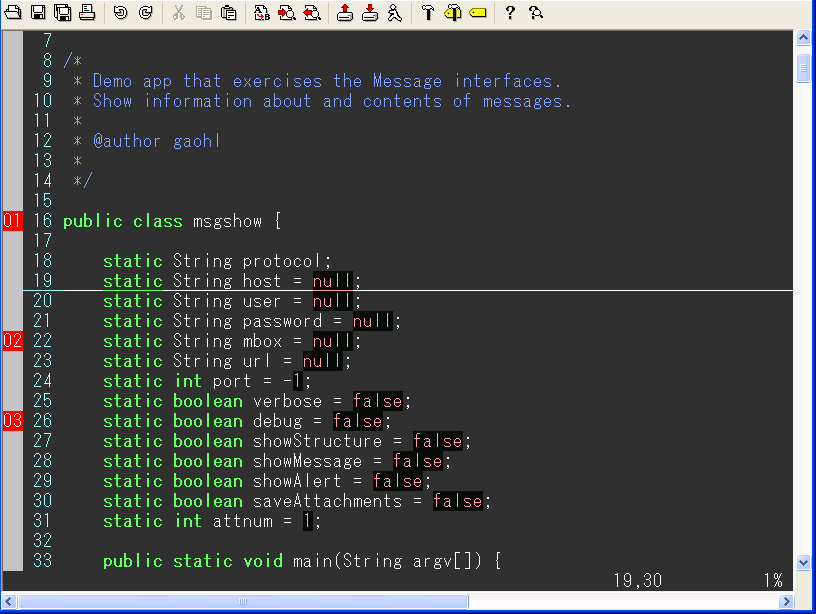
You can show your marks using number array in color, and you can delete one or all marks(now, you can replace a mark to another place). The color depend on your color scheme setting. You easy to trace the marks using hot key, move to ahead or behind. The mark's number make you easy to understand where you are. And you also can save and reload these marks in a file.
这个脚本显示用带颜色的数字标明的[标记],你可以删除你不想用的某个[标记],或者用F4键全部删掉所有的标记。带颜色的数字[标记]使你更容易了解当前行在代码中的位置,方便理解代码。[标记]的颜色依赖于你的颜色设定文件。不同的颜色风格可能又不同的[标记]颜色式样。你可以很方便的使用快捷键向前或者向后跟踪你的[标记]。你也可以保存你的[标记]到你指定的文件夹下面,然后以后再次打开所有的[标记]。
两个重要更新,移动标记和在不同的tab页之间跳转, 如果你有两个以上的tab页的话。
" ## You can set marks only less 100. ##
" ## If you have more than two tabpage, you can jump from one tabpage to another one. ##
这个脚本因为signs的显示的原因,所以只提供最大99个[标记]。
screenshot / 抓图
http://wiki.ubuntu.org.cn/images/b/b6/Vim_marks.PNG
USAGE:
1:make a mark, or delete it:
ctrl + F2
mm
2:move to ahead mark:
shift + F2
mv
3:move to next mark:
F2
mb
4:delete all marks:
F4
5:moving a mark:
m.
(press m. at the one mark, and move the cursor to another line, press m. again. )
6:save marks
F6, input a name, press ENTER
7:reload marks
F5, input a name, press ENTER
用法:
(下面所有的操作都是在非插入模式下,光标置于你要操作的行)
1:设定一个[标记],或者取消这个[标记]
按Ctrl+F2 或者 mm (快速连着按两下m字母键)
2:向前移动
按 shift + F2 或者 mv (快速按字母m和字母v键)
3:向后移动
按 F2 或者 mb
4:取消所有的[标记]
按F4键 (按取消后,再次标记时候重新从01到99开始标数)
5:移动一个[标记]
把光标移动到一个有标记的行,按m. 这时这个标记改变颜色,
然后把光标移到一个没有标记的行,再一次按m. 则把刚才的
标记移动到当前行。
6:保存标记
按F6,输入一个名称,按回车。
7:读入标记
按F5,输入一个以保存过的名称,按回车。