Ⅰ. 插件描述
Image popup tooltip plugin for NyaoVimⅡ. 基本信息
|
Ⅲ. 安装方法
使用Vundle管理器安装
在你的.vimrc下添加:Plugin 'rhysd/nyaovim-popup-tooltip':source %
:PluginInstall对于Vundle版本 < 0.10.2,请用上面的Bundle替换Plugin。
使用NeoBundle管理器安装
在你的.vimrc下添加:NeoBundle 'rhysd/nyaovim-popup-tooltip':source %
:NeoBundleInstall使用VimPlug管理器安装
在你的.vimrc下添加:Plug 'rhysd/nyaovim-popup-tooltip':source %
:PlugInstall使用Pathogen管理器安装
在终端中运行以下命令:cd ~/.vim/bundle
git clone https://github.com/rhysd/nyaovim-popup-tooltipⅣ. 文档说明
Popup Tooltip UI for NyaoVim
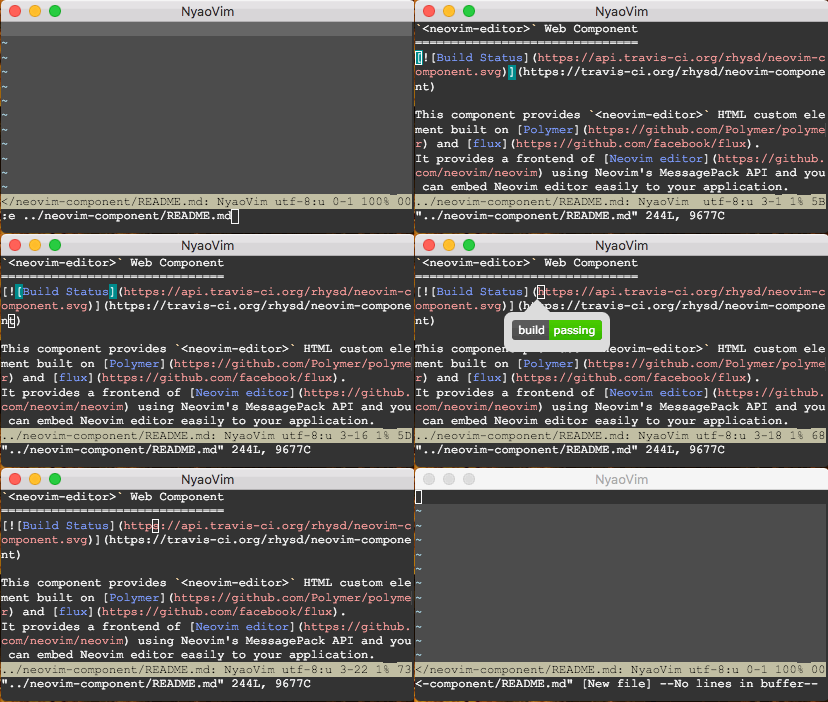
This is a NyaoVim UI plugin to provide popup tooltip which shows images on Neovim.
Installation
This is normal Neovim plugin. Please put this repo to the directory in runtimepath. If you use a plugin manager, install this plugin as other plugins.
After installing this repository as Neovim plugin, put <popup-tooltip> component to your ~/.config/nyaovimrc.html.
<neovim-editor id="nyaovim-editor" argv$="[[argv]]"></neovim-editor>
<!-- Add below line -->
<popup-tooltip editor="[[editor]]"></popup-tooltip>
Usage
This plugin defines two <Plug>(nyaovim-popup-tooltip-open) mapping on normal mode and visual mode. You can map it.
If g:nyaovim_popup_tooltip_default_mapping is not set to 0, this plugin overrides gi mapping. Below mappings are defined.
nmap <silent>gi <Plug>(nyaovim-popup-tooltip-open)
vmap <silent>gi <Plug>(nyaovim-popup-tooltip-open)
When you enter gi on path to image (both local path and remote http address will do), NyaoVim shows up image tooltip as above screenshot. Popup emerges on the cursor.
And three functions are available.
TogglePopupTooltip(path, line, col)OpenPopupTooltip(path, line, col)ClosePopupTooltip()
License
Licensed MIT License.
Copyright (c) 2015 rhysd