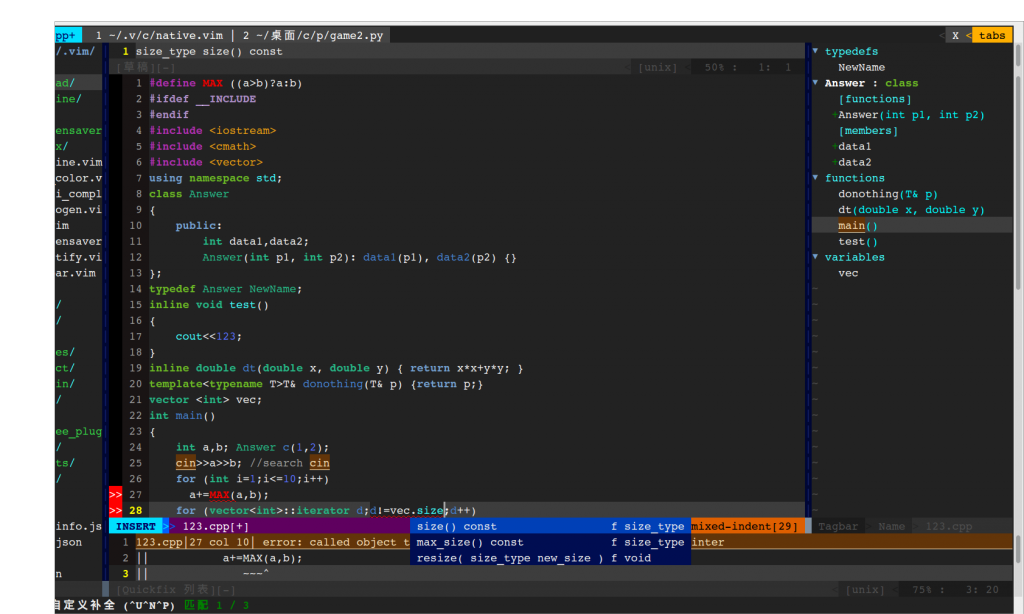
Ⅰ. 插件描述
Dark & cold color scheme inspired by geditⅡ. 基本信息
|
Ⅲ. 安装方法
使用Vundle管理器安装
在你的.vimrc下添加:Plugin '/perfect-dark':source %
:PluginInstall对于Vundle版本 < 0.10.2,请用上面的Bundle替换Plugin。
使用NeoBundle管理器安装
在你的.vimrc下添加:NeoBundle '/perfect-dark':source %
:NeoBundleInstall使用VimPlug管理器安装
在你的.vimrc下添加:Plug '/perfect-dark':source %
:PlugInstall使用Pathogen管理器安装
在终端中运行以下命令:cd ~/.vim/bundle
git clone https://github.com/vim-scripts/Perfect-DarkⅣ. 文档说明
This is a darkish scheme with various cold colors of which most are green/blue.
Recommend to install vimscript #4293 and vimscript #1640 to support STL and C++11.
Note that this color scheme does not specify colors in terminal, BUT you can install https://github.com/godlygeek/csapprox and follow steps in https://github.com/godlygeek/csapprox/blob/master/doc/CSApprox.txt to get full-color support in terminal, which just works well in my gnome-terminal.
Note2: I failed to make this scheme compatible with win32 vim terminal.
Screenshots:
In Linux GVim: http://i1377.photobucket.com/albums/ah43/lz96/perfectdark_zpsa7099350.png
In Windows GVim: http://i1377.photobucket.com/albums/ah43/lz96/win_zps3c95ecff.jpg
In Linux terminal (vimcat): http://i1377.photobucket.com/albums/ah43/lz96/perfectDarkinterm_zps34785a7a.png