Ⅰ. 插件描述
Vim plugin for psc-ideⅡ. 基本信息
|
Ⅲ. 安装方法
使用Vundle管理器安装
在你的.vimrc下添加:Plugin 'frigoeu/psc-ide-vim':source %
:PluginInstall对于Vundle版本 < 0.10.2,请用上面的Bundle替换Plugin。
使用NeoBundle管理器安装
在你的.vimrc下添加:NeoBundle 'frigoeu/psc-ide-vim':source %
:NeoBundleInstall使用VimPlug管理器安装
在你的.vimrc下添加:Plug 'frigoeu/psc-ide-vim':source %
:PlugInstall使用Pathogen管理器安装
在终端中运行以下命令:cd ~/.vim/bundle
git clone https://github.com/frigoeu/psc-ide-vimⅣ. 文档说明
# psc-ide-vim
A vim plugin that interfaces with purs ide, PureScript's editor support
server.
Setup
Installing the plugin via Vundle/NeoBundle/etc:
NeoBundle "frigoeu/psc-ide-vim"
If you manually install the plugin don't forget to generate help tags with:helptags vim commands:
helptags ~/.vim/bundles/psc-ide-vim/docJust change the path to one that points to the doc dir.
Syntax checking
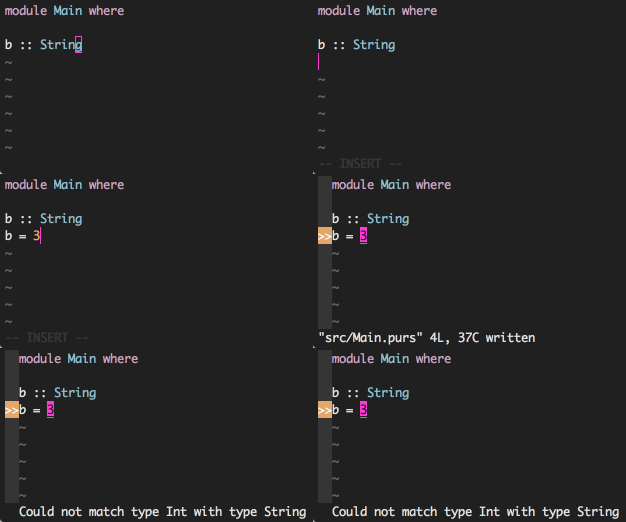
This plugin provides two kinds of syntax checking with syntastic. Controlling
which one you use happens via the global variable g:psc_ide_syntastic_mode.
- if
0-> syntax checking is disabled, but:Prebuildwill run whenever the
file is saved (an your quickfix will be synced) - if
1(default) -> syntax checking happens with the fast-rebuild feature of
psc-ide. This only checks the file that you're currently saving. You need psc
version >= 0.8.5.0 for this to work.
- if
2-> use pulp build. This rebuilds the whole project and is often quite
a bit slower, so using the fast-rebuild mode is advised.
Commands
Check :help psc-ide-vim or
here.
Mappings
No custom mappings are provided, but it's easy to map the above commands to any
key mapping you want. You can add these mappings toafter/ftplugin/purescript.vim:
nm <buffer> <silent> <leader>L :Plist<CR>
nm <buffer> <silent> <leader>l :Pload!<CR>
nm <buffer> <silent> <leader>r :Prebuild!<CR>
nm <buffer> <silent> <leader>f :PaddClause<CR>
nm <buffer> <silent> <leader>t :PaddType<CR>
nm <buffer> <silent> <leader>a :Papply<CR>
nm <buffer> <silent> <leader>A :Papply!<CR>
nm <buffer> <silent> <leader>C :Pcase!<CR>
nm <buffer> <silent> <leader>i :Pimport<CR>
nm <buffer> <silent> <leader>qa :PaddImportQualifications<CR>
nm <buffer> <silent> <leader>g :Pgoto<CR>
nm <buffer> <silent> <leader>p :Pursuit<CR>
nm <buffer> <silent> <leader>T :Ptype<CR>
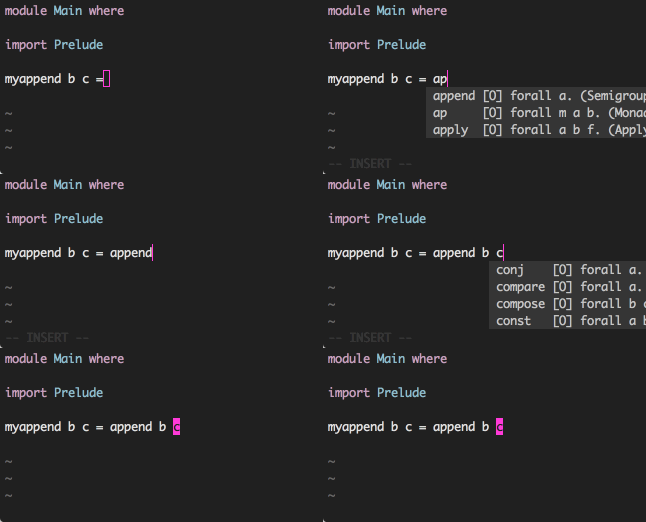
Omnicompletion and user completion
Omnicompletion gets possibilities based on the word under your cursor, and
shows the types.
Prerequisites
- Vim version 8 or higher or NeoVim version 0.2.0 or higher.
- purs installed and available on your path
- purescript-vim
bower.json,psc-package.jsonorspago.dhallfile in the root path of your project
Debugging
Add the following to have psc-ide-vim spit out all logs:
let g:psc_ide_log_level = 3