Ⅰ. 插件描述
a Vim colorscheme that looks like good old Microsoft QuickBASIC.Ⅱ. 基本信息
|
Ⅲ. 安装方法
使用Vundle管理器安装
在你的.vimrc下添加:Plugin 'caglartoklu/qbcolor-vim':source %
:PluginInstall对于Vundle版本 < 0.10.2,请用上面的Bundle替换Plugin。
使用NeoBundle管理器安装
在你的.vimrc下添加:NeoBundle 'caglartoklu/qbcolor-vim':source %
:NeoBundleInstall使用VimPlug管理器安装
在你的.vimrc下添加:Plug 'caglartoklu/qbcolor-vim':source %
:PlugInstall使用Pathogen管理器安装
在终端中运行以下命令:cd ~/.vim/bundle
git clone https://github.com/caglartoklu/qbcolor.vimⅣ. 文档说明
# qbcolor.vim
qbcolor.vim is a Vim colorscheme that looks like good old Microsoft QuickBASIC.
Vim script page:
https://www.vim.org/scripts/script.php?script_id=5787
It is based on
ibmedit.vim
colorscheme by maarten s.
Screenshots
qbcolor.vim on Vim on Windows 10
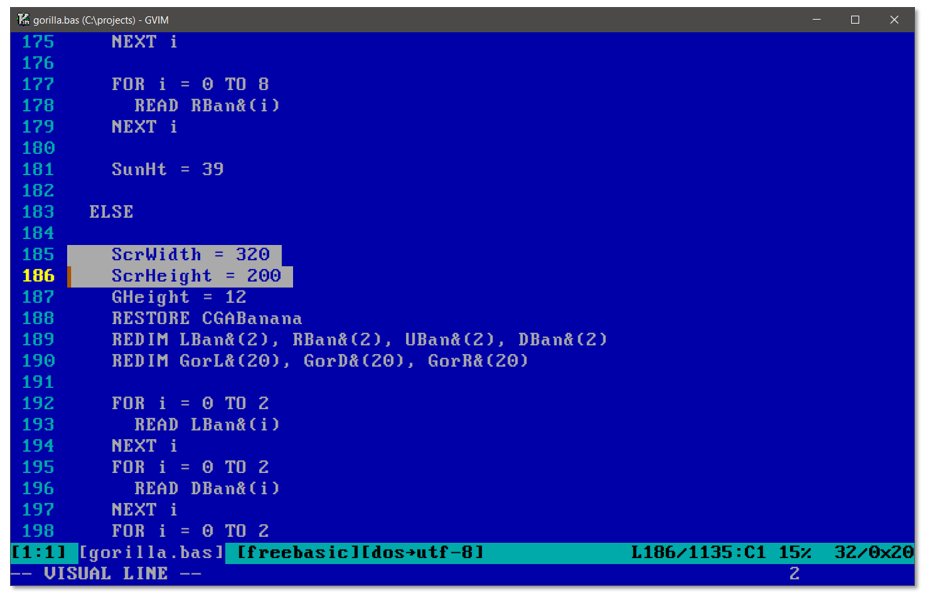
The font used in the screenshot:
set gfn=PxPlus_IBM_VGA9:h18:cANSI:qDRAFTIt can be downloaded here:
https://int10h.org/oldschool-pc-fonts/readme/
qbcolor.vim on Vim on DOSBox

original QuickBASIC 4.5 on DOSBox for comparison

The file in the screenshots is Gorilla.bas),
a video game first distributed with MS-DOS 5.0 that we have played a lot :)
Options
If the original color is too blue or bright, the following options can be used to make the background darker, since the background color is customizable.
To do so, one of the following code snippets should be added to VIMRC, before the following line:
colorscheme qbcolordark_blue background
let g:qbcolor_bg = "dark_blue"

dark_gray background
let g:qbcolor_bg = "dark_gray"
black background
let g:qbcolor_bg = "black"

Restoring the original blue
Simply delete the let g:qbcolor_bg = ".." line. The blue background can also be explicitely set:
let g:qbcolor_bg = "qb_blue"Installation
For Vundle users:
Plugin 'caglartoklu/qbcolor.vim'
For all other users, simply drop the qbcolor.vim file to yourcolors directory.
Usage
colorscheme qbcolor
See Also
ftcolor.vim
ftcolor.vim is a Vim plugin that switches colorschemes according to the file type.
fbc.vim
fbc.vim is a Vim compiler plugin for FreeBASIC.
It compiles the buffer with FreeBASIC, and shows the compilation results in quickfix window.
Freebasic-vim-syntax-file
Freebasic-vim-syntax-file is a syntax file for Vim.
It is the syntax file used in the screenshots on this page.
QB64
- QB64 is a self-hosting BASIC compiler for Microsoft Windows, Linux and Mac OS X, designed to be compatible with Microsoft QBasic and QuickBASIC. QB64 is a C++ emitter, which is integrated with a C++ compiler to provide compilation via C++ code and GCC optimization.
QB64 implements most QBasic statements, and can run many QBasic programs, including Microsoft's QBasic Gorillas and Nibbles games.
See more on on Wikipedia.