Ⅰ. 插件描述
VIM plugin that allows you to run a Ruby REPL inside a VIM buffer.Ⅱ. 基本信息
|
Ⅲ. 安装方法
使用Vundle管理器安装
在你的.vimrc下添加:Plugin 'bogdanp/rbrepl-vim':source %
:PluginInstall对于Vundle版本 < 0.10.2,请用上面的Bundle替换Plugin。
使用NeoBundle管理器安装
在你的.vimrc下添加:NeoBundle 'bogdanp/rbrepl-vim':source %
:NeoBundleInstall使用VimPlug管理器安装
在你的.vimrc下添加:Plug 'bogdanp/rbrepl-vim':source %
:PlugInstall使用Pathogen管理器安装
在终端中运行以下命令:cd ~/.vim/bundle
git clone https://github.com/bogdanp/rbrepl.vimⅣ. 文档说明
# RbREPL.vim
RbREPL.vim is a VIM plugin that allows you to run a Ruby interactive
interpreter inside a VIM buffer.
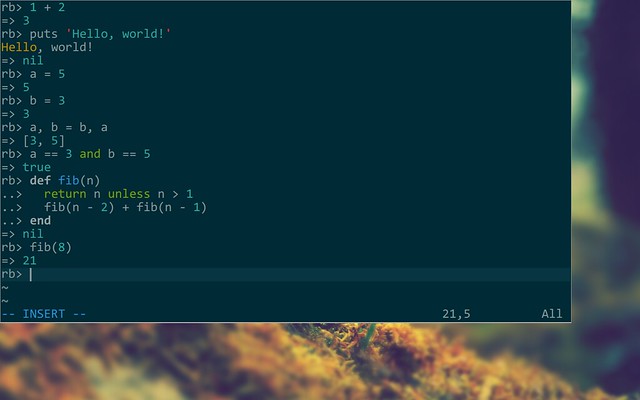
Preview
Screenshot:
Warning
Multiline statements don't yet sort-of work.
This plugin is in its early stages and I'm very new to Ruby programming.
It probably won't do anything harmful to your computer, but it might,
at times, not work as expected.
Installation
Use pathogen and clone this repository into your bundle directory.
Usage
Start the REPL using <leader>R or :RbREPLToggle<CR>. Type away. To
stop the REPL run either of those commands again. This will not close
the buffer.
It's possible to evaluate a file you're working on inside the REPL by
running the command :RbREPLEvalFile<CR> on a Ruby file.